Intro
Every active GitHub session is a door left unlocked. Most of the time, that's fine, if it's your door, on your machine, and you're the only one walking through it. But sessions have a way of piling up: the laptop you sold last year, the CI pipeline you configured and forgot, the personal access token you pasted into a script "just for testing." Each one is a standing invitation, and the longer it stays open, the more likely someone unwelcome finds their way in.
A GitHub session or personal access token is a bearer credential and whoever holds it is you, as far as the API is concerned. There's no second factor at request time, no re-authentication, no challenge. Just the token and the scopes attached to it. That design is what makes tokens convenient for automation and dangerous when they escape. A single leaked PAT with repo scope can clone private code, push commits, and open pull requests until the moment it's revoked.
Revoking sessions and tokens is the digital equivalent of changing the locks, and it's one of the most underrated habits in a developer's security routine. When a token leaks, when a laptop goes missing, or when an employee leaves the team, revocation is what turns a potential breach into a non-event. It's fast, it's free, and it shrinks your attack surface the moment you hit the button.
Yet it's the step people skip. We're diligent about creating access and careless about ending it. This article will go through how to close those doors, understanding why revocation matters, when to do it, and how to achieve it automatically.
OAuth and User Access Token
Most of the code that touches your account on your behalf isn't a person at all, but an app. And GitHub has two kind of apps, OAuth Apps and GitHub Apps, which look alike from the outside but authenticate in completely different ways. Knowing which one you're dealing with tells you how it got in, what it can reach, and how you get it back out.
OAuth Apps are the older, simpler model. A user clicks "Authorize," approves a set of scopes, and from then on the app holds a token (gho_) that acts as that user. As far as GitHub is concerned, the app is you. It can reach everything you can within the scopes you granted, and its token stays valid until someone revokes the authorization. There's no installation and no per-repository choice. The authorization is all-or-nothing against your account. Easy to build, but a single click hands over broad access with a token that never expires on its own.
GitHub Apps are the newer, more disciplined model, and they authenticate in three distinct ways depending on what they're doing:
- As themselves. The app proves its identity by signing a JSON Web Token with its private key with no user involved. This app-level identity handles administrative calls and, generates the token itself.
- As an installation. When the app acts on an account it's installed on, it trades that JWT for an installation access token (
ghs_), scoped to the specific repositories and permissions granted at install time and expiring after an hour. - On behalf of a user. When the app needs to act as a specific person, it runs the same OAuth flow an OAuth App uses and receives a user-to-server token (
ghu_), but bounded by the app's fine-grained permissions instead of broad scopes, and short-lived by default.
How did the attacker get access to my environment
There are different ways an attacker can gain access to your environment. They go from AiTM phishing, to GitHub authentication mechanism abuses, to leaked or stolen credentials. Based on them, we can also find the right way to revoke the access the attacker has on the environment. There are though authentication mechanisms we can utilize to phish a user and get their credentials.
We of course are aware of AiTM (adversary-in-the-middle) phishing as the go-to technique that defeats MFA. A reverse-proxy phishing page sits invisibly between the victim and the real login, relaying every field in real time. The victim signs in and completes their second factor legitimately, and the proxy pockets the resulting authenticated session, handing the attacker access getting their session and stealing their password along the way. This is a go to phishing technique, as if a company access resources through an IdP, the attacker can impersonate the IdP solution and access the entire suite of apps the target has access to.
AiTM has it’s own drawbacks though. Hardware OTP like FIDO keys bypass it, as they sign the token with the domain it will be generated for. IDS and IPS solutions are catching up to them, as well as some EDR solutions. Luckily, there are authentication mechanisms available on GitHub that handle the authentication themselves and provide the requestor with a token. Legitimate tools, such as GitHub CLI or Desktop use them and most likely if you have ever used any of these tools, you will have seen those mechanisms.
- OAuth consent phishing. The attacker registers a legitimate-looking OAuth app and lures the user to the genuine "Authorize" screen. One click grants a token that acts as the user, authorize the app on the Organization. GitHub handles the entire authentication process, including MFA and provides the attacker with a token. This technique, since t passed authentication once, also survives the victim's next password change.
- Device code phishing. A relative of the above technique that abuses the device authorization flow. The attacker starts the flow, obtains a short user code, and asks the victim, often while impersonating IT or a routine login prompt, to enter it at GitHub's real device-login page. The rest is the same, where the victim still authorizes the access to the Organization, through GitHub, with no fake URL to spot.
Notice the through-line: almost none of these require the password to know your credentials, and are built specifically to sidestep MFA. That's the nature of a token, after successfully authenticating, is what authorizes access to whatever or whoever will use it. It's exactly why, once you suspect any of these attacks happening, you revoke the credential.
It’s a phishin’ time
OAuth and Device Code phishing is not new. It has been happening, especially on EntraID a lot throughout these years. Since GitHub offers both authentication methods, it stands to reason that we can utilize these techniques to get access to a target’s environment.
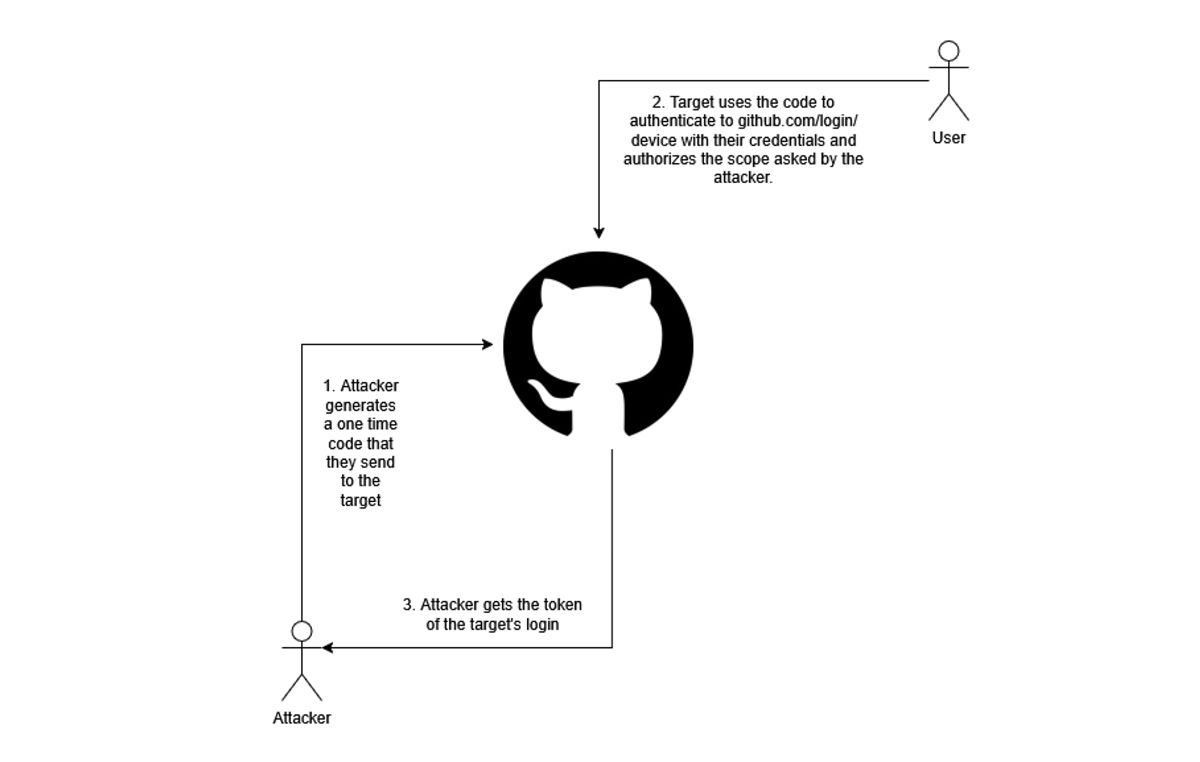
The attacker wanting to phish a user using Device Code phishing, will generate a OTP code that they send to the target and the target logs in and authorizes the app through GitHub’s login portal (https://github.com/login/device).
OAuth Flow Phishing works the same, but this time the attacker only generates a URL that they send to the target.
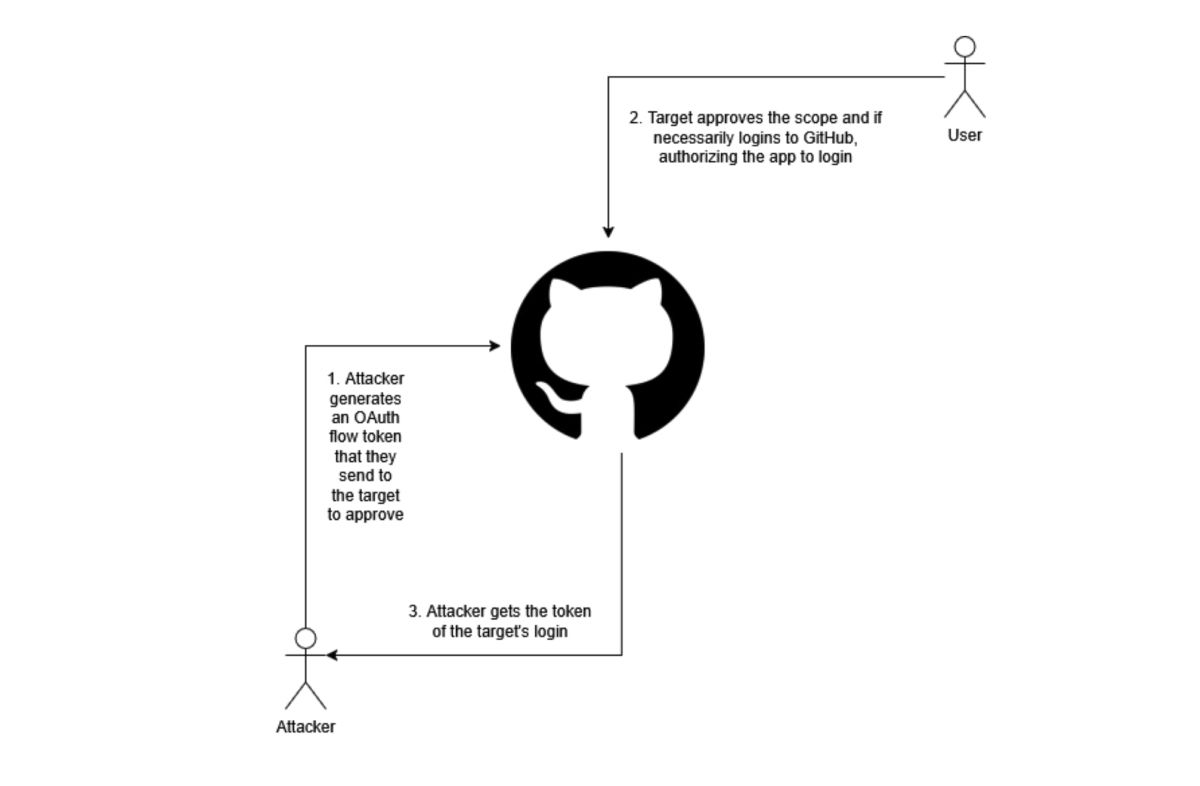
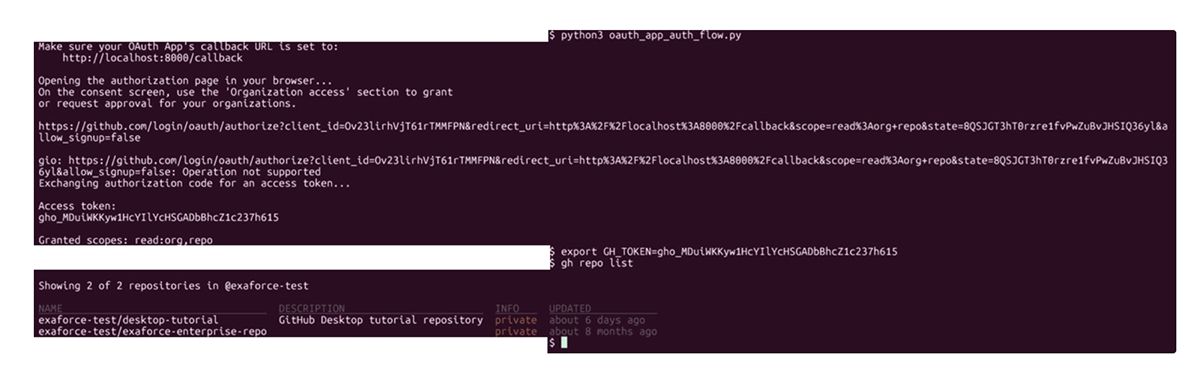
In the end, the target gets a token with a prefix of ghu_ for GitHub Apps and gho_ for OAuth Apps.
When the user authenticates through a GitHub App or an OAuth App, through either OAuth flow authentication or Device Code Authentication, it will allow that app to authenticate on the scope requested by the app itself.
When a user needs to authenticate on a GitHub App or OAuth App, the app will send a prompt to Authorize it to the Organization. This is of course optional if Organization access is not needed, but necessary if it does.
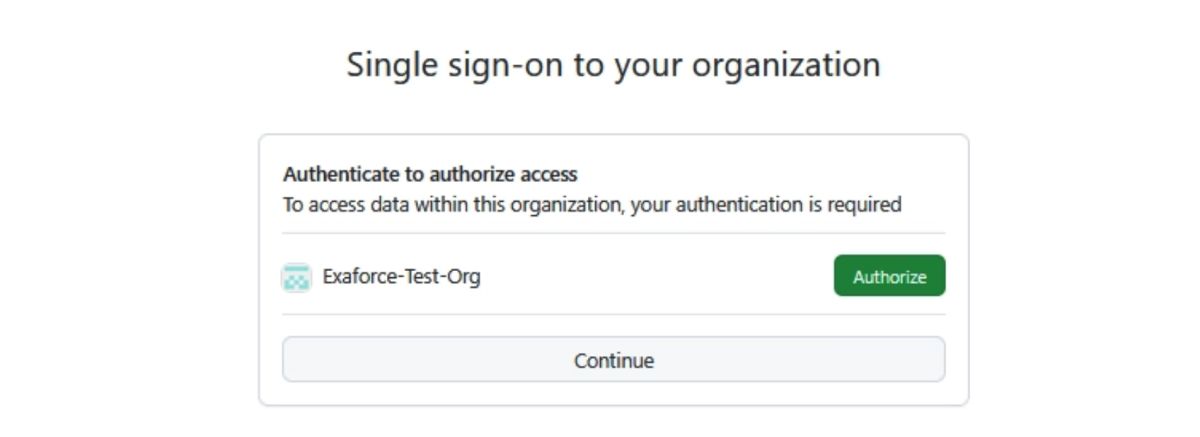
The prompt for both of them will look the same, and both of them, if they are apps operated by GitHub, will list the Owner of them as such.
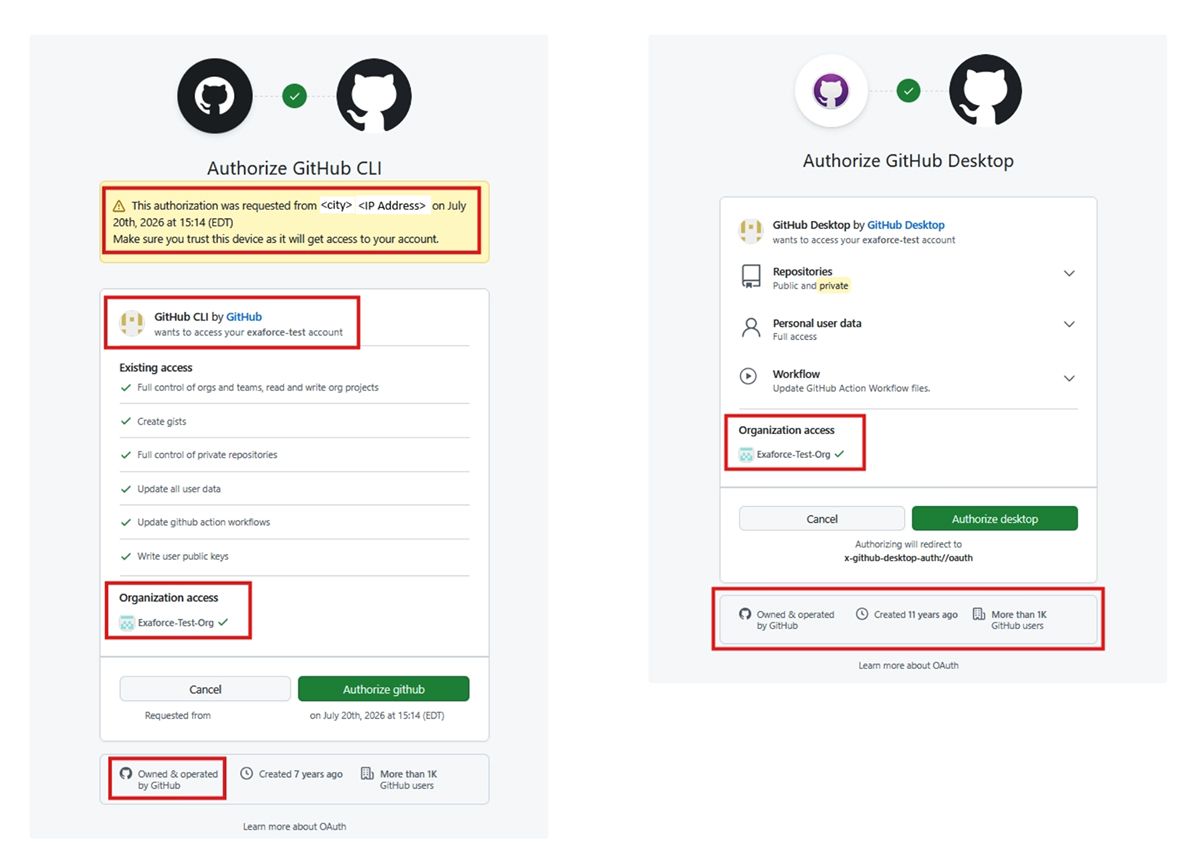
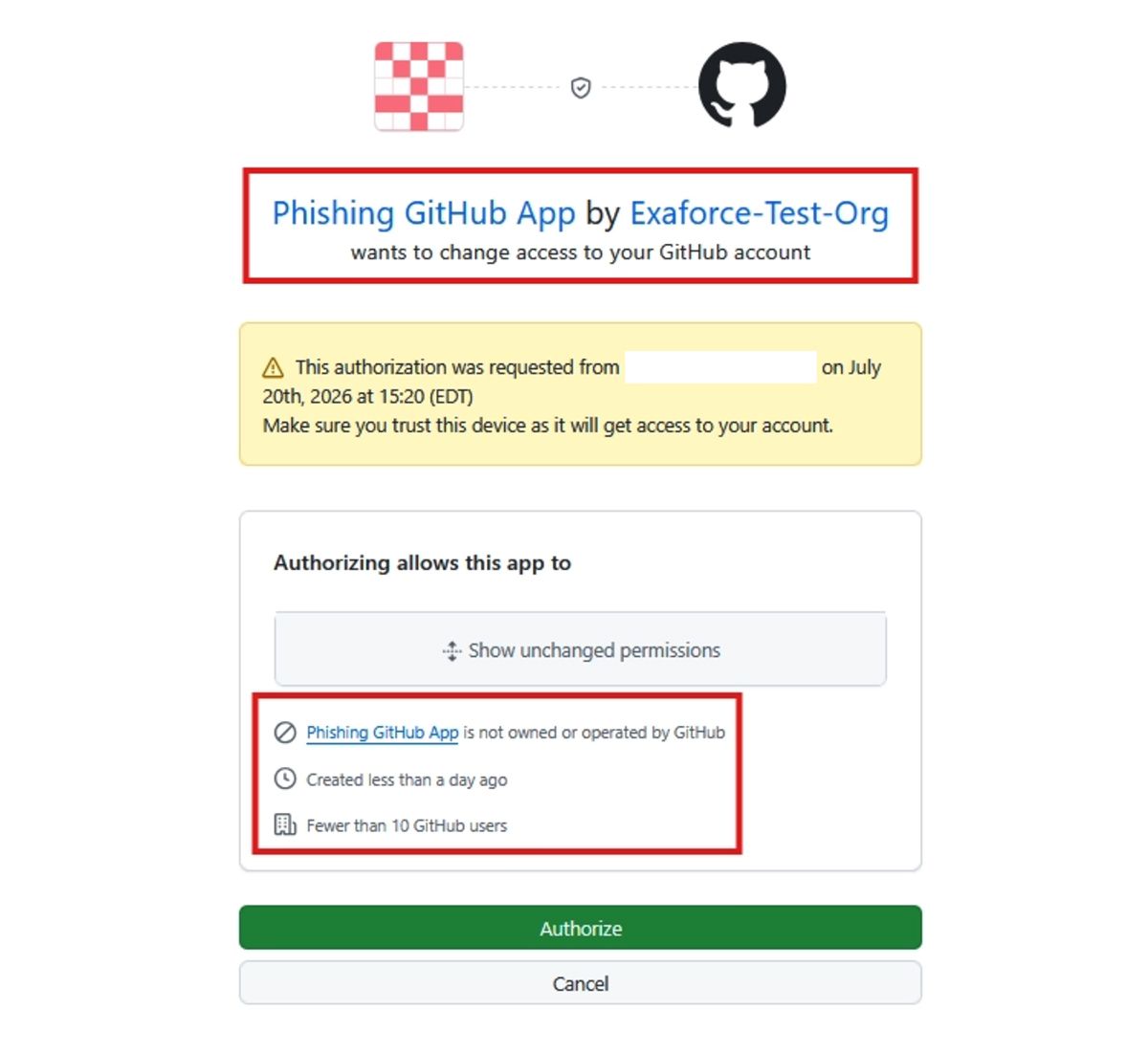
An app not owned by GitHub will be listed as not owned or operated by it, meaning, creating an account or organization impersonating GitHub to create a phishing app on it, will not look good.
Well known GitHub Apps
In order to make the phishing seem legitimate, we can utilize first party GitHub apps. For some of them, the CLI Client ID and Secret are publicly available on their source code, which is open source. For example, we can find the GHCLI client and secret the tool’s source code.

GitHub Desktop’s Client ID is de0e3c7e9973e1c4dd77, as seen from it’s OAuth Flow link, but they seem to also ship a dev Client ID and secret on their source code.

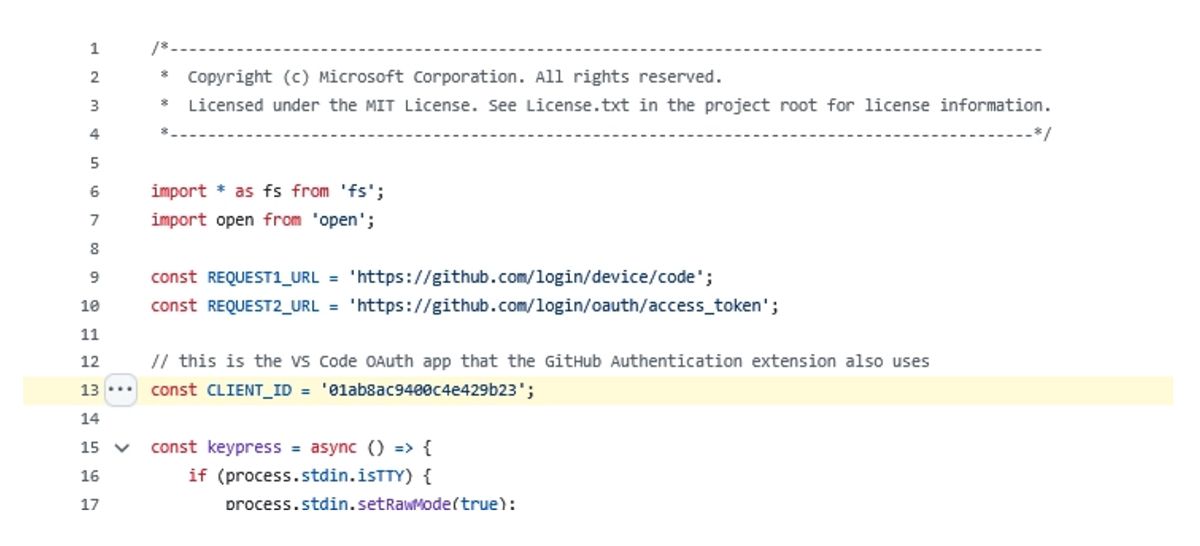
VSCode uses Device Code Auth to get a GitHub token and uses the Client ID 01ab8ac9400c4e429b23, also stored on their repo.
Stealing GitHub CLI user tokens from machines
An attacker with access to the target’s machine, can also opt to steal those credentials from that machine. When ghcli is used on a machine, it generates a token which depending on the system, get stored somewhere on the system. In Windows Machines, this token is stored as a Generic Credential on Windows Credential Manager.
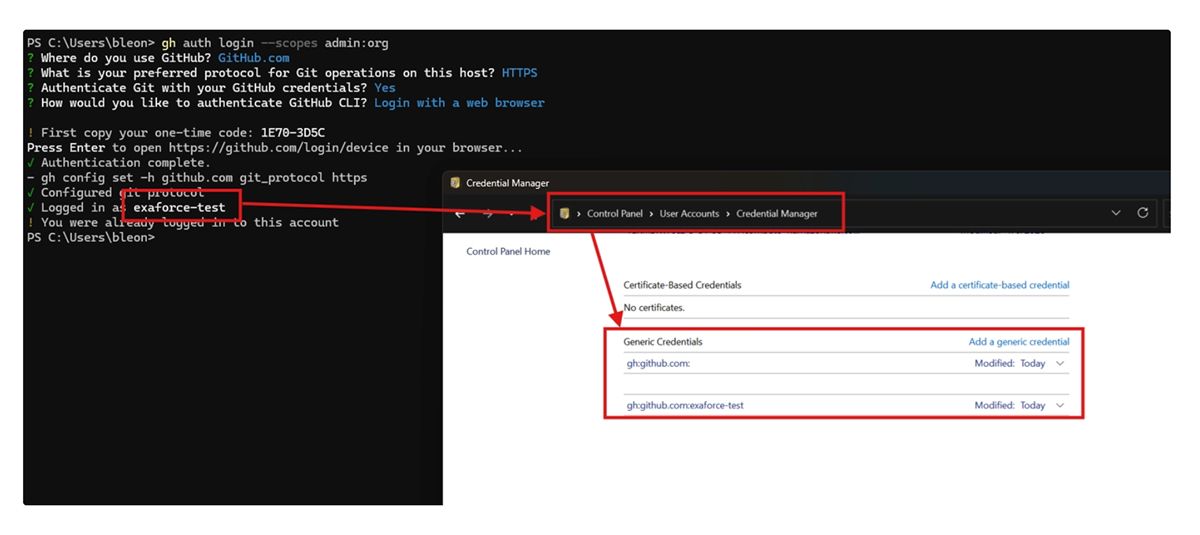
The access to it is allowed to the user, so dumping it, is (relatively) simple using [CredManRead]::CredRead.
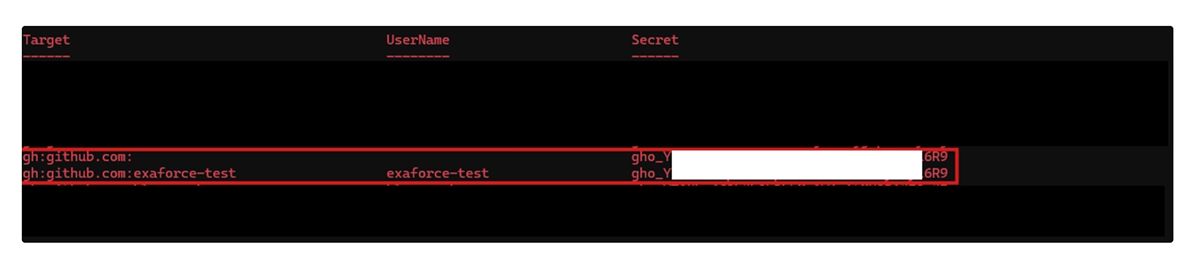
Linux and MacOS by default store the credential in plaintext on ~/.config/gh/hosts.yml.
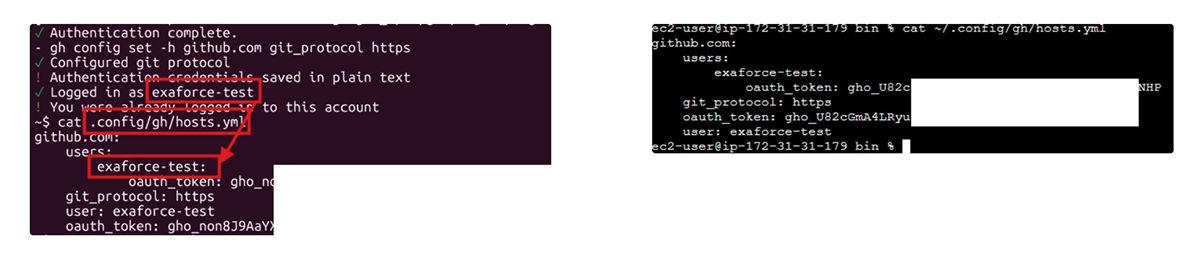
Even using the flag --secure-storage has resulted the same on our tests.
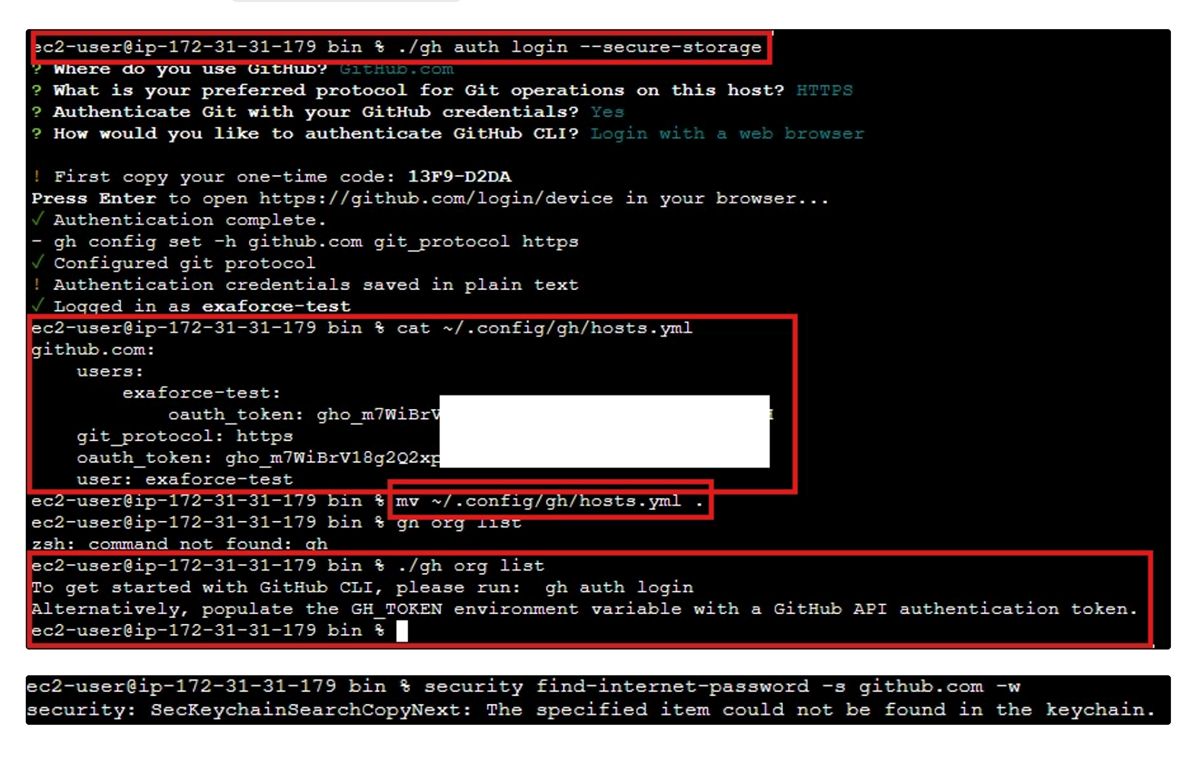
This article goes through how to force GHCLI to use MacOS Keychain and GNOME Keyring for tokens. In cases like that, the attacker will need to dump them using:
It should be lastly mentioned that the easiest way to dump the token, is by using ghcli and specifically gh auth cli.

Responding to compromised credentials
Listing authorized user logins on GitHub
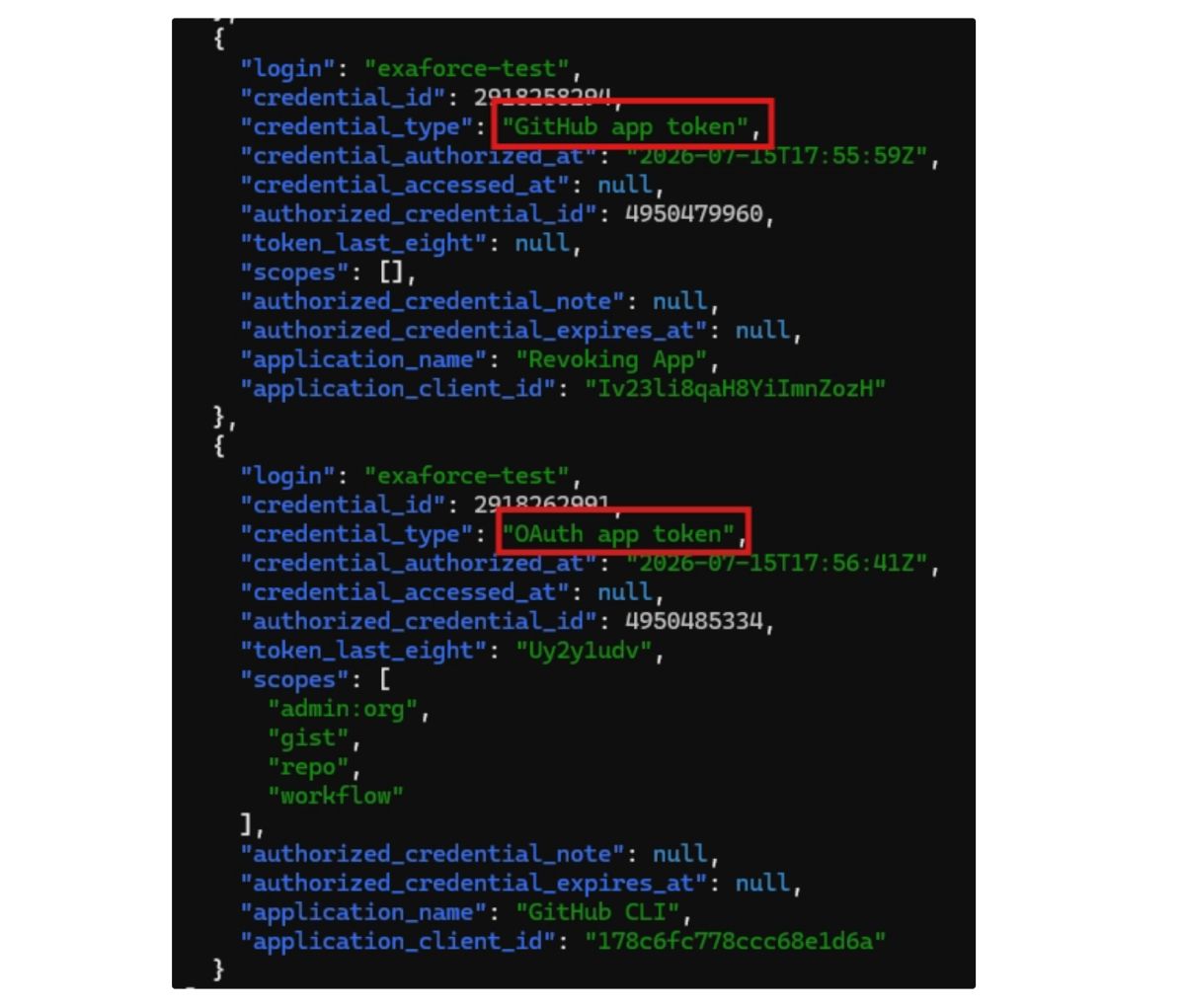
In case of a compromise, GitHub allows organization admins to list each Organization user’s SSO Sessions and authorized credentials. This does not though list the authentication of any user through GitHub Apps or OAuth apps, even first party ones from GitHub.
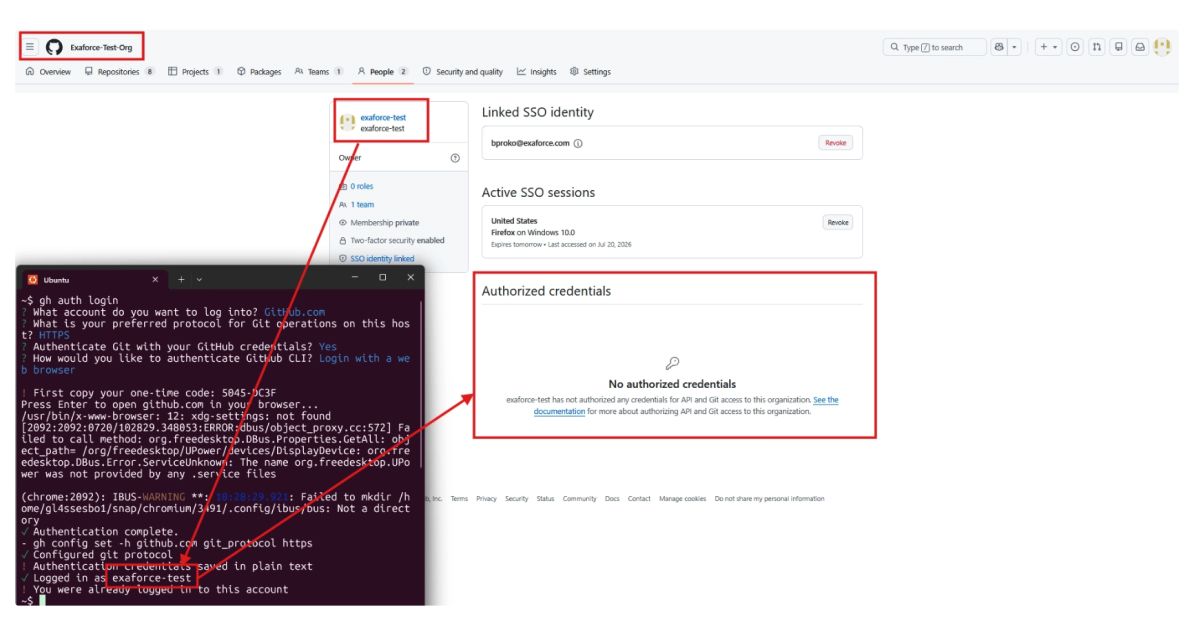
These authorizations on the organization, instead can be listed by using the GitHub API /orgs/$ORG/credential-authorizations.
One call to revoke them all
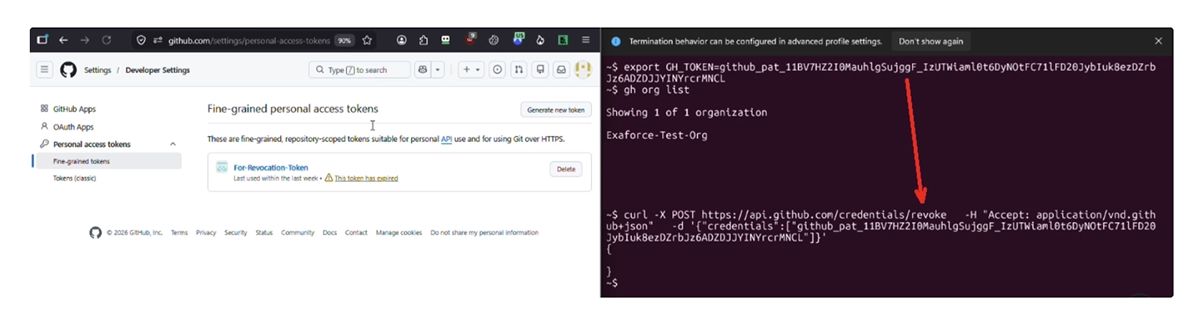
If any of your tokens have been leaked and you have the value of that token, GitHub offers an API endpoint to revoke such token. The API will take the value of the token and immediately expire the token, resulting in its revoking. Best of all, the endpoint is unauthenticated by design, so you don't need to prove ownership or even be logged in to shut a leaked credential down, a deliberate choice that lets anyone who stumbles on an exposed token report it and cut off the risk.
Once a token has been revoked this way it can't be reactivated, so any legitimate service still relying on it will need to be issued a fresh credential in its place.
Revoking GitHub or OAuth app user tokens
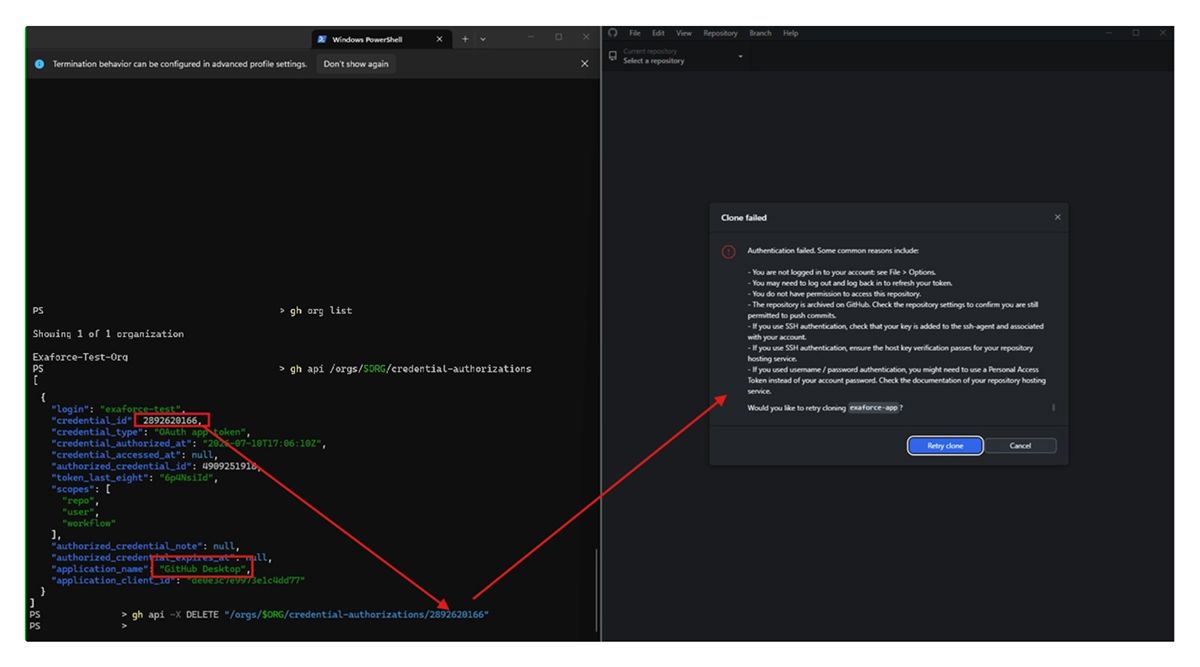
If a user is logged in through an unauthorized GitHub or OAuth app, an administrator can revoke that access by sending a DELETE request to /orgs/$ORG/credential-authorizations/<credential id>. This will revoke a session, until another successful authentication or authorization is done again.
Detecting misusage of OAuth and GitHub App authentication
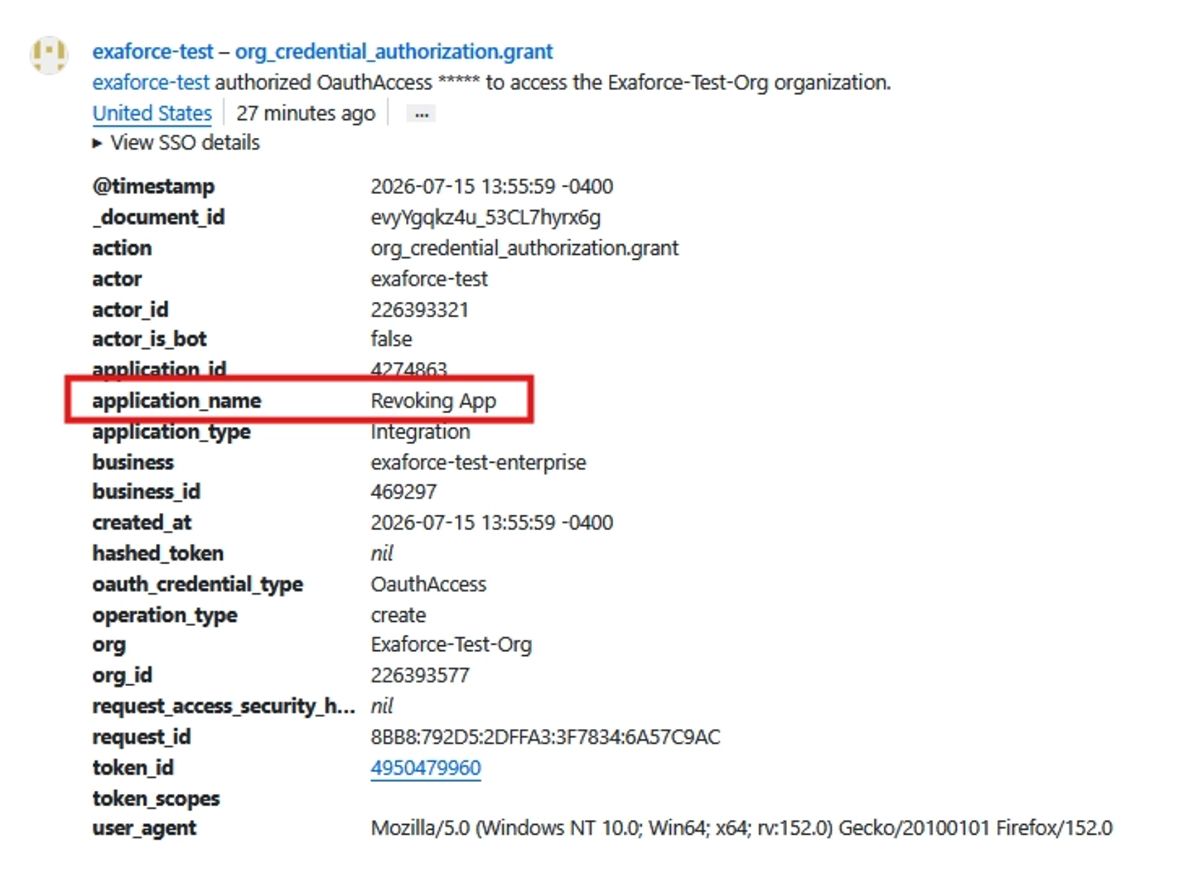
For OAuth and GitHub App user authentication, the event org_credential_authorization.grant is again generated, this time with the application_type being OauthApplication.
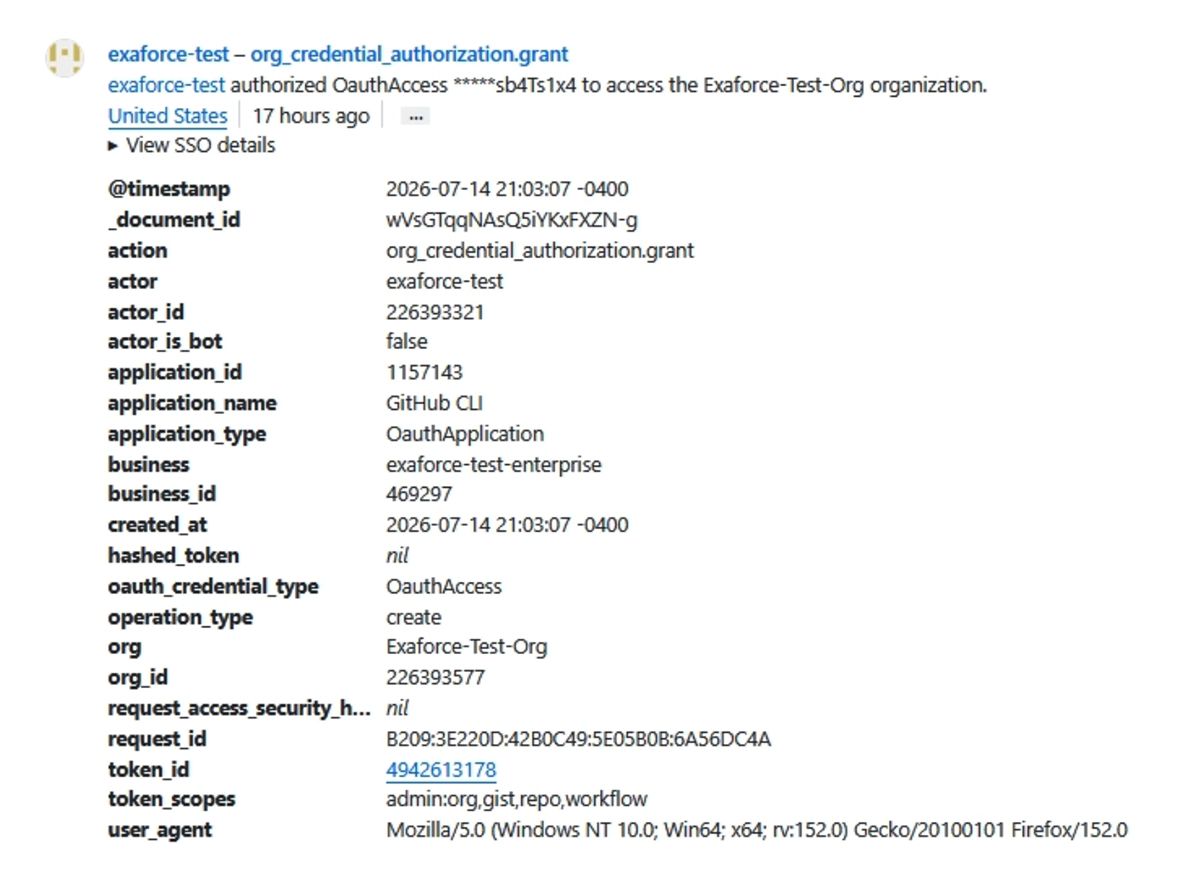
When the session is revoked, the event generated will be org_credential_authorization.grant.
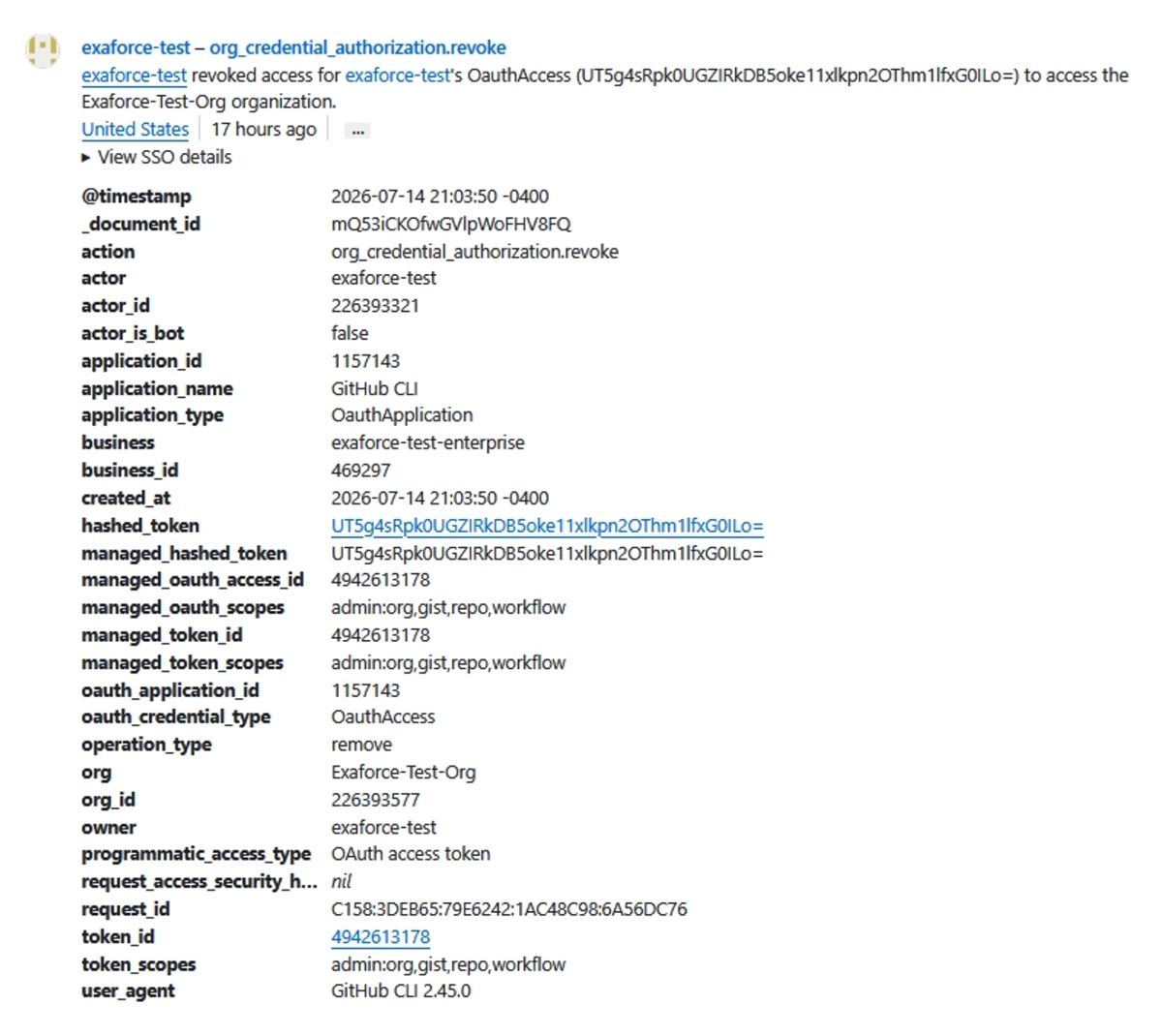
The same events are also generated for GitHub Apps user authentication.
Exaforce got you covered
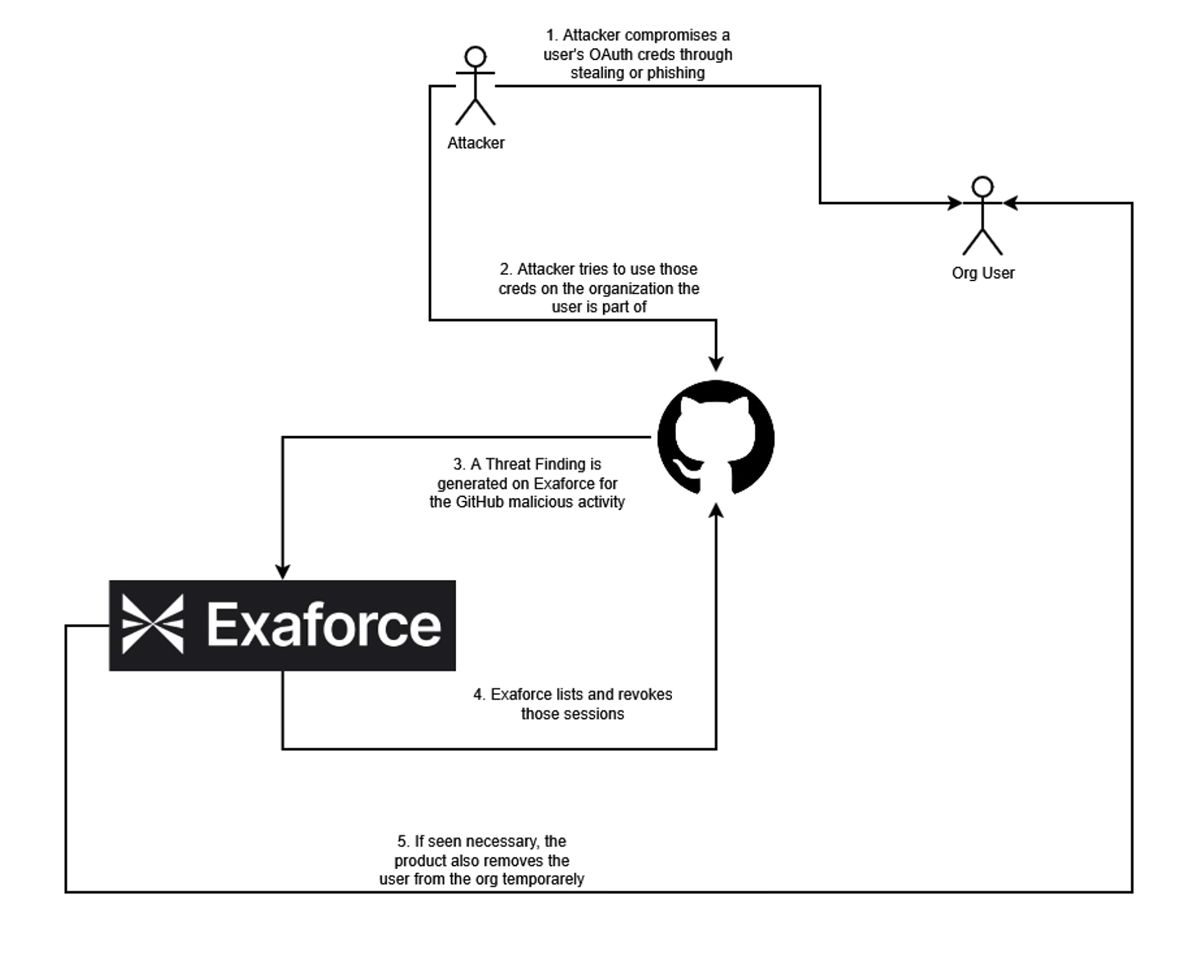
To allow for easy response of credential revoking against compromised credentials, Exaforce provides automated agents, capable of revoking suspicious and potential compromised sessions.
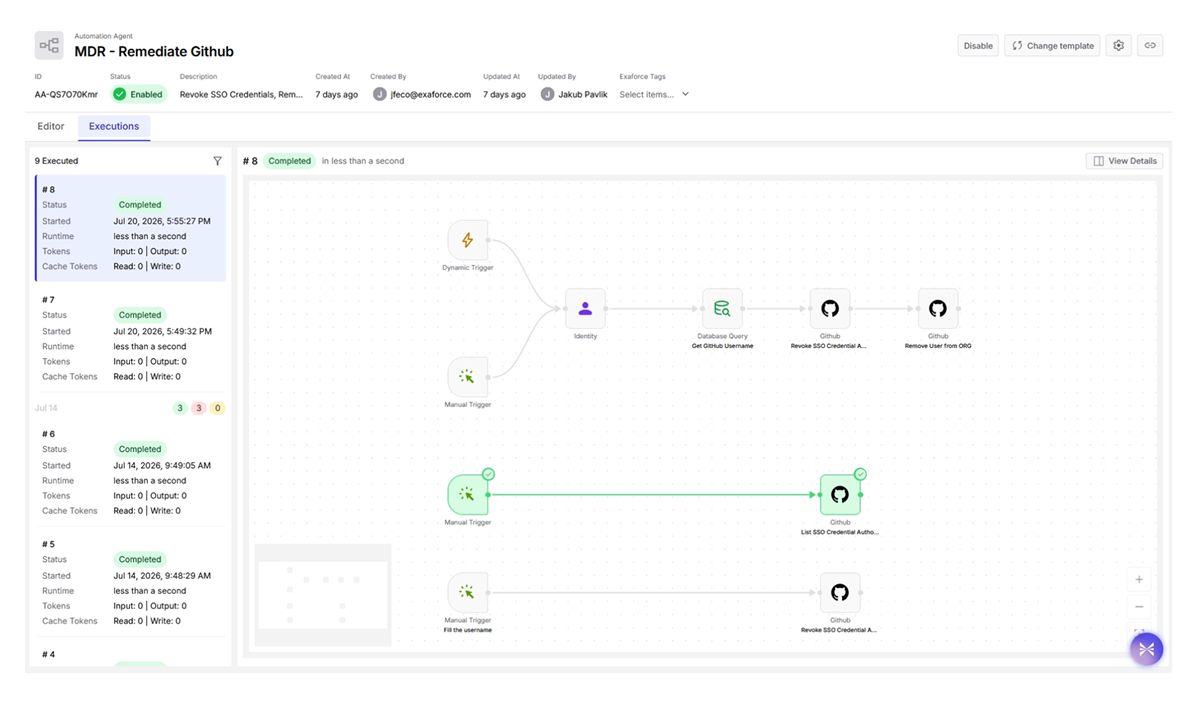
The Automation Agent works in three parts:
- Listing the GitHub user’s authorizations on the GitHub Organization
- Revoke the authorizations from the GitHub Organization
- If necessary, remove the user temporarily from the Organization
Conclusion
Revoking GitHub tokens matters because a token is a bearer credential. Whoever holds it can act with the full access it grants, with no password or second factor required. That makes any leaked token (accidentally committed to a repo, captured in logs, phished, or left on a compromised machine) a live key for as long as it stays valid. Revocation is your immediate kill switch: it invalidates the token on the spot so it can no longer be used, which is the fastest way to contain a suspected compromise.
It also complements expiration and rotation rather than replacing them. Expiration shrinks the exposure window automatically, but revocation lets you cut access right now when you actually need to, whether an employee leaves, an integration is retired, or you spot something suspicious, instead of waiting for a token to age out. The underlying principle is least standing access: every active token is attack surface, so promptly revoking ones that are exposed or no longer needed keeps that surface as small as possible.