はじめに
ある従業員が、一見すると通常の連絡に見えるメッセージを受け取り、送られてきたリンクをクリックすると、自社のOktaサインインページと思われる画面が表示されました。ユーザー名とパスワードを入力すると、その直後にスマートフォンにOktaのプッシュ通知が届き、そのユーザーはためらうことなく承認しました。無理もありません。ログイン操作をした直後であり、その認証プロンプトはまさに想定どおりのものだったからです。
そのユーザーが気づいていなかったのは、信頼したそのページが、実際には正規のページではなかったことです。それは、ユーザーと正規のログインページの間にひそかに介在するプロキシで、認証情報を正規サイトへ中継しながら、その情報を取得していました。パスワードも、承認操作も、認証フロー全体も、すべて攻撃者のインフラを経由していたのです。そして「承認」をタップした瞬間、ユーザーは自分自身のためではなく、攻撃者のために第2認証要素を満たしてしまいました。
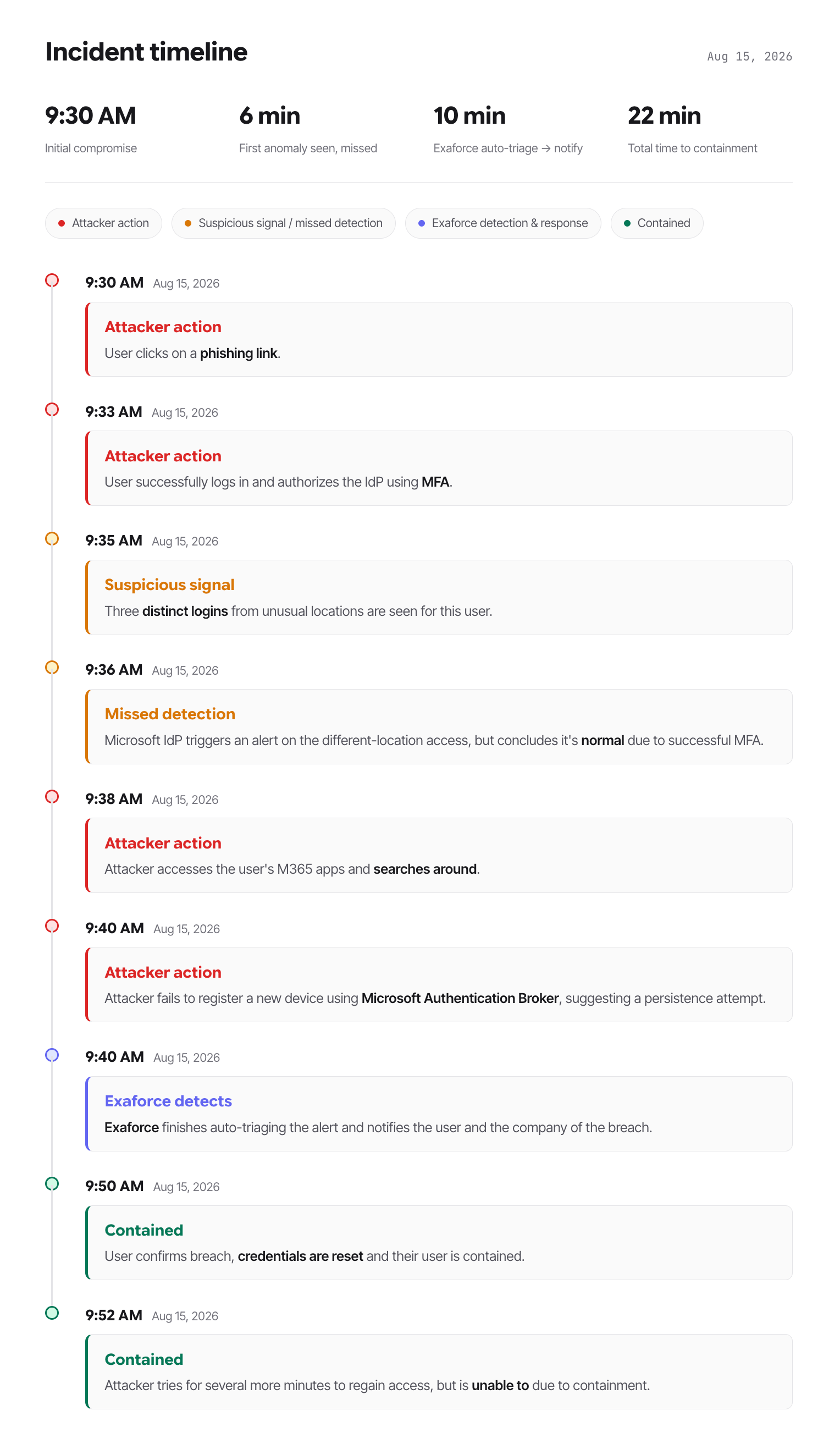
その数秒後には、そのユーザーの利用が確認されたことのない端末と場所から、Azureのトークンがリプレイされていました。わずか3分のうちに、そのトークンは3つの大陸で使用されていました。攻撃者はMFAを突破したわけではありません。認証情報の保管庫を破ったわけでも、未修正の脆弱性を悪用したわけでもありません。攻撃者は、自分たちの代わりにユーザー自身にログインを完了させ、その承認によって開かれた扉から入り込んだのです。
これはAdversary-in-the-Middle(AiTM)攻撃であり、セキュリティ上、最も信頼されている制御の1つが、侵害を成立させる仕組みとして悪用されました。盗まれたトークンには、OktaでMFAが完了済みであることを示すクレームが含まれていたため、Azureは異議を唱えませんでした。追加のプロンプトもチャレンジもなく、攻撃者の動きを遅らせるものは何もありませんでした。Azure自身のリスクエンジンは5分以内に異常を検知しましたが、その後、修復済みと判定しました。記録上は、ユーザーがMFAを通過していたためです。
この攻撃を終わらせたのは、エクサフォースが同じテレメトリを見ながら、異なる問いを立てていたことです。問うたのは「認証は成功したか」ではなく——それは明らかに成功していました——「そのアカウントを使用しているのは、普段そのアカウントを使用している本人か」でした。
数分のうちに、エクサフォースはその操作がユーザー本人によるものではないことを確認し、有効なセッションを無効化し、認証情報をリセットしたうえで、発生したすべての事象の完全な記録をセキュリティチームに引き渡しました。一連の対応は、Tier 1アナリストが状況の把握を終えるよりも前に完了していました。
攻撃チェーン
ある従業員が、通常の業務中に、自社のOktaサインインページと思われる画面にたどり着きました。認証情報を入力してMFAのプロンプトを承認しましたが、その時点では、特に異常を感じさせる点はありませんでした。
しかし、そのページはOktaではありませんでした。それは、ユーザーのブラウザと正規の認証サービスの間に介在するAdversary-in-the-Middle(AiTM)プロキシでした。ユーザーが送信した認証情報と認証トークンはすべて、本来の宛先に届く前に、攻撃者が管理するインフラを経由していました。その数分後には、攻撃者は認証済みセッションを他国からリプレイしていました。
この認証では、米国からの初回アクセス、これまで使用履歴のないLinux/Chromeのデバイスプロファイル、新しい住宅向けISPなど、通常とは異なる特徴が確認されました。AzureのリスクエンジンによってMFAチャレンジが要求され、ユーザーは登録済みデバイスを使用して正常にMFAを完了しました。
Oktaトークンを取得してユーザーのM365にアクセスした攻撃者は、そのトークンを自身が管理する3台の端末で使用しました。攻撃者はそれらの端末から、ユーザーのM365環境、メール、その他のオフィスアプリにアクセスしました。
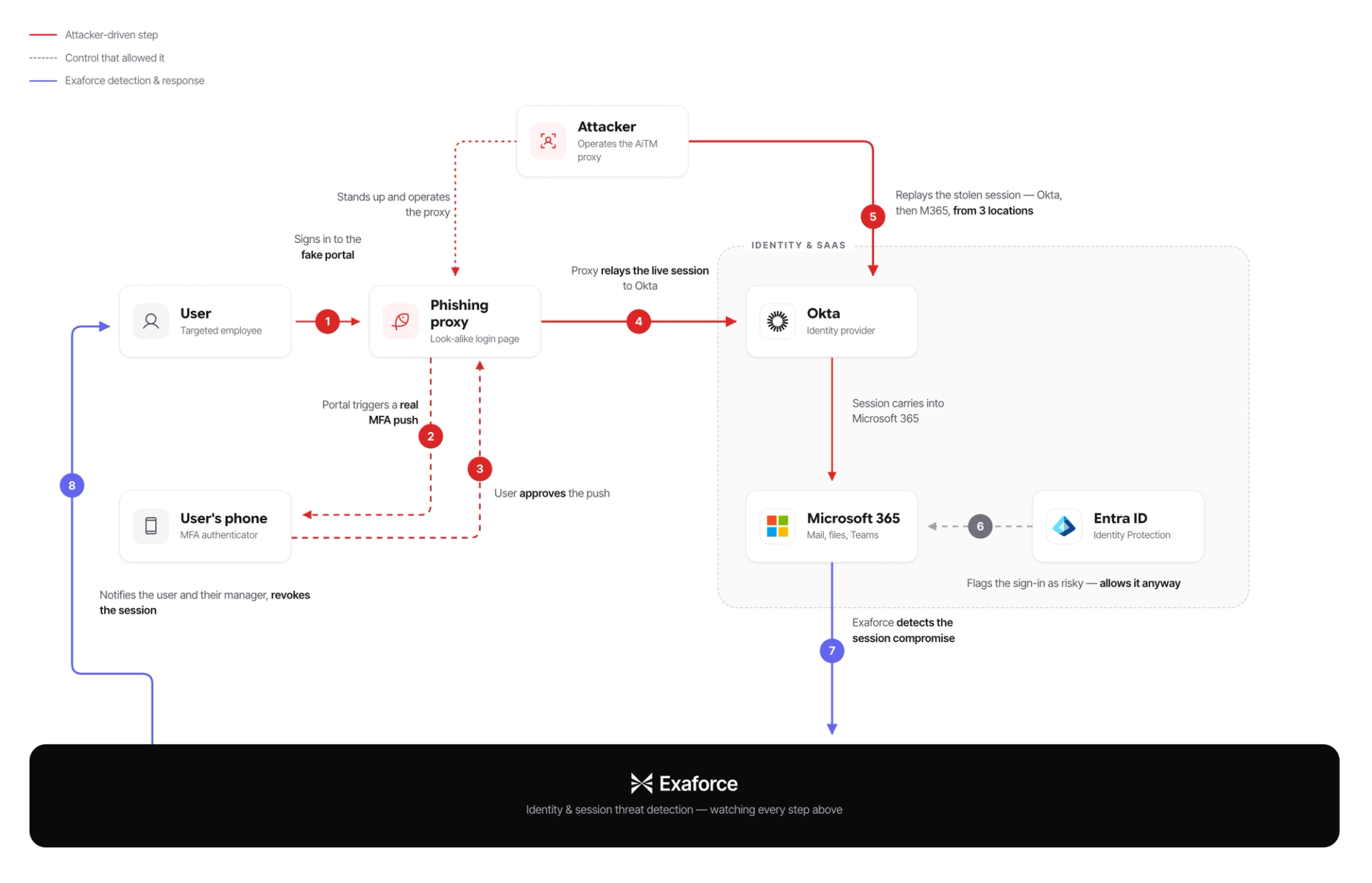
Azure Identity Protectionは、攻撃者による最初のアクセスから約5分後に、通常のアクセス地域とは異なる場所からのアクセスを検知しました。このセッションでは、通常とは異なるIPアドレスとOSが使用されていましたが、userPassedMFADrivenByRiskBasedPolicyを理由に「修復済み」と判定されました。これは、リスクのあるログイン自体は成功しており、認証情報に加えて、ユーザー自身が実行した可能性のあるMFAによる認証も完了していたことを意味します。これは、複数の検出結果からなる一連の検出のうち、最初の検出結果でした。攻撃者はその後も、デバイスレベルでの永続的なアクセスの確立を試み続けました。
エクサフォースの対応
エクサフォースは、ベースラインからの逸脱を検知し、ユーザー本人とその上司、およびエクサフォースのMDRチームに通知しました。
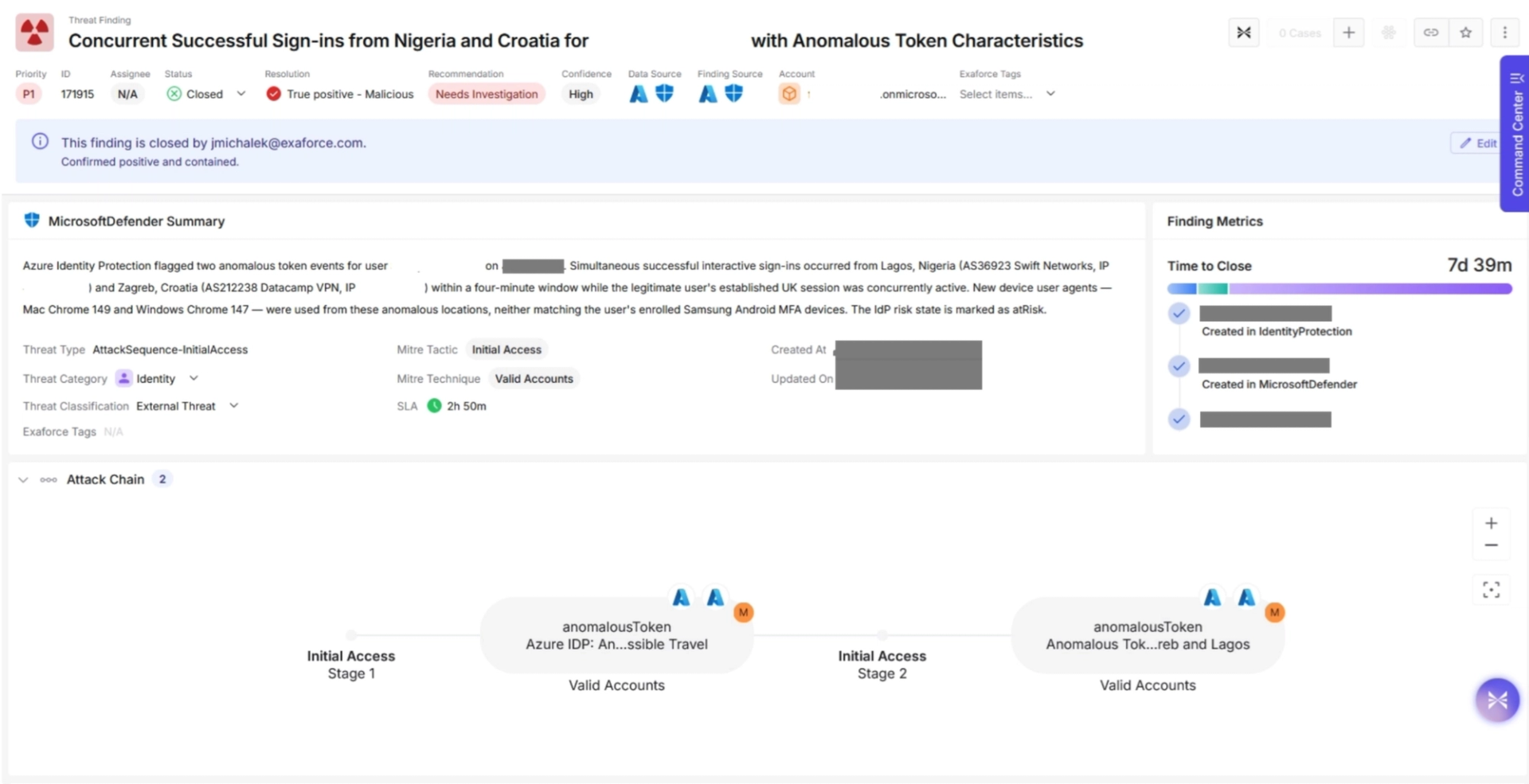
ユーザーは、そのログインが本人によるものではなく、不正なログインであることを確認しました。これを受けて、侵害されたAzureセッションがリセットされました。
攻撃者は他のOktaアプリへのアクセスも試みましたが、封じ込めの過程で、正規か否かを問わず、そのユーザーのすべてのセッションが無効化されました。ユーザーの認証情報を入手していた攻撃者は、その後、別の場所から新たなOktaセッションの確立を試みましたが、封じ込めの際に実施されたパスワードリセットにより、何も行うことはできませんでした。
攻撃は約20分間続き、その間、攻撃者はユーザーがアクセス権を持つM365アプリを閲覧することができましたが、その後、ユーザーは封じ込められました。
なぜ標準的なMFAではこの攻撃を防げなかったのか
ユーザーのセッションが終了されるまでに、攻撃者はすでに3つの異なる防御レイヤーをすり抜けていました。しかし、これらの防御レイヤー自体に問題があったわけではありません。いずれも設計どおりに動作していました。
最初の認証フロー自体は正規のものでした。Oktaから見れば、MFAの要件は正規の手順で満たされていました。実際にユーザー本人が承認していたからです。偽造トークンも認証プロンプトの回避もなく、この承認をユーザーが過去に何千回も行ってきた通常の承認と区別するものはありませんでした。
AzureもMFAを再度要求しませんでしたが、それには妥当な理由がありました。AzureはOktaとのフェデレーションによる信頼関係に基づいており、受け取ったトークンには、MFAがすでに完了していることを示すamr(Authentication Methods Reference)クレームが含まれていました。記録上、上流の認証プロセスですでに第二要素認証の要件が満たされていたため、Azureはそのクレームを受け入れ、再度MFAを要求することなくセッションを発行しました。
IPベースの検知が最後の防御レイヤーでしたが、検知した時点ではすでに手遅れでした。最初のOktaログインは、米国の住宅向けISPであるFrontier Communicationsから行われており、ユーザーの通常のアクティビティと比較しても、特に不審な点はありませんでした。リスクシグナルが検知され始めたのは、トークンがすでに複数の端末に渡り、ラゴスとザグレブの端末から再利用された後で、認証自体が成功してからかなり時間が経っていました。
この攻撃を阻止できた対策とは
フィッシング耐性MFAは、この攻撃を根本から阻止するセキュリティ制御です。FIDO2セキュリティキーやパスキーでは、MFAの応答が認証を開始したドメインに暗号学的に紐付けられます。そのため、本物そっくりの偽装ページに介在するプロキシが、その応答を正規サイトへ中継することはできません。偽のログイン画面がどれほど本物らしく見えても、認証プロセスは成立しません。
さらに、複数の防御レイヤーによって被害を封じ込めることも可能でした。準拠デバイスを必須とする条件付きアクセス(Conditional Access)ポリシーが適用されていれば、ラゴスとザグレブの端末はいずれもIntuneに登録されていなかったため、アクセスを即座にブロックできたはずです。継続的アクセス評価(Continuous Access Evaluation)が有効であれば、リスクシグナルが検知された時点でセッションをリアルタイムに失効させ、トークンが自然に期限切れになるまで攻撃者のアクセスが継続する事態を防げたはずです。また、承認前にログイン要求のIPアドレスと位置情報をユーザーに表示するナンバーマッチングが利用されていれば、ユーザーは、自分が承認しようとしているサインインの場所が実際の居場所と一致していないことに気付けた可能性があります。
エクサフォースによる自動対応アクション
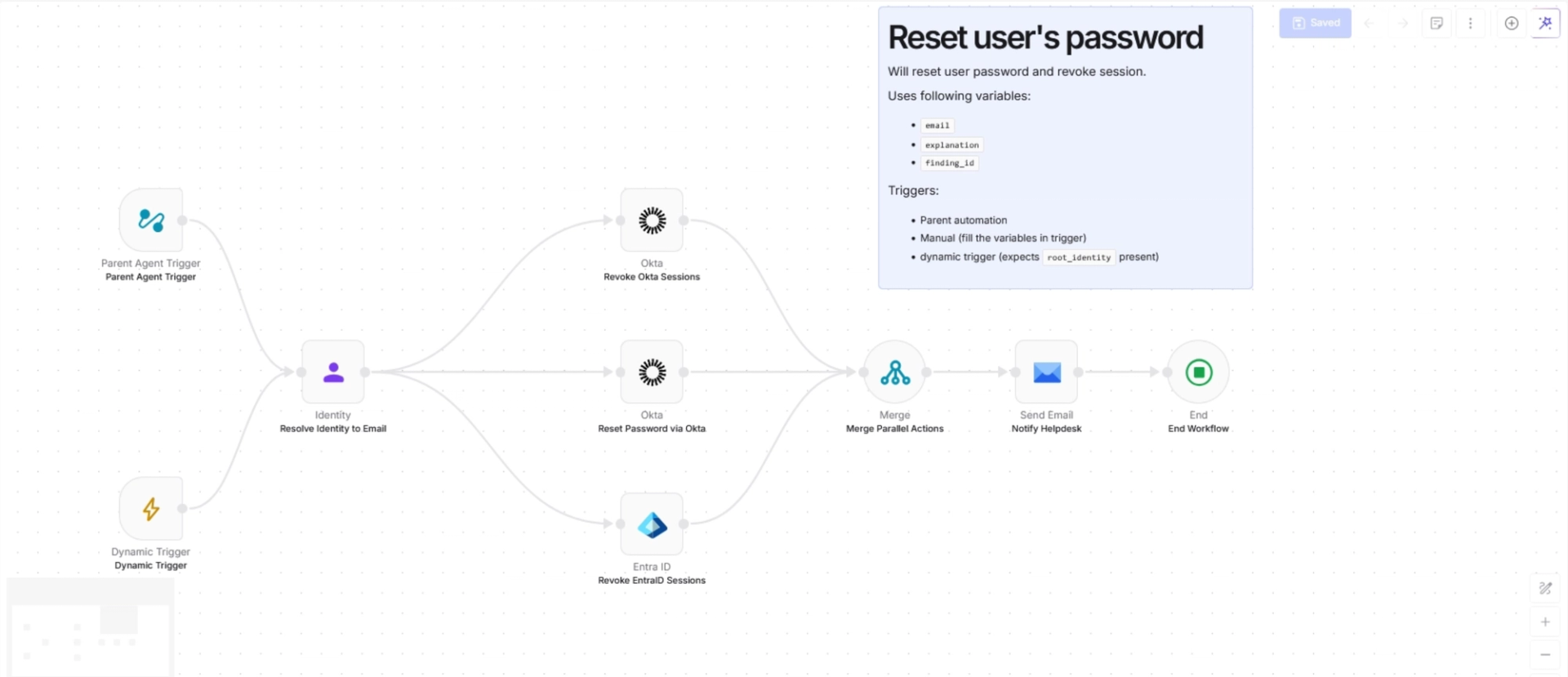
Automation Agent(AA)は、エクサフォースが提供する機能で、特定のトリガーや条件に応じて実行される自動フローを容易に設定できます。その内容は、スクリプトの実行、ユーザーやシステムの封じ込め、通知、脅威の自動再評価まで多岐にわたり、これらをすべて同時に実行することもできます。あらかじめ設定しておくことで、トリガーまたは実行するユーザーは、要求したタスクが確実に実行されること、また条件が満たされずに失敗した場合には再実行と通知が行われることを保証できます。
今回のシナリオでは、ユーザーを封じ込めるためにこれらが活用されました。最初の検知から封じ込めまでに要した時間は20分未満であり、これはすべて、エージェントが自律的に動作していたことによるものです。今回の対応では、2種類のAutomation Agentが使用されました。
1つ目のAAは、脅威についてユーザーに自動的に連絡するために使用されました。ユーザーが脅威であると確認した時点で直ちに封じ込めが実行され、すべてのデータソースにおいてパスワードのリセットとセッションの無効化が行われました。
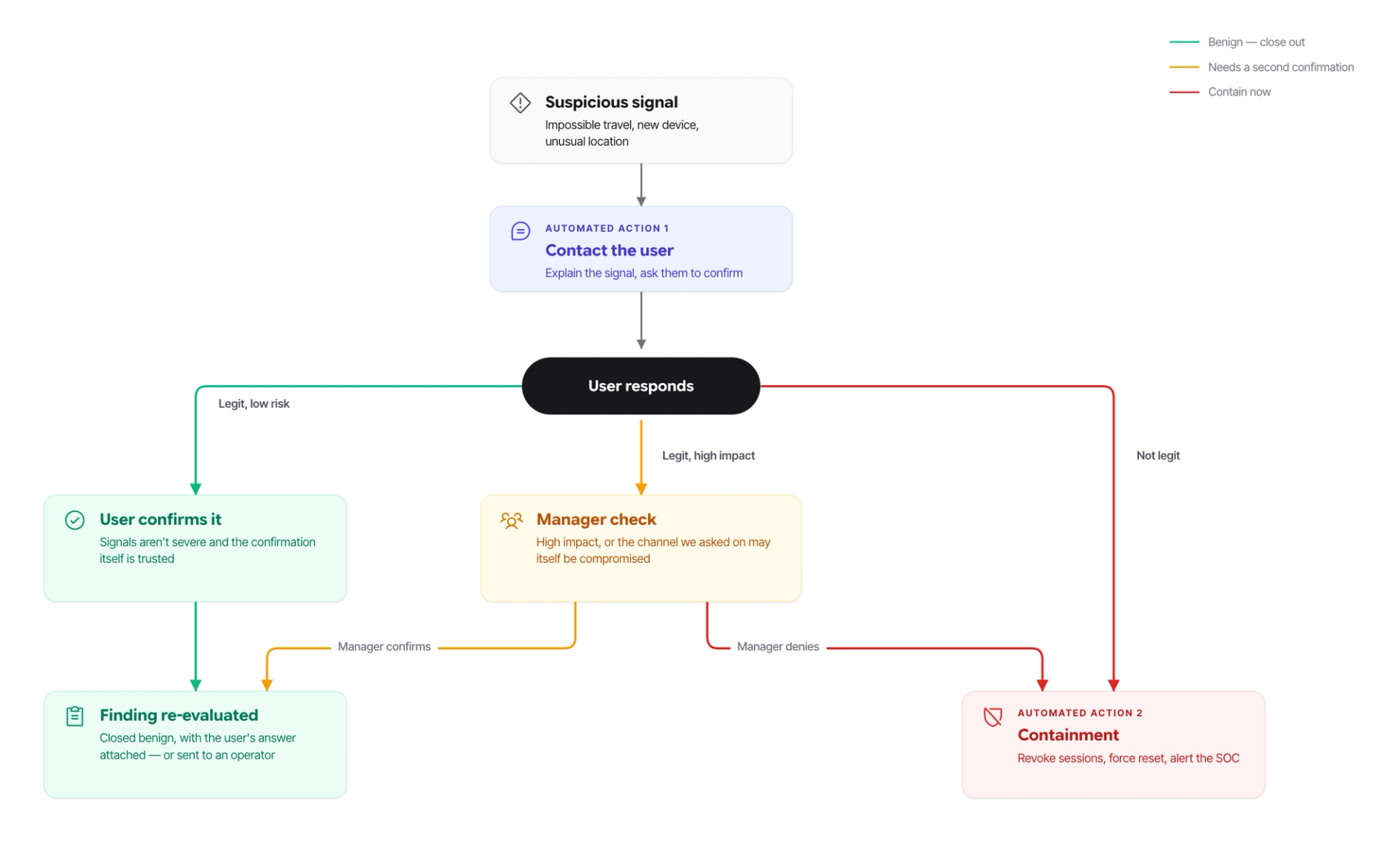
ユーザーの上司にも通知が行われ、この攻撃が当該アイデンティティのアクセス可能なリソースに与えた可能性のある影響について、確認が求められました。上司が存在しない場合(経営幹部などのケース)には、通知は自動的にSOCチームへ送られ、承認を求めます。
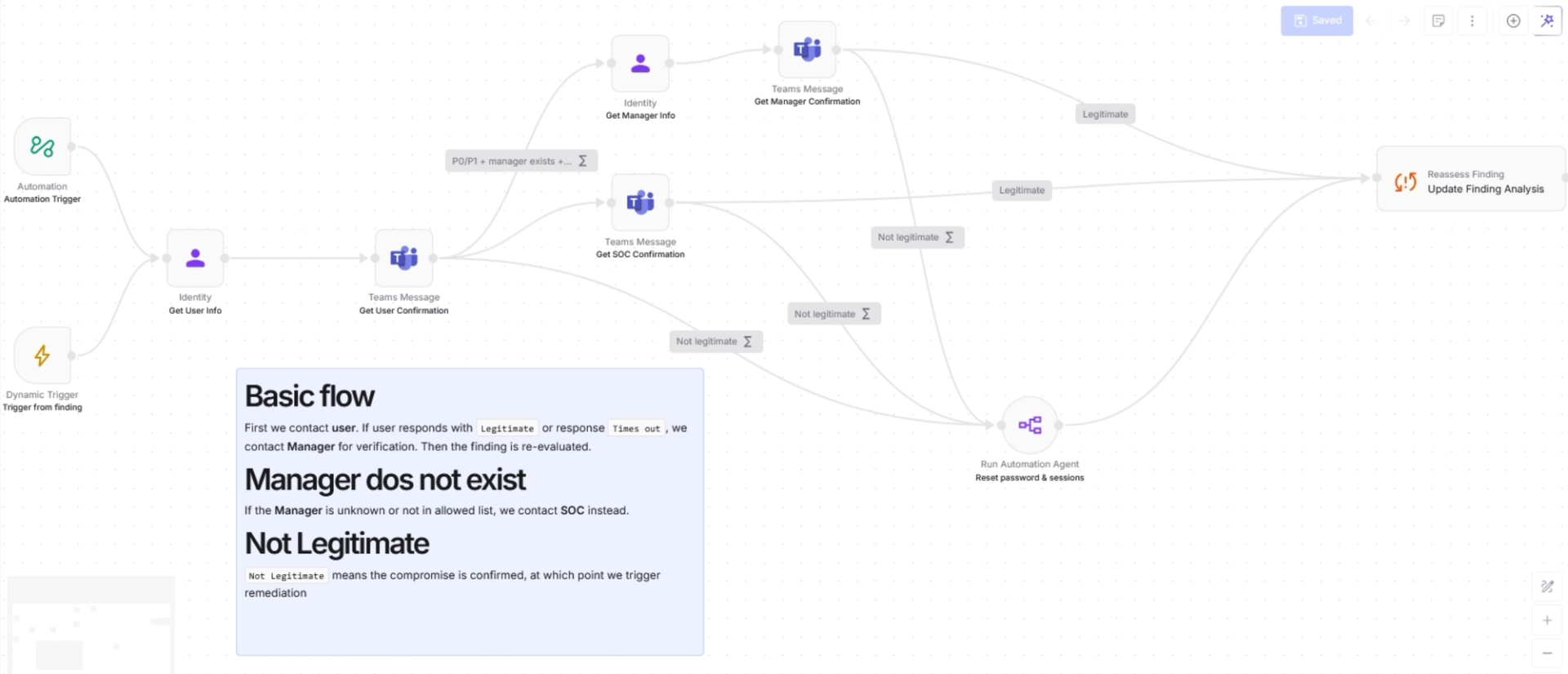
確認が得られると、1つ目のAAによって2つ目のAutomation Agentが自動的に起動され、ユーザーの封じ込めが実行されました。今回のケースではOktaであるIDP上のユーザーセッションが無効化され、攻撃者がそれを経由して他のアプリにアクセスすることを防ぎました。IDPセッションと並行して、影響を受けたEntra IDのセッションも無効化し、攻撃者がユーザーのM365リソースに対して持っていたアクセスを遮断しました。続いて、攻撃者がフィッシングで窃取した認証情報を使用してさらにアクセスを試みることがないよう、ユーザーのすべてのデータソースでパスワードのリセットを実行しました。実際に攻撃者はアクセスを試みましたが、失敗に終わりました。最後に、ユーザーの封じ込めが完了した後、ユーザー本人、その上司、およびセキュリティチームに封じ込めの実施が通知され、今後の攻撃の試みに備えて当該ユーザーを継続的に監視するよう助言されました。
まとめ
AiTMフィッシングが非常に危険なのは、巧妙に実行されると、攻撃の最中に異常を示す兆候がほとんど現れない点です。ユーザーは有効な認証情報を入力し、正規のMFAプロンプトを承認しているため、アイデンティティプロバイダーから見れば、すべてのステップが想定どおりに進んでいました。認証要素の失敗も、ブルートフォース攻撃を示すパターンも、検知対象となる不正な形式のリクエストもありません。攻撃者は個々のセキュリティ制御を突破したのではなく、正規に完了したログインを悪用したのです。唯一の手掛かりとなり得るのは、ユーザーが認証情報を入力するドメインです。しかし、そのドメインでさえ、技術者を欺けるほど正規のものに見せかけることができます。
意識向上トレーニングを別にすれば、最も強力な防御策は、FIDO2キーやパスキーといったフィッシング耐性のあるMFAです。これらは認証情報を正規のサイトに紐付けるため、プロキシが認証フローを完了させることはできません。
しかし、予防策が常に完璧とは限りません。いったんセッションが確立されれば、重要なのはそのセッションをどれだけ迅速に無効化できるかです。今回のインシデントでは、セッションが無効化されるまでに5分かかりました。エクサフォースは、まさにこの時間差をなくすために設計されています。アナリストによる調査と手動対応を待つのではなく、エクサフォースは悪意のあるセッションを脅威と特定した時点で自動的に失効させ、攻撃者が活動できる時間を数分からほぼゼロまで短縮します。