
An adversary-in-the-middle (AiTM) phishing relay passed Okta number matching and ended in session hijacking and business email compromise. An employee received a bid invitation, signed in, and approved a number-matching push with a fingerprint. Eight minutes after that sign-in, an attacker was using the Google Workspace session from another network. In the next 40 minutes the attacker hid the lure, mailed 1,569 people from the real account and erased the replies. This post shows the attack in the raw Okta and Google Workspace logs, with five hunting queries and the indicators.
Executive summary
- Access: an MFA relay through an adversary-in-the-middle phishing page. The user passed an Okta Verify number challenge with biometrics for a sign-in that was not theirs. No vulnerability was exploited.
- Infrastructure: the sign-in came through a residential proxy exit. Eight minutes later the stolen session cookie was in use from a VPN hosting range (AS397423), and then from a second hosting range (AS14956).
- Actions: the session blocked the sender of the lure and marked the lure as spam. It then sent one e-signature themed email in five messages to 1,569 distinct recipients in 147 domains, and permanently deleted 280 bounces and replies from the mailbox.
- Outcome: the email security tool purged 296 delivered copies in the same minute they arrived. Analysis of the Gmail logs found 93 mailboxes that the purge missed. Ten days of Gmail logs show no coworker who opened the message or clicked its link.
The attack at a glance
How the relay works
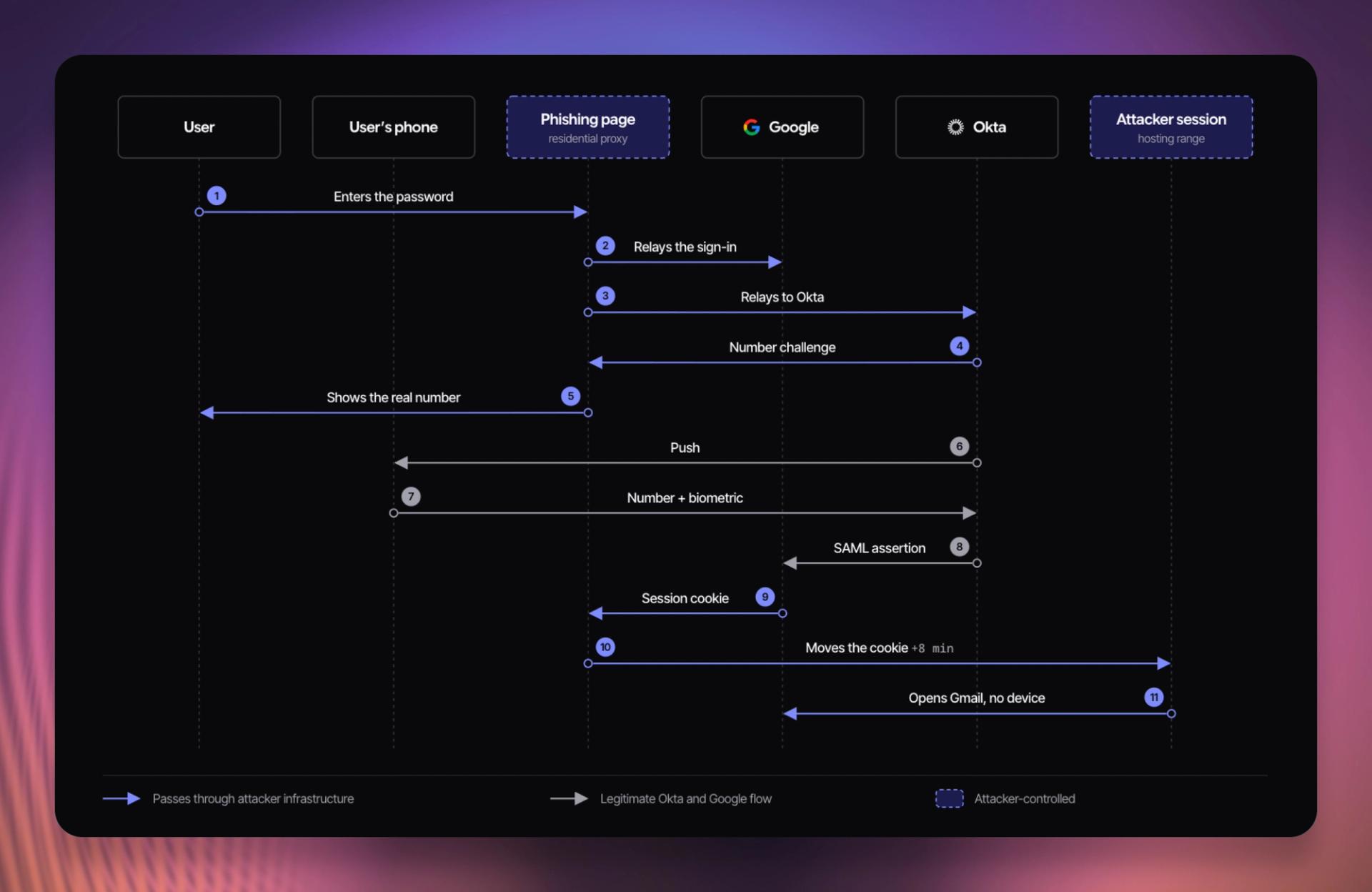
Figure 1. The relay. The user types the password into the phishing page. The page, which runs behind a residential proxy, sends the sign-in to Google and then to Okta. Okta shows a number on the sign-in screen and sends a push to the user's phone. The phishing page shows the same number to the user, so the user enters the correct number and passes the biometric check. Okta sends the SAML assertion and Google creates a session. The phishing page keeps the session cookie. Eight minutes later the attacker opens Gmail with that cookie from a hosting range, with no sign-in and no device.
Timeline (UTC)
Calendar dates are removed. All times are on one day unless a row says +1 day.
Stage 1: the phishing lure
The phishing lure was a short email with the subject "IFB" (invitation for bid) and one attachment. It came from a gmail.com account and its links pointed to candapanting[.]com. It arrived 9 minutes before the first sign-in attempt.
The address the attacker later blocked was also in the recipient list of the bulk send, so it was one of the user's contacts. The block and the spam mark on the lure are 3 seconds apart. This timing points to a lure sent from a contact's compromised mailbox, which is how this type of campaign moves from one address book to the next.
Stage 2: adversary-in-the-middle sign-in and MFA relay through a residential proxy
The adversary-in-the-middle page relayed the sign-in to Google first. Google logged a failed password attempt and then sent the browser to Okta, because the domain uses SAML.
{
  "id.applicationName": "login",
  "name": "login_failure",
  "ipAddress": "68.129.46.186",
  "parameters": [
    {
      "name": "login_type",
      "value": "google_password"
    },
    {
      "name": "login_challenge_method",
      "multiValue": [
        "none"
      ]
    }
  ]
}
Okta then evaluated the sign-in. The Okta System Log entry is trimmed and redacted here, and the field names are unchanged.
{
  "eventType": "policy.evaluate_sign_on",
  "published": "22:16:56Z",
  "outcome": {
    "result": "CHALLENGE"
  },
  "client": {
    "ipAddress": "68.129.46.186",
    "userAgent": {
      "os": "Ubuntu",
      "browser": "CHROME"
    },
    "geographicalContext": {
      "city": "Oceanside",
      "state": "New York"
    }
  },
  "securityContext": {
    "asNumber": 701,
    "asOrg": "verizon business",
    "isProxy": false,
    "risk": {
      "level": "HIGH",
      "reasons": [
        "Anomalous Device",
        "Anomalous Location"
      ]
    },
    "userBehaviors": [
      {
        "name": "New Device",
        "result": "POSITIVE"
      },
      {
        "name": "New IP",
        "result": "POSITIVE"
      },
      {
        "name": "New ASN",
        "result": "POSITIVE"
      },
      {
        "name": "New City",
        "result": "POSITIVE"
      },
      {
        "name": "New State",
        "result": "POSITIVE"
      },
      {
        "name": "New Geo-Location",
        "result": "POSITIVE"
      },
      {
        "name": "New Country",
        "result": "NEGATIVE"
      },
      {
        "name": "Velocity",
        "result": "NEGATIVE"
      }
    ]
  },
  "debugContext": {
    "debugData": {
      "associatedProxies": [
        "SHOPSOCKS5_PROXY",
        "NODEMAVEN_PROXY",
        "IPIDEA_PROXY",
        "IPROYAL_PROXY",
        "NEXUS_PROXY",
        "DATAIMPULSE_PROXY",
        "9PROXY_PROXY",
        "EARNFM_PROXY",
        "OXYLABS_PROXY",
        "YILU_PROXY",
        "SHIFTER_PROXY"
      ],
      "challengeAuthenticatorsList": "[{Okta Verify : push}]",
      "risk": "{reasons=Anomalous Device, Anomalous Location, level=HIGH}",
      "threatSuspected": "false"
    }
  },
  "target": [
    {
      "type": "AppInstance",
      "displayName": "Google Workspace",
      "detailEntry": {
        "signOnModeEvaluationResult": "CHALLENGE",
        "signOnModeType": "SAML_2_0"
      }
    },
    {
      "type": "Rule",
      "displayName": "Catch-all Rule",
      "detailEntry": {
        "policyRuleFactorMode": "2FA",
        "deviceAssuranceDenied": "false"
      }
    }
  ],
  "device": {
    "managed": null,
    "registered": null
  }
}
Three details matter in this entry.
- isProxy is false, but associatedProxies names 11 residential proxy networks. The address belongs to a consumer ISP, so a check for hosting or VPN ranges does not see it.
- The risk level is HIGH and six of the behavior checks are positive. The policy rule that matched was a catch-all rule that asks for a second factor and has no risk or device condition.
- Velocity is negative. The identity provider did not see impossible travel on this sign-in.
Twelve seconds later the user approved the push.
{
  "eventType": "user.authentication.auth_via_mfa",
  "published": "22:17:08Z",
  "outcome": {
    "result": "SUCCESS"
  },
  "client": {
    "device": "Mobile",
    "userAgent": {
      "os": "iOS"
    },
    "geographicalContext": {
      "state": "<the user's home state>"
    }
  },
  "debugContext": {
    "debugData": {
      "factor": "OKTA_VERIFY_PUSH",
      "authenticatorMethodChallengeTime": "22:16:56.909Z",
      "pushOnlyResponseType": "OV_RESPONSE_APPROVE",
      "pushWithNumberChallengeResponseType": "OV_WITH_CHALLENGE_RESPONSE_VALID",
      "keyTypeUsedForAuthentication": "USER_VERIFYING_BIO_OR_PIN"
    }
  },
  "target": [
    {
      "type": "AuthenticatorEnrollment",
      "displayName": "Okta Verify",
      "detailEntry": {
        "methodTypeUsed": "Push",
        "methodUsedVerifiedProperties": "[USER_PRESENCE, DEVICE_BOUND, USER_VERIFYING, HARDWARE_PROTECTED]"
      }
    }
  ]
}
This was not a plain push. Okta asked for a number challenge, and the response was valid. The user also passed a biometric or PIN check on a device-bound key. A number challenge stops push fatigue, because the user must read the number from the sign-in screen. It does not stop an MFA relay, because the phishing page shows the user the real number. Only one push was sent, and Okta logged no failed attempts, so this was not push fatigue or password spraying.
The browser was in New York. The phone that approved the push was in the user's home state, on the other side of the country. That gap is in the log, in two events 12 seconds apart.
Google accepted the SAML assertion and recorded its own doubt.
{
  "id.applicationName": "login",
  "name": "login_success",
  "ipAddress": "68.129.46.186",
  "parameters": [
    {
      "name": "login_type",
      "value": "saml"
    },
    {
      "name": "login_challenge_method",
      "multiValue": [
        "saml"
      ]
    },
    {
      "name": "is_suspicious",
      "boolValue": true
    }
  ]
}
A sign-in that passes every identity check is the main case for the identity attack surface: the detection must come from what the identity does next.
Stage 3: session cookie replay from a second network
Session hijacking came next: the attacker replayed the stolen session cookie from a different network. The residential proxy was used for 40 seconds and never again. Eight minutes after the Okta sign-in, the same Google account was active from 191.96.101.50 in AS397423, a range that VPN and proxy services use. There is no sign-in from that address. Google Workspace does not bind a session to the device or network that created it.
The first event from the new address is a Context-Aware Access evaluation.
{
  "id.applicationName": "context_aware_access",
  "name": "MONITOR_MODE_ACCESS_DENY_EVENT",
  "ipAddress": "191.96.101.50",
  "parameters": [
    {
      "name": "CAA_ACCESS_LEVEL_UNSATISFIED",
      "multiValue": [
        "<mail and chat access level>"
      ]
    },
    {
      "name": "CAA_APPLICATION",
      "value": "HANGOUTS_CHAT"
    },
    {
      "name": "CAA_DEVICE_ID",
      "value": "UNKNOWN"
    },
    {
      "name": "CAA_DEVICE_STATE",
      "value": "No Device Signals"
    }
  ]
}
The access level was in monitor mode, so the event records a deny and the request continues. The device has no identity and sends no signals. This is the fingerprint of session cookie theft: a valid cookie with no device behind it. Eleven minutes later the same event appears for Gmail from a second hosting address, 2605:7980:0:20a2::1 in AS14956.
Seven seconds after the first event, the Gmail add-ons asked for their OAuth tokens, which happens when Gmail opens in a browser.
{
  "id.applicationName": "token",
  "name": "authorize",
  "ipAddress": "191.96.101.50",
  "parameters": [
    {
      "name": "app_name",
      "value": "<phishing report add-on>"
    },
    {
      "name": "client_type",
      "value": "WEB"
    },
    {
      "name": "scope",
      "multiValue": [
        "https://www.googleapis.com/auth/gmail.addons.current.message.readonly",
        "https://www.googleapis.com/auth/gmail.addons.execute",
        "openid"
      ]
    }
  ]
}
The add-on that asked first was the button employees use to report phishing. These grants repeat about every 28 minutes while the Gmail tab stays open, from 22:25 until 03:07 on the next day. They measure how long the attacker kept the mailbox open: 4 hours and 42 minutes.
Stage 4: business email compromise: hide, send, erase
The business email compromise stage used the real mailbox for three tasks. This is the email attack surface from the inside: mail that comes from a trusted account.
Hide the lure. The session's first change to the account was a sender block.
{
  "id.applicationName": "login",
  "name": "blocked_sender",
  "type": "blocked_sender_change",
  "id.time": "22:49:37Z",
  "ipAddress": "191.96.101.50",
  "parameters": [
    {
      "name": "affected_email_address",
      "value": "<contact>@gmail.com"
    }
  ]
}
Three seconds later the "IFB" email was marked as spam. The block removes the lure from view and sends any later mail from that contact to spam.
Send. Five messages went out between 22:54:51 and 23:04:53 with the subject "Confirmation of Document Completion and Final Review". The message was styled as an e-signature request and its links included review-document[.]com.
{
  "id.applicationName": "gmail",
  "name": "delivery",
  "ipAddress": "191.96.101.50",
  "event_info": {
    "success": true
  },
  "message_info": {
    "rfc2822_message_id": "<CAMJYe_...@mail.gmail.com>",
    "subject": "Confirmation of Document Completion and Final Review",
    "payload_size": 18490,
    "flattened_destinations": "<292 addresses>"
  }
}
The five messages list 1,573 recipients in total (292 + 401 + 401 + 401 + 78). One outside address is the last entry in all five messages, so the distinct count is 1,569 addresses in 147 domains. 415 are coworkers. The other 1,154 are outside the company, mostly personal mailboxes at gmail.com (517) and yahoo.com (196). The lists follow the order of the address book.
Erase. While the messages went out, the same session cleaned the mailbox.
Gmail logs these as mail_event_type 13 (moved to trash). At 23:07 and 23:36 the session emptied the trash, logged as type 27 (permanently deleted), for 280 messages. The Okta notice was the alert for the attacker's own sign-in. Its message ID matches the notification Okta sent at 22:17:10. It was moved to trash and is not among the permanently deleted messages in the log.
How far the email got
Mail from a coworker's real account passes SPF, DKIM and DMARC and carries no outside-sender warning.
Google Groups widened the reach. Groups on the recipient list sent the message to their members, so 138 mailboxes that were never on the list received it or were sent it. Two mailboxes forwarded it by rule.
The automatic purge was fast but not complete. We traced every delivered copy to its outcome in the Gmail logs and found the 93 mailboxes it missed, 16 of them shared mailboxes that many people read. The same analysis shows no coworker who opened the message, clicked a link, replied or forwarded it in the ten days after.
The external recipients are outside these logs. What came back is visible: 266 bounces, and replies from at least eight people. The attacker deleted the first replies. The email security tool deleted the later ones within seconds of arrival.
MITRE ATT&CK mapping
Hunting for this pattern
These queries are DuckDB SQL. They read an Okta System Log export and a Google Workspace Reports API export, both as JSON files with the field names the APIs return. They were run on the events of this incident. Create the views first.
CREATE VIEW okta AS SELECT * FROM read_json_auto('okta_system_log.json', map_inference_threshold=-1);

CREATE MACRO pval(ps, n) AS list_filter(ps, p -> p.name = n)[1];

CREATE VIEW gws AS SELECT a.id.time::TIMESTAMPTZ AS time, a.id.applicationName AS app, a.actor.email AS email, a.ipAddress AS ip, e.name AS event, e.parameters AS params FROM read_json_auto('gws_activities.json') a, unnest(a.events) AS t(e);

CREATE VIEW gmail AS SELECT time, email, ip, pval(pval(params, 'event_info').messageValue.parameter, 'mail_event_type').intValue AS mail_event_type, pval(pval(params, 'message_info').messageValue.parameter, 'subject').value AS subject FROM gws WHERE app = 'gmail';
1. Relayed number challenge. A number challenge that was answered correctly from a different state than the browser that asked for it.
SELECT m.published, m.actor.alternateId AS user_name, s.client.ipAddress AS browser_ip, s.client.geographicalContext.state AS browser_state, m.client.geographicalContext.state AS phone_state FROM okta m JOIN okta s ON s.authenticationContext.rootSessionId = m.authenticationContext.rootSessionId AND s.eventType = 'policy.evaluate_sign_on' WHERE m.eventType = 'user.authentication.auth_via_mfa' AND m.debugContext.debugData.pushWithNumberChallengeResponseType = 'OV_WITH_CHALLENGE_RESPONSE_VALID' AND s.client.geographicalContext.state <> m.client.geographicalContext.state;2. Residential proxy sign-in. A new Okta session from an address that Okta ties to a proxy network, with a HIGH risk rating. Mobile carrier addresses also appear in associatedProxies, so keep the risk condition.
SELECT published, actor.alternateId AS user_name, client.ipAddress AS ip, debugContext.debugData.associatedProxies AS proxies FROM okta WHERE eventType = 'user.session.start' AND outcome.result = 'SUCCESS' AND debugContext.debugData.associatedProxies IS NOT NULL AND debugContext.debugData.risk LIKE '%level=HIGH%';3. Session with no device. A Context-Aware Access event with an unknown device, for a user whose other events carry a device ID. On this incident the query returned both attacker addresses.
WITH caa AS ( SELECT time, email, ip, pval(params, 'CAA_DEVICE_ID').value AS device_id FROM gws WHERE app = 'context_aware_access' ) SELECT u.time, u.email, u.ip FROM caa u WHERE u.device_id = 'UNKNOWN' AND EXISTS ( SELECT 1 FROM caa k WHERE k.email = u.email AND k.device_id <> 'UNKNOWN' );4. Cover move. A sender block followed within a minute by a spam mark from the same user.
SELECT b.email, b.time AS block_time, s.time AS spam_time, s.subject FROM gws b JOIN gmail s ON s.email = b.email AND s.mail_event_type = '3' AND s.time BETWEEN b.time AND b.time + INTERVAL 60 SECOND WHERE b.event = 'blocked_sender';5. Clean-up after a bulk send. More than 20 bounce messages moved to trash or permanently deleted by one user from one address in 10 minutes.
SELECT email, ip, time_bucket(INTERVAL 10 MINUTE, time) AS bucket, count(*) AS deleted FROM gmail WHERE mail_event_type IN ('13', '27') AND subject LIKE 'Delivery Status Notification%' GROUP BY email, ip, bucket HAVING count(*) > 20 ORDER BY bucket;Indicators
The two IPv4 addresses and the IPv6 address are shared infrastructure. Use them to search your logs for the day of an incident. Do not block them permanently. The IP owners match public routing data as of November 2026, but hosting and proxy ranges change owners. Both link domains were registered about three weeks before the attack. At the time of writing, no vendor or sandbox report named either domain.
Takeaways
Number matching is not phishing resistance. The user did everything the prompt asked, on a device-bound key with biometrics, and the attacker still got the session. Only an authenticator that checks the origin of the sign-in page, such as a passkey or FIDO2 key, breaks the relay.
Act on the risk the identity provider already computes. The sign-in was rated HIGH, from a new device on an address tied to 11 proxy services. A policy rule that denies or steps up on that rating stops this at the first event.
Tie the session to the device. Context-Aware Access saw a session with no device 24 minutes before the first change to the account. In enforce mode, that is a block.
Confirm the purge by search. Automatic remediation removed most copies in a minute and missed 93. Search every mailbox by message ID, and start with shared mailboxes and group members.
Watch behavior after the sign-in. Every control at the sign-in passed. The attack was visible in what the session did next: a new network with no sign-in, a setting change, a send to the whole address book.
FAQ
Does Okta number matching stop phishing?
No. Number matching stops push fatigue, because the user must read a number from the sign-in screen. In an adversary-in-the-middle attack the phishing page shows the user the real number, so the user enters it correctly. In this incident the response was valid and the biometric check passed.
What is an adversary-in-the-middle (AiTM) phishing attack?
It is a phishing page that passes the user's sign-in to the real service while the user types. The user completes the real password and MFA steps, and the page keeps the session cookie that the service returns. The attacker then uses that cookie and does not need the password or the MFA device again.
How do I detect a stolen Google Workspace session?
Look for the account on a network where it has no sign-in event. A replayed session cookie makes Context-Aware Access events with an unknown device, OAuth token grants for Gmail add-ons from the new network, and account changes from that network. Hunting queries 3 and 4 in this post find these patterns.
What stops an MFA relay?
A phishing-resistant authenticator such as a passkey or a FIDO2 security key, because it checks the origin of the sign-in page and will not answer a phishing domain. A sign-in policy that denies HIGH risk sign-ins and a session bound to a managed device are the next two controls.
How do I find every copy of a phishing email that a compromised account sent?
Search every mailbox by the message ID, not only the mailboxes on the recipient list. Groups send the message to their members and forwarding rules move it again. In this incident 138 mailboxes that were not on the list were reached that way.
How Exaforce customers are protected
Every control at the sign-in passed in this attack. Exaforce MDR detects it from what the session does next, and responds.
- Coverage. Exaforce watches the sign-in, the session on a new network and the mailbox changes, across Okta and Google Workspace. This covers the identity attack surface after MFA.
- Correlation. The Exabots, the Exaforce AI agents, join this activity and alerts from other tools into one finding. Here it was a P1 account takeover.
- Response. Exaforce MDR analysts work each finding 24/7. If you are not a customer and see this pattern, call the incident response hotline below.
- Log analysis. After the incident, Exaforce traced every delivered copy of the email to its outcome and found the 93 copies that the automatic purge missed.
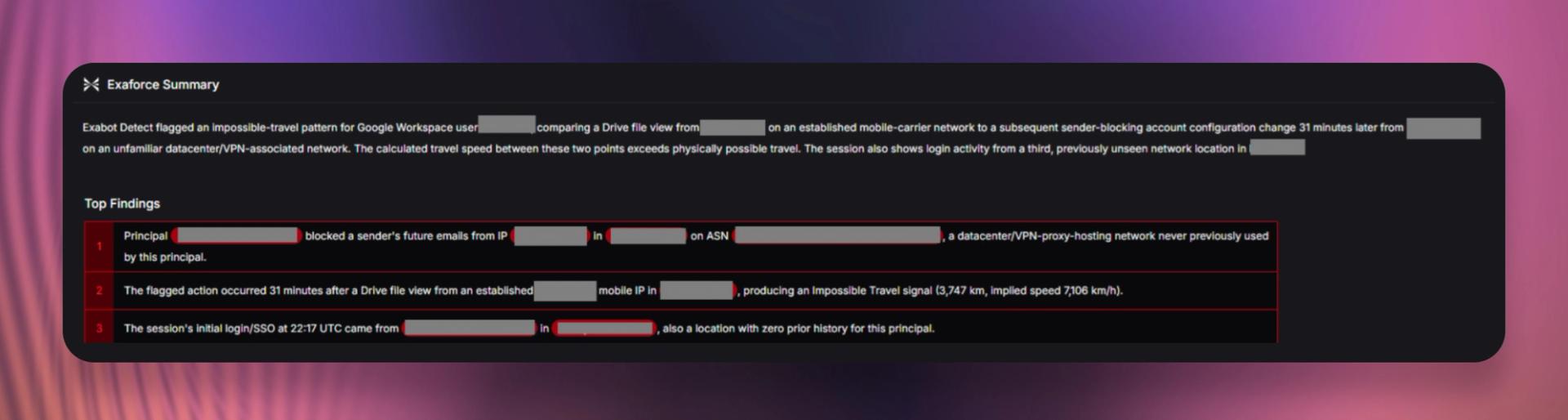
Figure 2. The Exaforce summary of the finding. Exabot Detect compares a Drive file view from the user's phone with the sender block from the attacker's session 31 minutes later, and finds a travel speed that no person can reach. Names, addresses and locations are redacted.
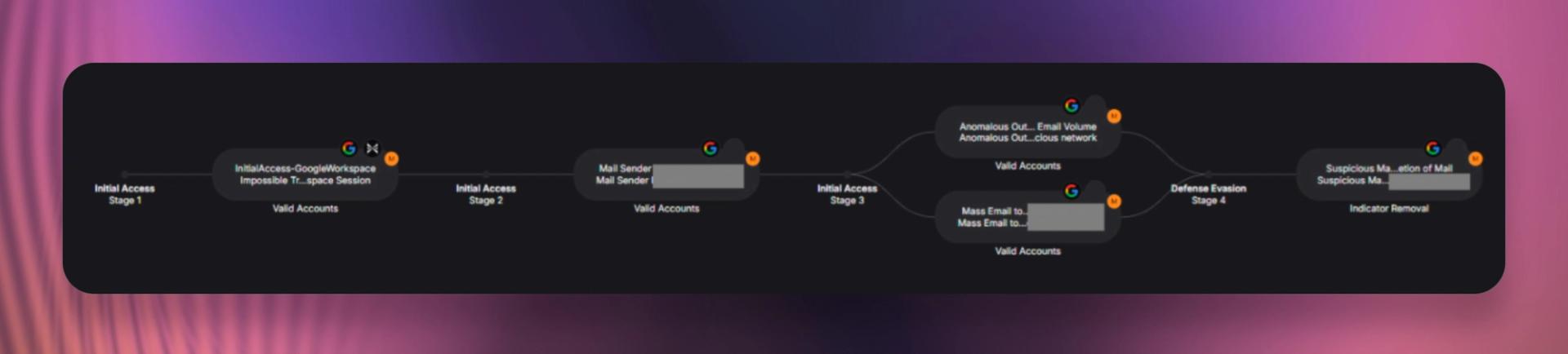
Figure 3. The correlated P1 finding as an attack graph. Exaforce joins the impossible travel finding and the alerts from Google Workspace and the SaaS security tool into one finding, and places each alert under a MITRE ATT&CK tactic and technique. Names and addresses are redacted.
Seeing this in your environment? Call the Exaforce incident response hotline at +1 (844) 660-1663, or go to https://www.exaforce.com/incident-response. A responder answers within 15 minutes, and you do not need a retainer.
References
- Okta System Log API (event fields, securityContext, debugContext): https://developer.okta.com/docs/reference/api/system-log/
- Google Workspace Context-Aware Access: https://knowledge.workspace.google.com/admin/security/protect-your-business-with-context-aware-access
- MITRE ATT&CK T1566.001 Phishing: Spearphishing Attachment
- MITRE ATT&CK T1557 Adversary-in-the-Middle
- MITRE ATT&CK T1111 Multi-Factor Authentication Interception
- MITRE ATT&CK T1090.002 Proxy: External Proxy
- MITRE ATT&CK T1078.004 Valid Accounts: Cloud Accounts
- MITRE ATT&CK T1539 Steal Web Session Cookie
- MITRE ATT&CK T1550.004 Use Alternate Authentication Material: Web Session Cookie
- MITRE ATT&CK T1564 Hide Artifacts
- MITRE ATT&CK T1534 Internal Spearphishing
- MITRE ATT&CK T1070.008 Indicator Removal: Clear Mailbox Data
- Registry record (RDAP) for candapanting[.]com: https://rdap.verisign.com/com/v1/domain/candapanting.com
- Registry record (RDAP) for review-document[.]com: https://rdap.verisign.com/com/v1/domain/review-document.com
- Routing data for the IP addresses (RIPEstat): https://stat.ripe.net/