Modern corporate environments span dozens of SaaS applications and complex cloud infrastructure, each with its own permission model, role hierarchy, and access control logic. Security teams are expected to investigate incidents, triage alerts, and assess risk across all of it. Yet most lack a clear answer to the most fundamental question in identity security: what can this user actually do? Without that answer, blast radius estimates are guesswork, access reviews are incomplete, and alert triage depends on intuition rather than fact. This blog explores what effective permissions are, why they're so difficult to resolve in practice across both SaaS and IaaS environments, and why getting this right is one of the most operationally impactful investments a SOC team can make.
What are effective permissions?
Effective permissions represent the true, net set of actions an identity can perform after evaluating all grants, denials, inheritance paths, and policy constraints.
In some SaaS environments, this evaluation is relatively straightforward because permission models are simple and role-based. Most SaaS tools either ship with predefined roles and permissions that teams leverage, and may allow the ability to create custom roles that recombine the permissions to better fit their usecases and ensure that users are not over-privileged. For example, GitHub and Slack have a short list of predefined roles, but also allow custom permissions. They are considered layered permissions, where, in GitHub for example, a user with multiple roles gets the combined permissions, but those can be overruled by organization and branch protection policies. For example, a user with repository admin permissions may appear to be able to force push, but branch protection rules could prevent that.
In IaaS environments, however, the picture becomes significantly more complex.
Take AWS as an example. Users (often accessing via SSO) receive permissions through account-specific policies. Those policies are attached to roles, and users assume roles to perform actions. Permission sets manage policies across accounts. Policies may be granted directly to users or inherited through groups. At the same time, resource policies independently define who can access a resource and what actions are allowed. On top of all of this, Service Control Policies (SCPs) impose organizational-level constraints. AWS itself documents this layered permission model, highlighting the multiple levels at which access can be granted or denied.
AWS reference for reconciling permission

The result is a dense and often opaque permission graph with overlapping grants, explicit denies, inherited access paths, and recursive role chaining. Deep expertise is needed to properly consider all conditions and develop an evaluation methodology. Eg. in AWS deny statements in a policy overrule any allow statements or allow permissions. This knowledge is critical to evaluating policies and is not true of all systems. Similarly, in complex environments it is common to see multiple policies granting the same access, another policy restricting it, and yet another resource policy narrowing it further, understanding the types of policies, policy statements and their order of evaluation is imperative to accurately assessing permissions.
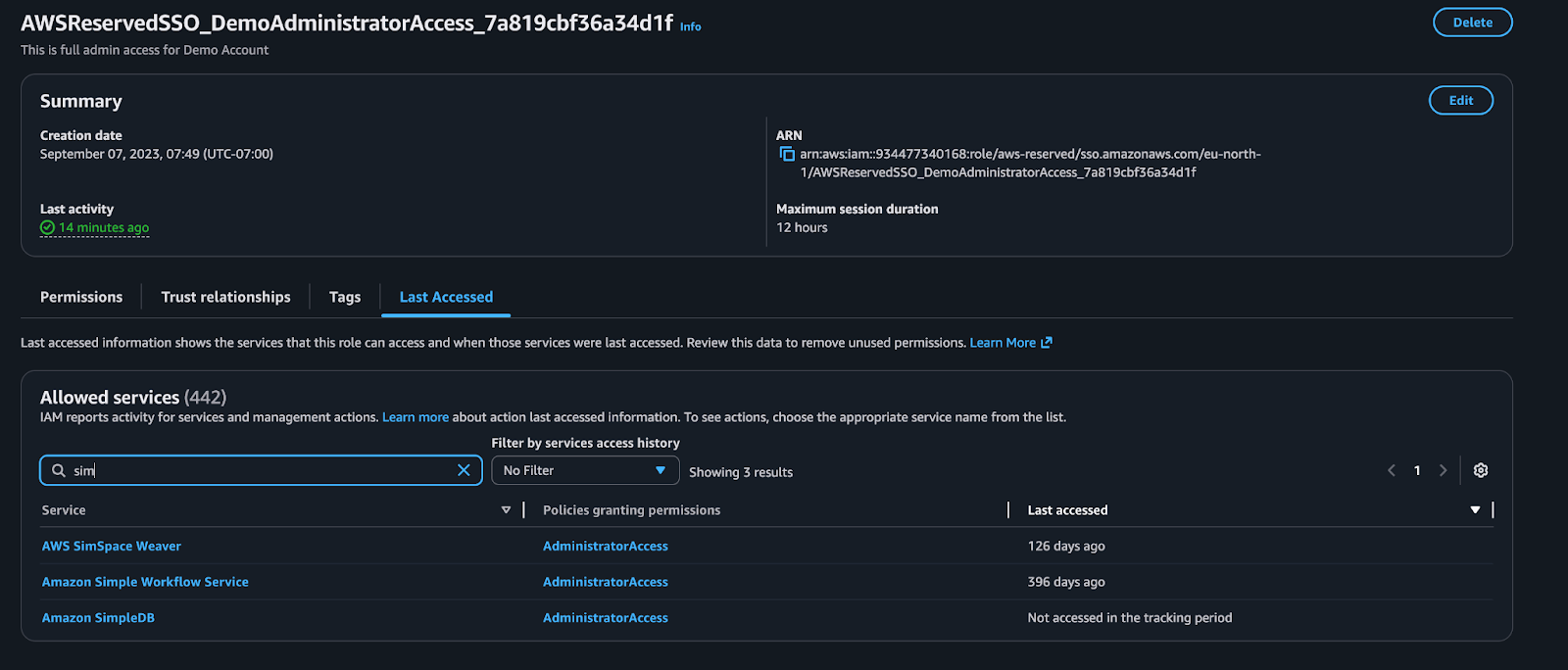
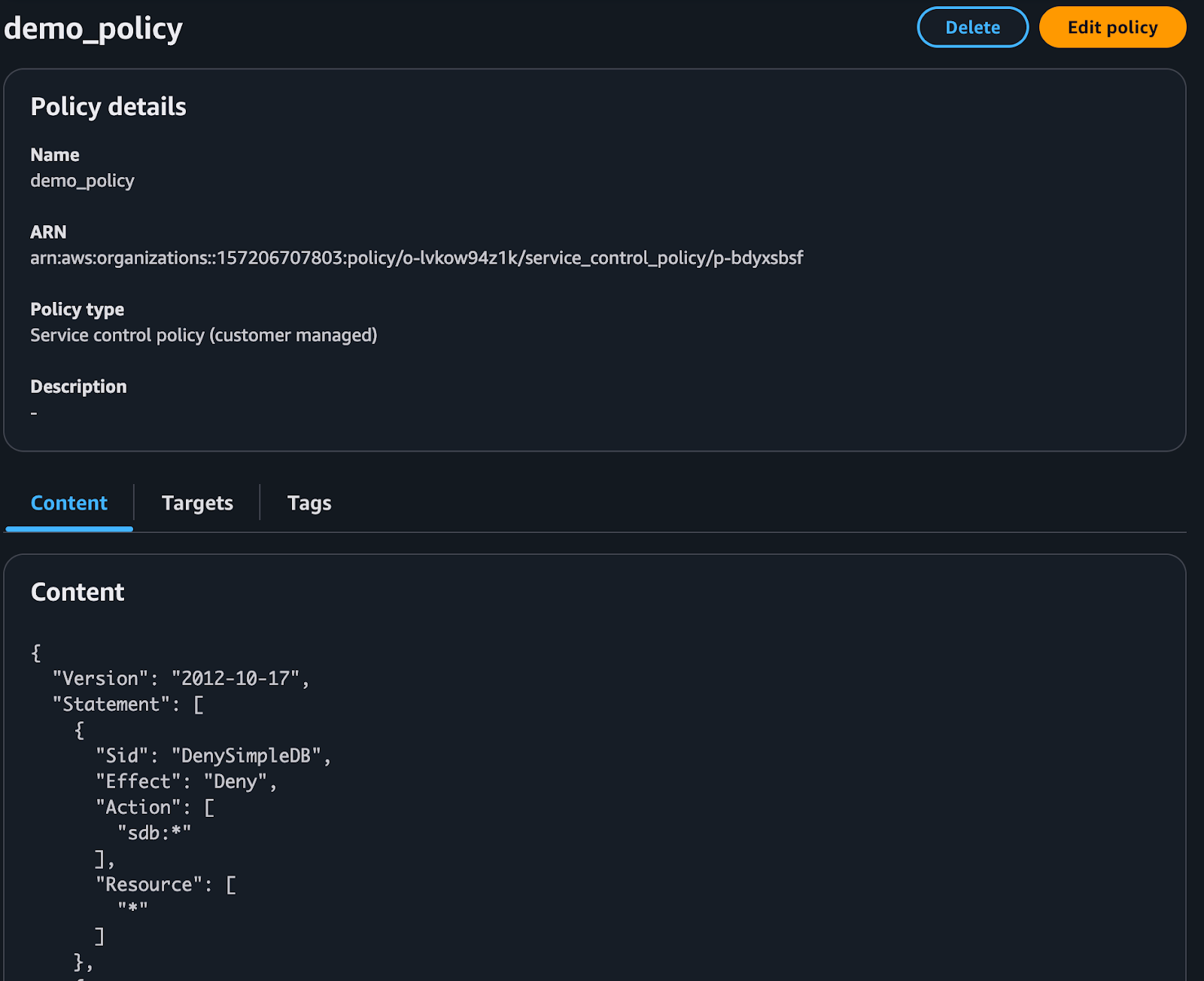
Consider the role shown below. In the AWS Console, it appears to have broad access to Amazon SimpleDB. However, an organizational SCP explicitly denies SimpleDB actions. SCPs override other policy granted permissions. The effective result is that the role does not actually have SimpleDB access.
AWS IAM role granting admin access
SCP that overrides the AWSReserved specific IAM policy
Some cloud providers expose a limited view of this information, but not the resolved outcome. AWS Access Analyzer allows for the ability to request what a user can access but charges an exorbitant price of $9 per month per resource! For the average environment with thousands or millions of resources, this is prohibitive. On top of that, the offering does not consider deny policies - so the effective permissions output are incomplete. GCP provides a similar capability, which also ignores SCPs as part of the permission analysis. Azure offers nothing and suggests users deduce this information by purchasing 3rd party tools. All of which leaves the analyst in the difficult position of doing this evaluation manually or not at all.
To determine what a user can actually do (what actions they can perform and on which resources) analysts must evaluate every identity-based, group-based, resource-based, and role-based policy, resolve all explicit denies, incorporate SCP constraints, and account for role chaining across accounts.
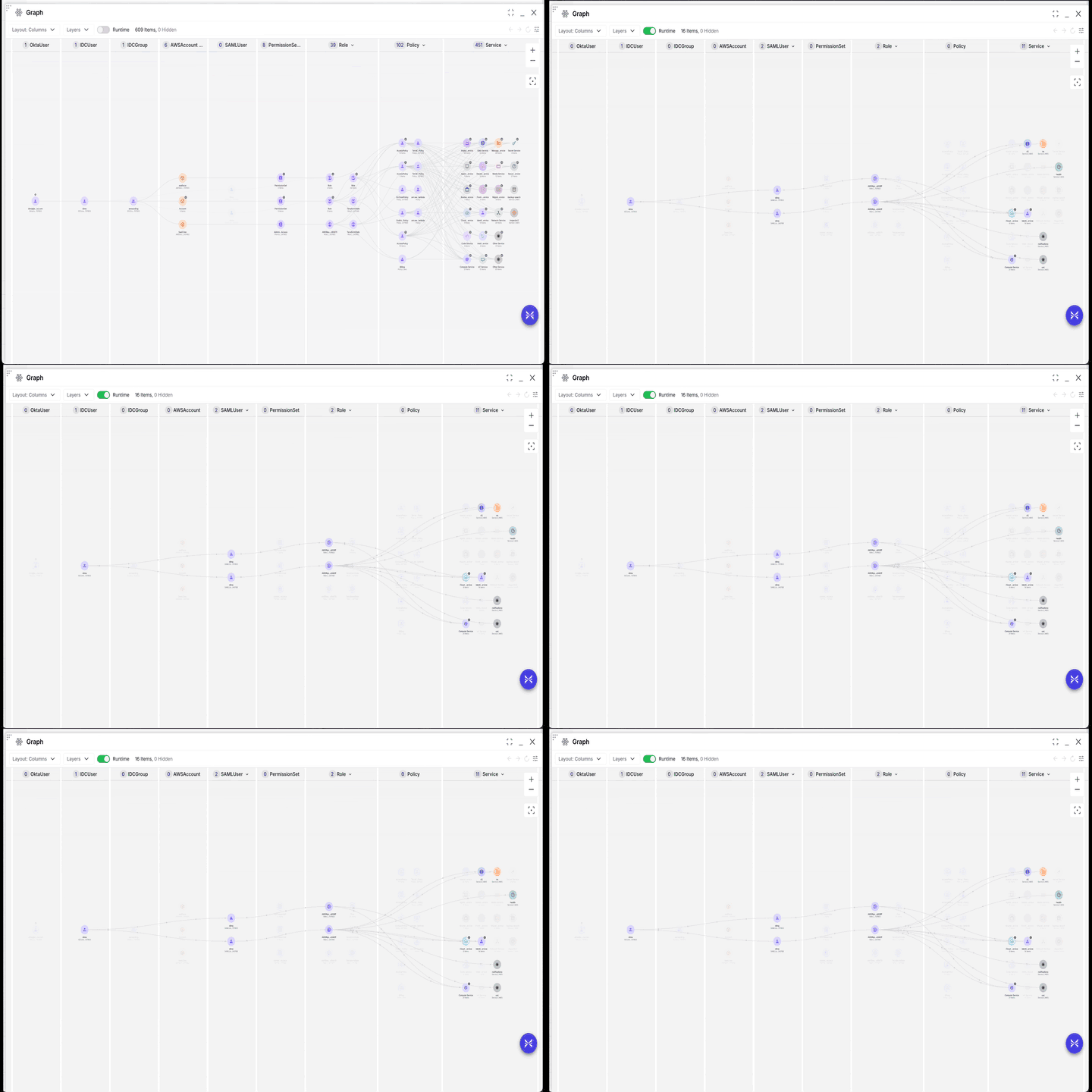
The end result of this evaluation may look like the graph below. This graph shows the process by which this user is able to achieve access to each of these services. The Runtime toggle easily shows which roles and services are actually used by the identity.
Exaforce graphical view of AWS User's Permissions, how they are granted, and which are actually used.
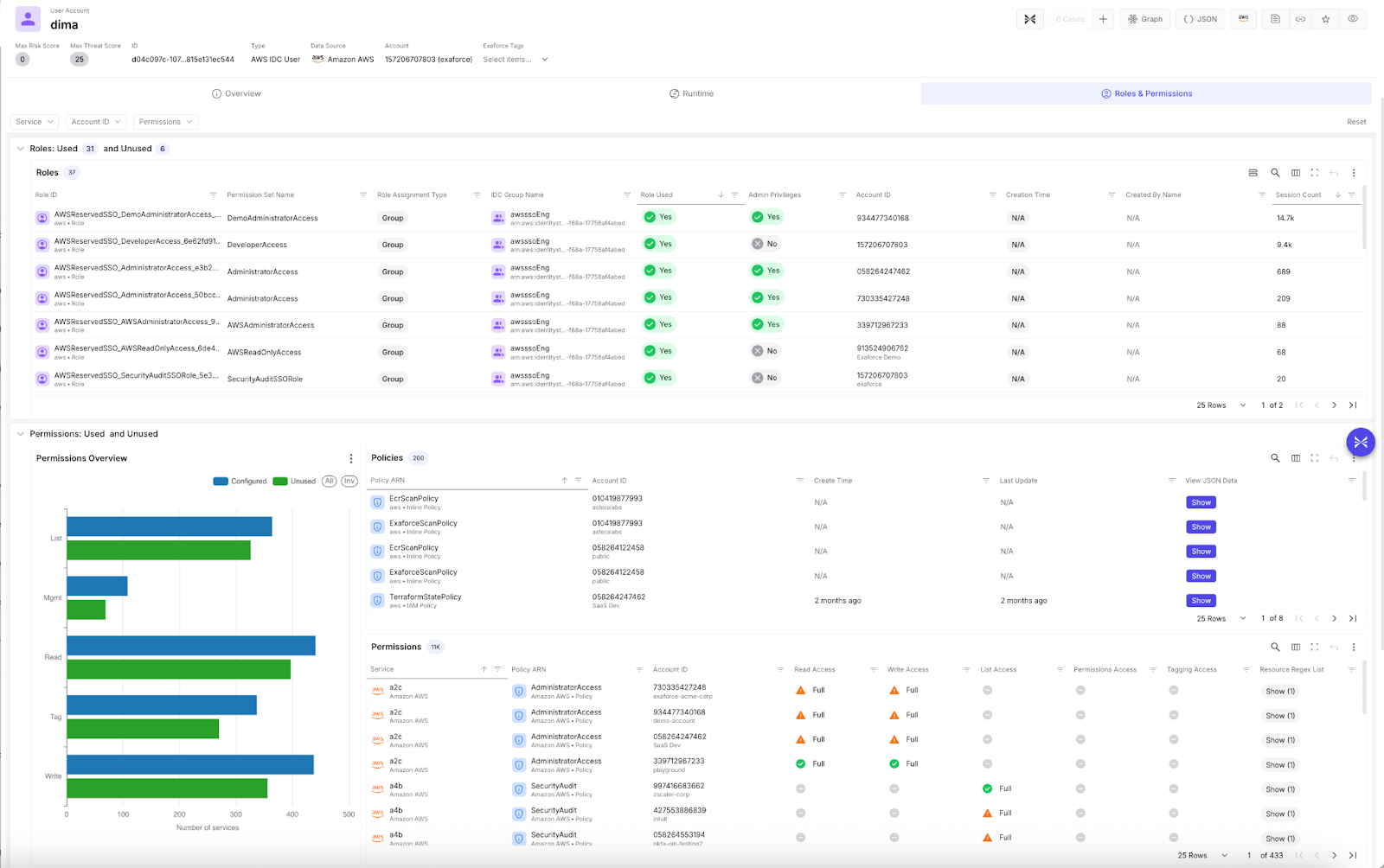
Further permission analysis of this identity can show us a detailed breakdown of which roles across which accounts an identity has access to, even recursively, which permissions across each service are present and used, and within each service, which resources can be accessed to what degree.
Exaforce's detailed view of AWS User's roles, policies, permissions, and their usage.
So I understand who can actually do what. How does that help me in the SOC?
Understanding effective permissions unlocks meaningful operational advantages for SOC teams.
Simplification
Most organizations have compliance requirements around auditing administrative users. But who exactly qualifies as an “admin”?
In complex environments, “admin” is not a title, but an effective outcome of permissions. Some tools define administrators for you. Others omit the concept entirely. AWS for example has no canonical definition of Admin, while GCP and many SaaS tools tag specific roles and permissions as Admin. In order to standardize for audit, hygiene, and compliance usecases Exaforce creates a simple definition of Admin when the app does not. For those apps an admin is any identity with the permissions to increase the access of themselves or others.
Using our analysis of effective permissions we are able to calculate this and apply this admin tag to all applicable identities - making it easy to search or filter for them throughout the Exaforce product.
Similar simplifications are done for “Has Data Access”, and “Is Third Party”, “Has Cross Account Access” etc.
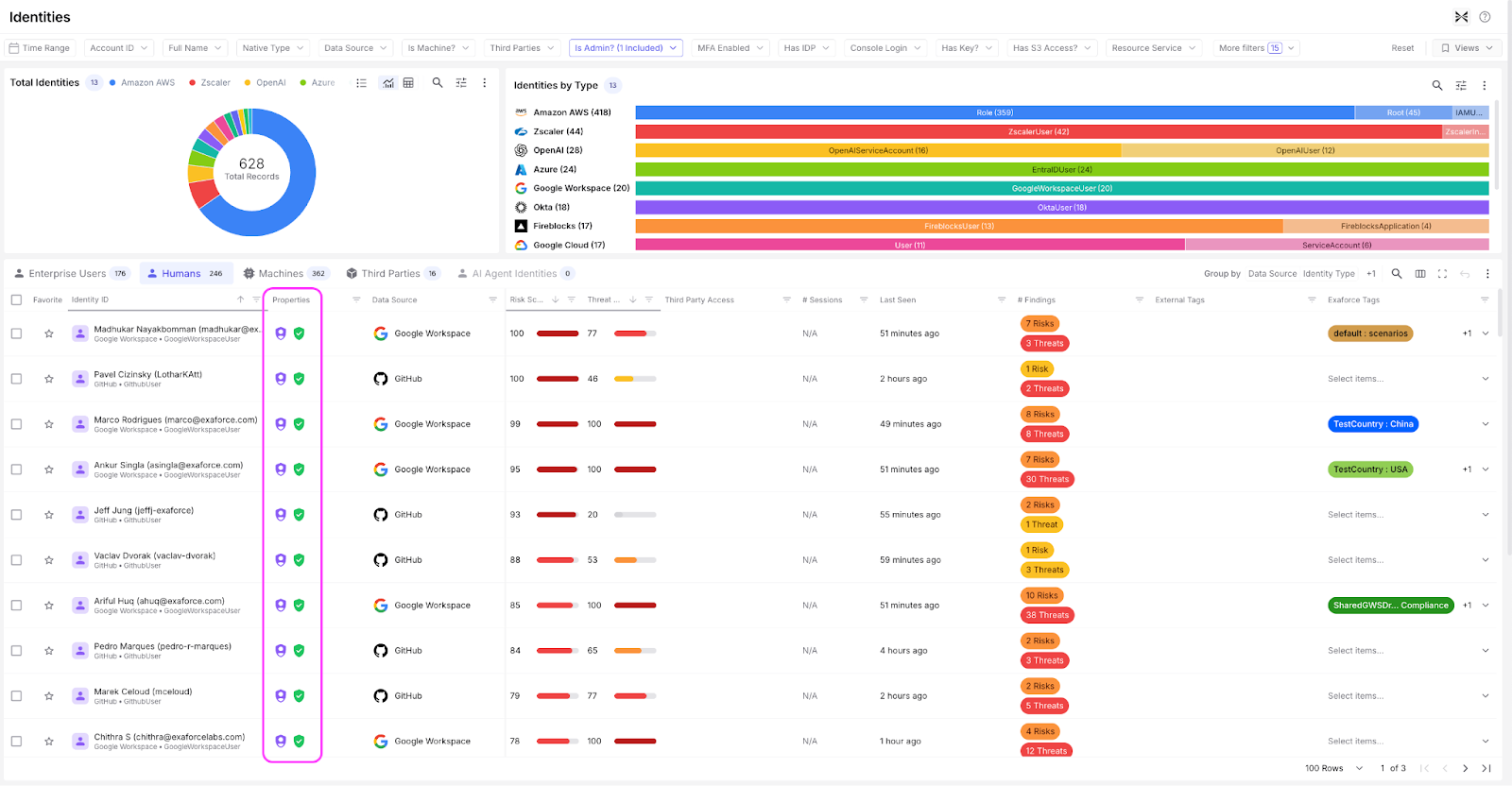
These simplifications don't just appear as embellishments and filters throughout the product but also can be used in searches to reduce complex logic into a simple query. Here is a view of some of the admin identities in an environment.
Simple "Admin" badges make it easy for users to identify and filter by key permission attributes
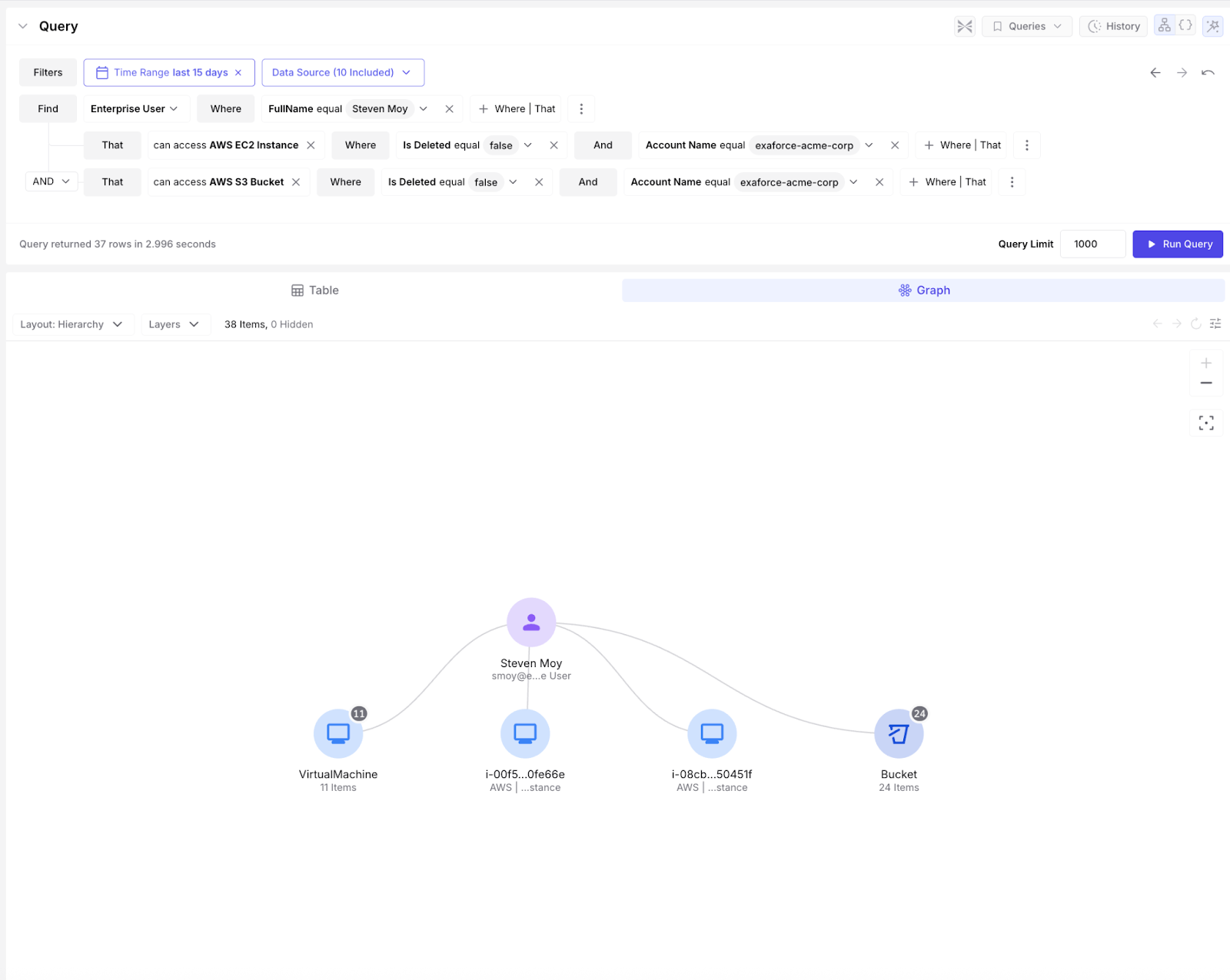
Simplification doesn't just encompass tagging identities but also includes how the effective permission can be accessed. In addition to the out of the box dashboards and tags Exaforce exposes a query interface (with Natural Language capabilities) that enables users to ask the questions around access that would otherwise be excessively complex.
Easily query for any permission information using natural language or a structured query. Join it with runtime data for a comprehensive understanding. View results as a graph or table.
By calculating effective permissions, you can simplify complex constructs into simple filters, and standardize processes and understandings. This makes audits cleaner, access reviews more consistent, and investigations faster. Instead of debating definitions, you operate from a computed understanding of privilege.
Remediation
Many IAM or risk tools, including Exaforce, will flag “high-risk users” with many permissions or unused permissions. But determining whether permissions are truly excessive requires context.
Are those permissions actually used?
How does this user’s behavior compare to peers?
Is their activity consistent with their role?
When effective permissions are combined with usage analysis, you move from static access reviews to behavior-aware privilege management. You can identify users who behave similarly and cluster them appropriately. You can detect outliers who do not act like others on their team. You can recognize role archetypes, such as SREs who legitimately exhibit broader operational patterns.
Most importantly, you can determine what needs to change.
In a layered system like AWS, telling a team that “this user has unused permissions” is not actionable. Effective permission analysis allows you to pinpoint the specific policy responsible for the risk, determine whether the issue sits at the role, group, or permission set level, and recommend the precise object that should be modified. Such systems may be even more complex if roles are managed via Okta groups or similar external tools.
See this example where an access review audit was performed on this AWS User. We can see that the system checked for how the permissions were assigned, which were used, and made a recommendation accordingly. The recommendation is specifically around a directly assigned role that was granted outside of the permissions this identity has due to its groups. The Remediations tab provides step by step instructions on how to either edit the policy, permission set, group, etc., or, as in this case, remove the directly assigned role from this identity.
Exaforce Access Reviews simplify remediation steps by thoroughly analyzing how users got their excessive permissions, which are truly excessive, and providing remediative policies and steps.

In SaaS platforms with predefined roles, this becomes even more practical. Based on usage patterns and comparative role analysis, you can recommend the best-fit role and reduce over-permissioning without guesswork.
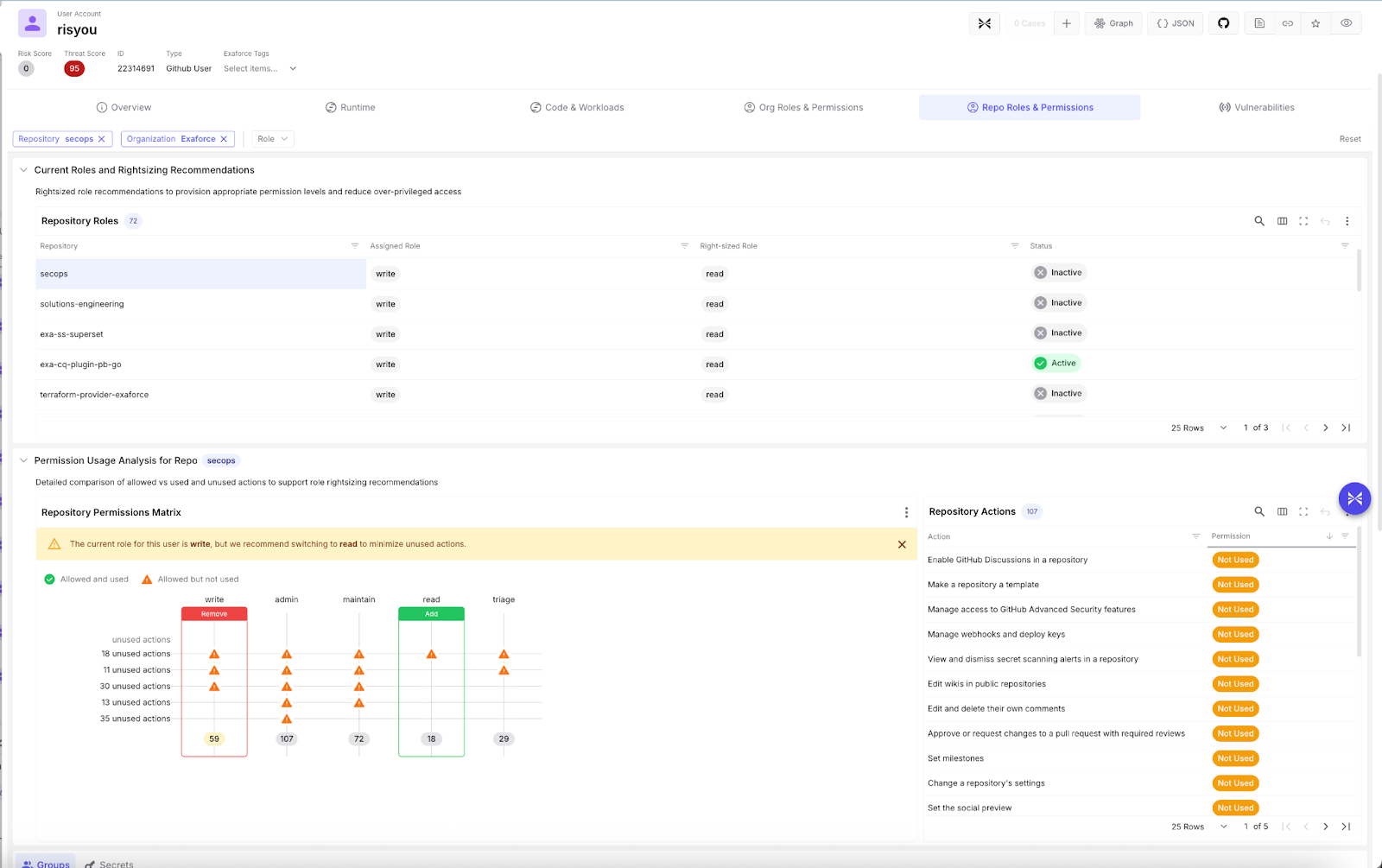
Let’s take a look at this GitHub user and their repository (repo) roles and permissions. We can see the list of repos this identity has access to, a summary of the assigned role, and the right-sized role based on their usage. Below, we see a detailed analysis of how the best fit role was calculated and the specific actions within the role that were used or unused. We calculate the best fit by identifying the role that contains 100% of used permissions and the fewest unused permissions. In this example, GitHub provides 5 out of the box roles for each repo - write, admin, maintain, read, and triage, each of which has a fixed set of available action permissions. In some environments, however, custom roles are also available, and if so, a custom role can be evaluated similarly for best fit.
Detail view of user's Github permissions across repos, as well as the best fit role based on permissions used.
Impact
From a SOC perspective, one of the most important questions during an investigation is:
If this identity is compromised, how bad could it get? Effective permissions provide that answer.
By understanding what an identity can do, you can estimate blast radius, identify sensitive resources they can access, modify, or delete, determine potential lateral movement paths, and assess cross-account or cross-system impact.
Not all alerts are equal. A suspicious login from a read-only user is fundamentally different from a suspicious login from an identity that can modify IAM policies, access production databases, disable logging, or assume other high-privilege roles. Cross source permissions can also be similarly considered - a user having Admin access to Github on an active repo and having high permissions in AWS could be a much riskier employee given the compounding impact if compromised. Exaforce evaluates permissions per source per identity, but also provides identity resolution to show a unified view of each user. Bob may have many usernames across each app, but Exaforce is able to provide a unified picture of Bob’s access across apps and dive deep into each. This cross source visibility and stitching allows for a very comprehensive picture of risk - which we use to inform priority of threats.
Contrarily if, a user granted themselves an additional policy, which gave them access to a role with additional permissions. On the surface this is very suspicious. However, when we look closely we can see that the role itself was very limited in scope for a particular administrative action, and as a result we can contextualize this action as only medium severity, adding color to what would otherwise be a very simplistic detection.
In the example below, a user created another user and granted them extensive S3 permissions, and a long term access key, specifically the AWS managed policy `AmazonS3FullAccess`, which grants unrestricted access to all S3 resources. Even though GuardDuty didn't trigger an alert, Exaforce identified that this activity was risky and triggered this finding given the extent of the permissions granted.
Finding in which a user created a new user and granted wide S3 permissions.
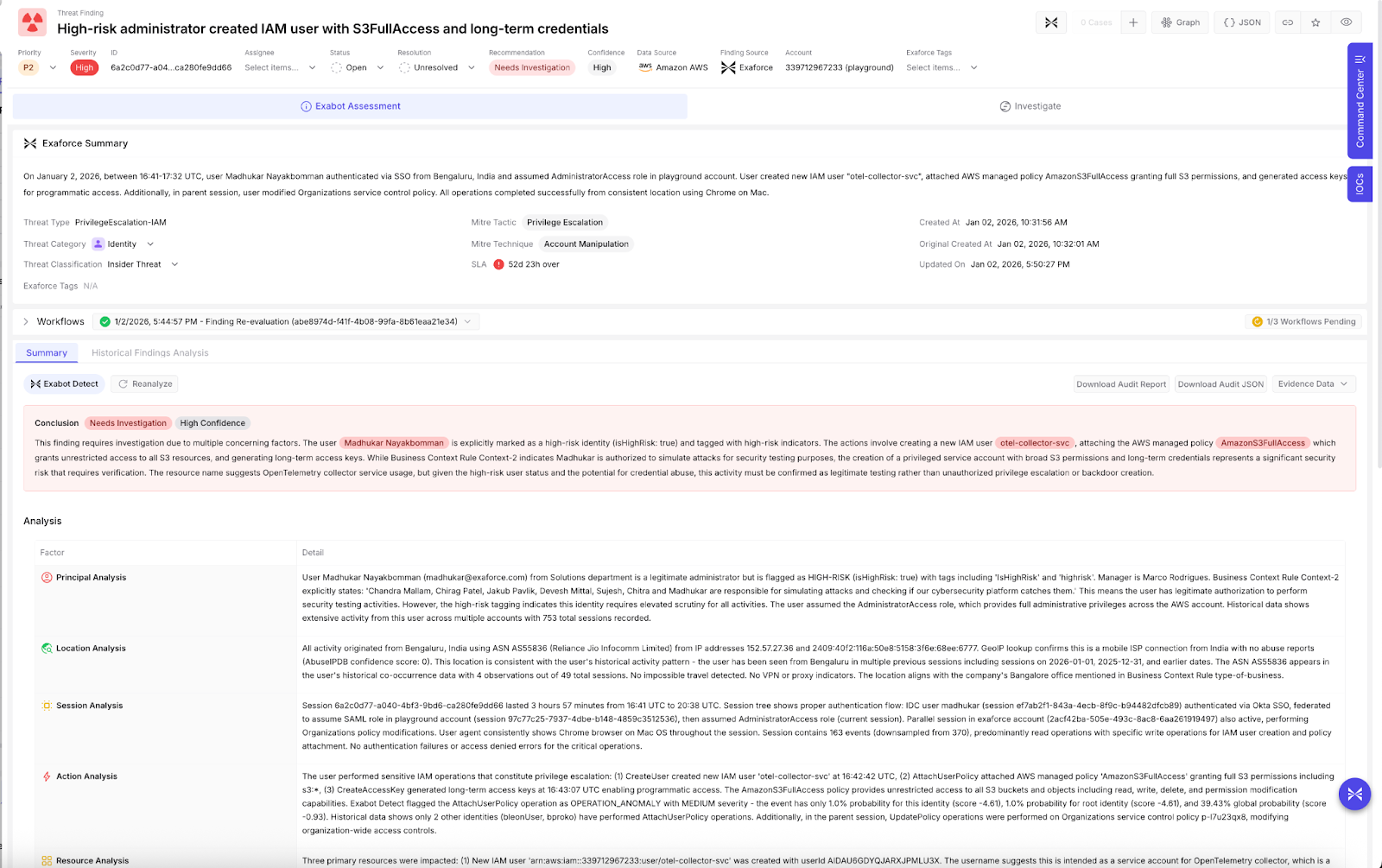
Permission analysis transforms identity alerts from simple signals into risk-weighted incidents. For SOC teams, this leads to faster triage, more accurate severity scoring, better escalation decisions, and reduced alert fatigue.
From permission visibility to operational clarity
For a SOC team, the inability to assess the effective permissions of users or identities in the organization is debilitating. It materially limits the effectiveness of the analysis performed and skews the perception of possible impact. Forcing SOC teams to construct this information manually can be prohibitively time consuming, given the number of apps in modern corporate environments and the complexity of the many environments the SOC oversees.
If you want to learn more about effective permissions and their impact on SecOps, watch our recorded webinar.