ARTEX is an AI-powered penetration testing console that threat actors adopted within days of its release. This teardown reads the source of one maintained fork to explain how the tool works, which tools and skills it runs, how its techniques map to MITRE ATT&CK, and what defenders can look for on the wire and on a host that runs it.
Intro
On the 8th of October 2026, a developer by the nickname Autumn-27 released a tool called ARTEX Autonomous Penetration Testing Console (https://github.com/Autumn-27/ARTEX), an AI-powered pentesting tool used by both red teamers and internal security engineers to breach the infrastructure of a target and gain access to it, based on a goal set by the attacker.
The tool was immediately used by threat actors as an easy way of breaching their targets, which prompted Autumn-27 to make the repo private. Still, many forks were made, which transitioned into tools of their own, where contributors develop and fix bugs. One such fork is BaaRai/ARTEX. This is the repository we are looking into in this article. This article will go through what ARTEX is, how it works, the techniques and tools used by it, and the indicators to look for.
This article uses the repository BaaRai/ARTEX at commit 8e6acb0 on the main branch, cloned on 19 November 2026. Nothing was built, run or pointed at a target, and no other fork or copy of ARTEX was used as a source. The sources read were:
- README.md, CHANGELOG.md, SECURITY.md and RSI.md
- The Go source, Dockerfile, Compose file, install and start scripts, and the extension manifest
This is a fork of the tool, as the original is not public anymore, and due to contributions from the fork owner and other contributors, the main branch is ahead of the last release. Extra features or changes to the flow of the code might have been made, which could affect detection. In the same way, a malicious attacker can do the same with their own copy of ARTEX.
How does ARTEX work?
ARTEX runs a penetration test as a loop between a planner that decides what to try and workers that try it. It records everything they learn in two linked graphs in PostgreSQL.
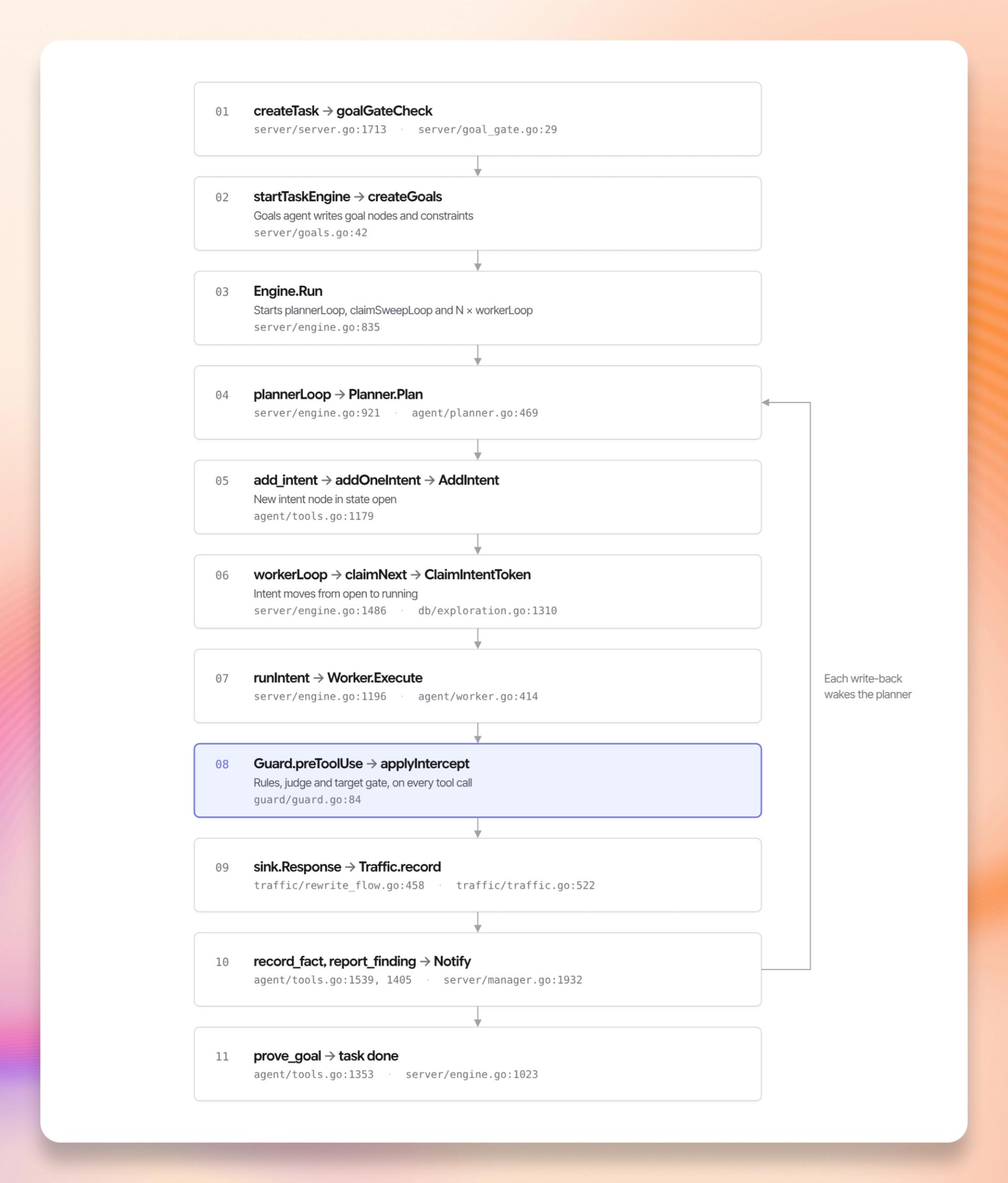
Figure 1. ARTEX execution flow: one planner loop and N workers, with every write-back waking the planner.
An operator starts a task by describing a goal in plain language, such as a target and what would count as success. A goals agent turns that text into goal nodes and into allow and deny constraints. From then on the engine runs one planner and a pool of workers for the task, three by default.
That is one planner loop, one sweeper that reopens intents whose claim lease expired, workers worker loops named work#1 onward, and a deadline timer.
The planner never touches the target beyond a few opening probes. It wakes whenever the graph changes, reads a summary of what is known, and issues "intents". Each intent is a single direction to explore, such as testing one endpoint for one class of flaw. It issues at most four per round and often none.
Each worker claims one intent and carries it out with real tools: a shell, scanners such as nuclei, sqlmap and ffuf, and a headless browser. It writes back three kinds of result and then stops:
- Assets: newly discovered hosts, services and endpoints go into the asset graph, which is shared across tasks.
- Facts: observations and conclusions go into the task's exploration graph.
- Findings: vulnerabilities go into the exploration graph too, but only when the worker actually triggered them and has the evidence.
Each write wakes the planner, which uses the new facts to choose the next intents. Multi-step attacks are kept as a to-do list across rounds and dispatched one step at a time.
Two subsystems sit between the workers and the target. A guard inspects every tool call before it runs. It applies deny rules for destructive commands and can hold a call for human approval. An LLM judge and a per-target approval gate are available but off by default. A built-in interception proxy then records every HTTP request and response the workers send. That lets agents search past traffic without repeating requests, and lets a finding be bound to the exact exchange that proves it.
The loop ends when the planner marks each goal as proven, citing the evidence, or when the task's budget or deadline runs out. Throughout, the operator can pause the task, add hints, steer or stop a worker, and answer a worker's request for something only a human can supply, such as a one-time code.
ARTEX high-level architecture
Looking at its Docker Compose file, we see two services (artex and postgres) being deployed as containers.
services:
  postgres:
    --snip--
  artex:
    --snip--
Looking at the architecture in its README, though, we see the tool is made up of these major parts:
- Its Next.js web frontend, compiled into the binary.
src/apphas the login and setup pages, the working pages (chat, dashboard, tasks, assets, findings, traffic, workspace) and the system pages (agents, intercept approvals, LLM, logs, MCP, notifications, settings, skills, tools). - The REST web service written in Go, which manages the tasks created by the user and the workers that will execute them, and sends commands to the agent about the commands to execute.
- The agent, which, upon retrieving the commands, will execute the required operations and return or reuse the data.
- The PostgreSQL database where the data is stored.
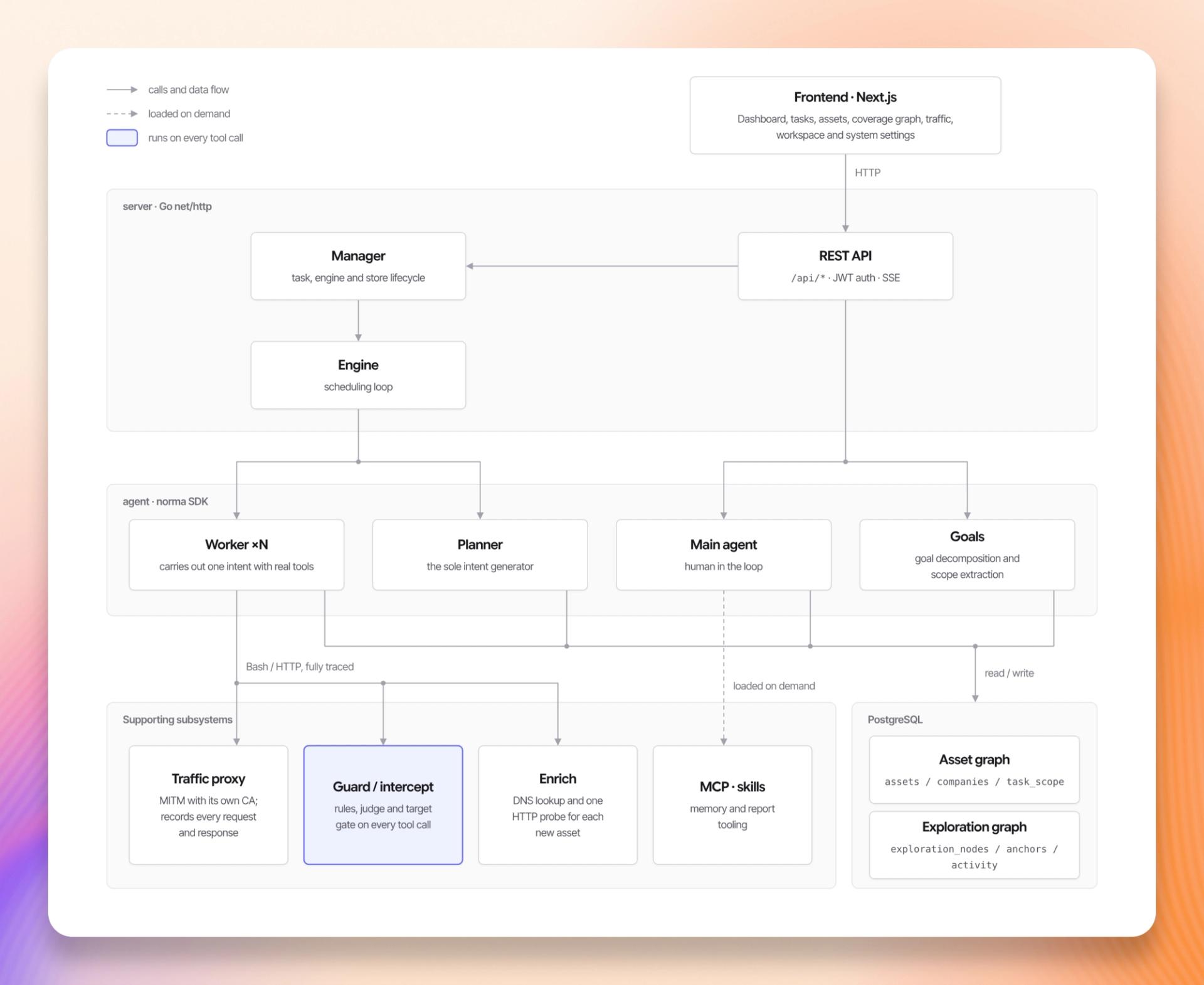
Figure 2. ARTEX high-level architecture.
The backend is one Go module, including tests, written in Go 1.26.10. The module path, even for forks currently in development and maintenance, is github.com/Autumn-27/artex, the initial repo module.
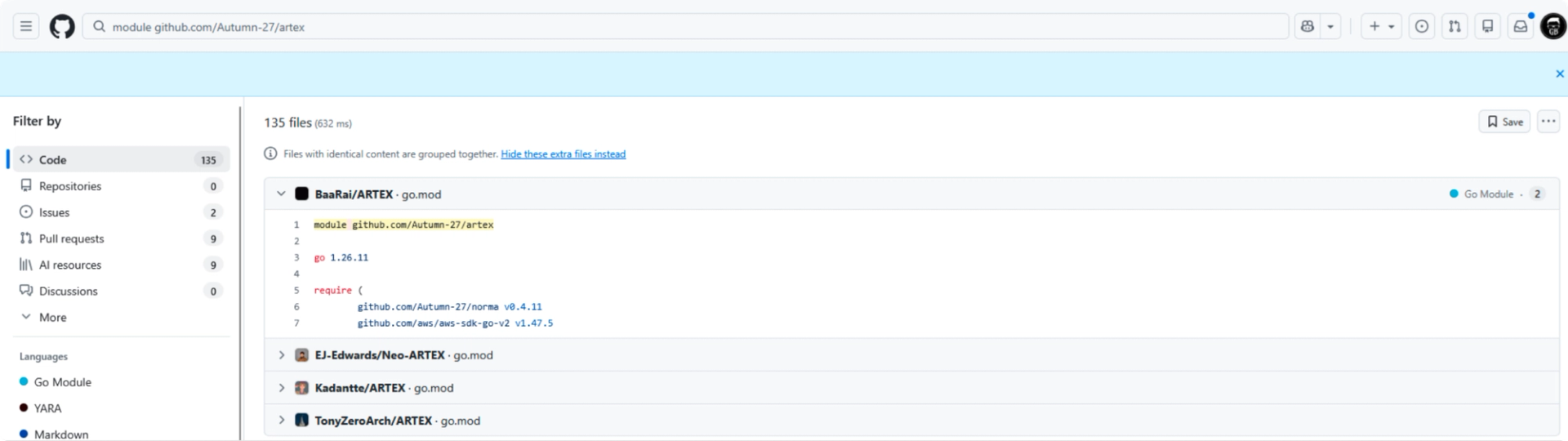
Figure 3. The go.mod module path is still github.com/Autumn-27/artex across forks.
The module itself is then split into Go packages, each offering a specific function.
agent: the LLM agents (goals, planner, worker, main, chat, retester), their prompts, and the tools that read and write the two graphs.cmd/artex: the program entry point; parses flags, starts the server, and handles shutdown.config: locates and loadsconfig.jsonand the key, skill and data directories.db: the PostgreSQL layer for both graphs, tasks, findings, rules, secret encryption and seeded defaults;migrationsholds the numbered schema changes applied at startup.egress: the noise governor that paces ARTEX's own requests to targets (per-host rate, jitter, backoff, short caching).enrich: non-AI enrichment of new assets by DNS resolution and a single HTTP probe.evidence: a store that preserves the proof behind a finding independently of the disposable traffic index.guard: the hook every tool call passes through before it runs, plus the audit log of allowed and blocked calls.intercept: the decision logic behind the guard: deny, allow and ask rules, argv matching, risk scoring, the LLM judge, and the target gate.llmpool: failover and rotation across LLM profiles, with a circuit breaker for failing ones.llmrec: records LLM requests, responses and token usage.mcphttp: the client for remote MCP tool servers over HTTP and SSE.notify: finding alerts to DingTalk, Feishu, WeCom, Telegram, email and webhooks.report: generates the findings report and exports.server: the HTTP API, login, the task engine that schedules planner and workers, budgets, custom tools, skills, MCP management and archives.sidequestion: the/btwfeature, which answers a side question from a snapshot of a running agent's context.traffic: the recording man-in-the-middle proxy, its SQLite index, WebSocket and SSE capture, and replay;rewriteholds the rules that modify requests and responses in flight.
Aside from the packages, there are also the supporting scripts and other utilities the app needs.
scripts: maintenance and support scripts. I read only the backup script, so the subfolder purposes are inferred from their names:benchmarkwith ground-truth data for scoring runs,poc/php2shellas a lab and proof of concept for that skill,sqlfor database scripts, andsubmission_reviewwith rules for checking findings before submission.extension: the "ARTEX Traffic Capture" browser extension that copies a logged-in tab's traffic into ARTEX.screenshots: UI images used in the README.skills: ten playbooks agents can load, covering API recon and API security testing, bbot recon, code audit, EDR telemetry analysis, patch diffing, PHP file-inclusion exploitation, Playwright browser automation, reverse engineering, and ScopeSentry.
The agent runtime is based heavily on the norma SDK, another project by Autumn-27, which allows better control of an agent for a specific prompt the user provides. As seen in the screenshot below, sessions, workers, and chat- and question-related tasks borrow from the norma SDK.
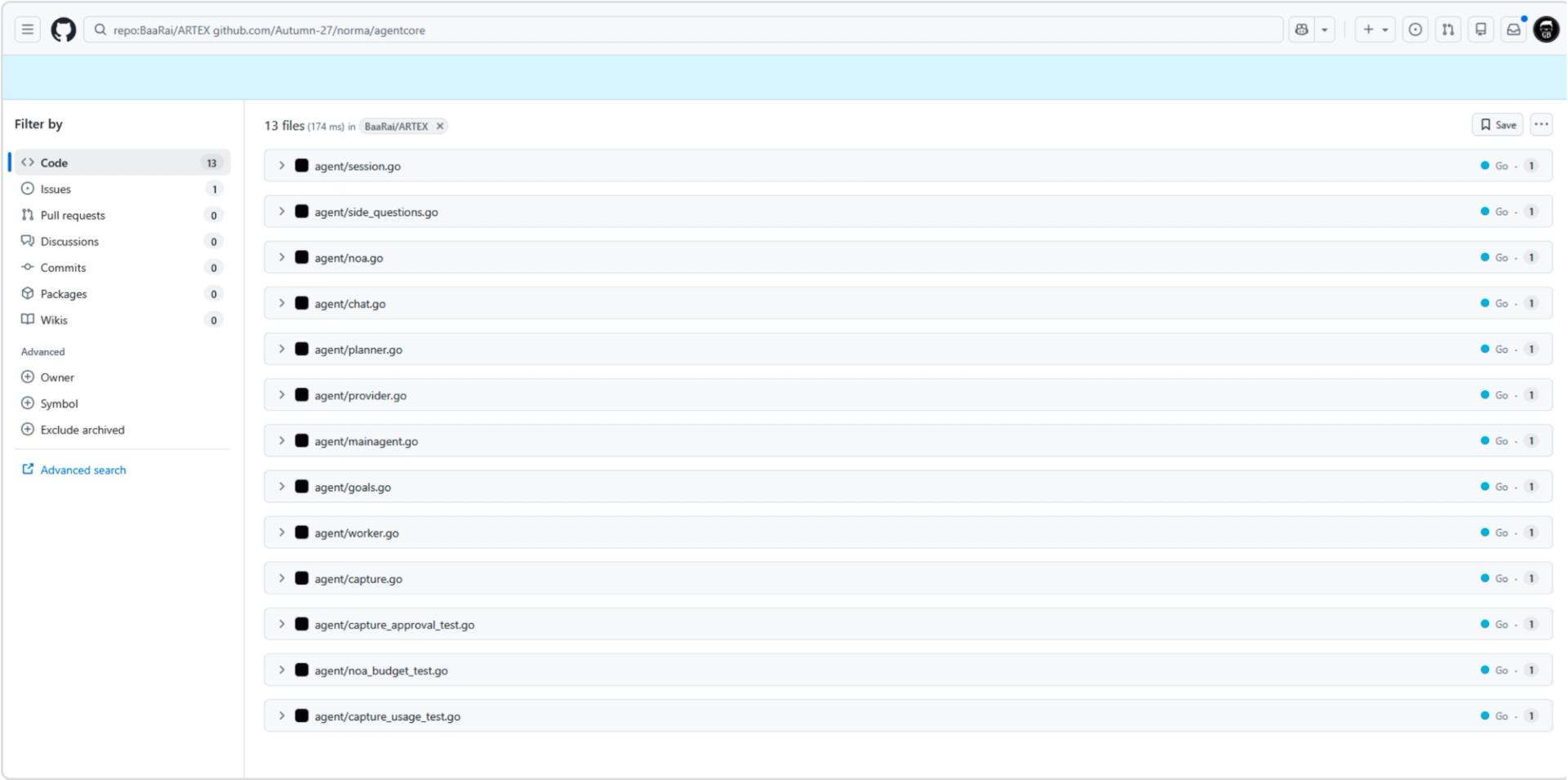
Figure 4. Agent files in BaaRai/ARTEX that import the norma SDK.
Outside the Go code there are three more parts:
webis the Next.js frontend, exported statically and compiled into the binary with theembeduibuild tag.extensionis a Manifest V3 browser extension named "ARTEX Traffic Capture". It uses thedebuggerpermission with<all_urls>host access to copy a tab's traffic into ARTEX.skillsholds ten playbooks:api-recon,api-security,bbot-recon,codeaudit,edr-bypass-re,patch-diff,php2shell,playwright-cli,reaandscopesentry.
Detection guide
Ultimately, ARTEX is a rare case of what happens when a threat actor is not really a threat actor. Unlike a programmatic tool, it has the adaptability of a human operator, but with a much shorter time of execution. As such, I think ARTEX should not be treated as a tool with indicators, but as a threat actor with a specific framework built and a list of tools selected and executed by them.
Tools used
The Dockerfile is a multi-stage build that uses the node:22-bookworm-slim, golang:1.26-bookworm, debian:bookworm-slim and python:3.12-slim-bookworm images.
$ curl -s https://raw.githubusercontent.com/BaaRai/ARTEX/refs/heads/main/Dockerfile | grep 'FROM '
FROM --platform=$BUILDPLATFORM node:22-bookworm-slim AS web
FROM --platform=$BUILDPLATFORM golang:1.26-bookworm AS build
FROM --platform=$BUILDPLATFORM debian:bookworm-slim AS tools
FROM python:3.12-slim-bookworm
Inside the images, scanning and exploitation tools are downloaded at a pinned version and checked against the publisher's checksum file before installing. These tools handle tasks executed on the target, mostly public reconnaissance and enumeration.
ARG NUCLEI_VERSION=v3.11.1
ARG NUCLEI_SHA256_AMD64=ea63d4ae232808cd7c6bc00d0142428e231fab59dae01042246097d195835ab6
ARG NUCLEI_SHA256_ARM64=8044e3d9768ba0a744b2872c1a87e813006f013da97ca9f50f7661a4203bec07
ARG HTTPX_VERSION=v1.12.0
ARG HTTPX_SHA256_AMD64=9d8439e8b6c9aa7d1e2314817a392e00d5178da3af5652f7475f88868f418f76
ARG HTTPX_SHA256_ARM64=fd7b123c1dfbc3d69f19f524e4eebcd6ec06b9a6cbd56813c76f11645197331e
ARG SUBFINDER_VERSION=v2.17.0
ARG SUBFINDER_SHA256_AMD64=a39c3e5c7a26ef3c430915c4d6cbf7716a00f26769a75e9405aba796142eba37
ARG SUBFINDER_SHA256_ARM64=24913d49dddc1d3a5e99a4a7580da5be980959b9415b96f52c4f7f4124392190
ARG KATANA_VERSION=v1.8.0
ARG KATANA_SHA256_AMD64=cb027ae99d0757061b70c07a15c7a80f62c5a535ab52c4a329f80c4b0a7309d2
ARG KATANA_SHA256_ARM64=80e269210727a855511ffac8dfb01297b2344742acec71a35e8ba4a67a90f0f2
ARG FFUF_VERSION=v2.3.0
ARG FFUF_SHA256_AMD64=b2a3c725fcb9da175159682f54d6e9149f2905b00d84d155e7efc5d599975ceb
ARG FFUF_SHA256_ARM64=e2d712615d53da797ee929006e41f2df5a7960a5353133db9c150ddaa22ae4e8
ARG DALFOX_VERSION=v3.2.4
ARG DALFOX_SHA256_AMD64=c11cfd2f8261973f0a2a2a1eba5a147ce77712a29acfa6343f9847fb8bb7eca2
ARG DALFOX_SHA256_ARM64=fd56b0b7da2d06868cd73b504f41d21314629feffcd5bdc97718db1c9dd2fa70
ARG SQLMAP_VERSION=1.9.9
ARG SQLMAP_COMMIT=cceda39208b5aad478de2c3f731df4239d9881f6
# --snip-- (bbot from blacklanternsecurity/bbot)

RUN apt-get update && apt-get install -y --no-install-recommends \
      ca-certificates ripgrep curl wget vim git jq unzip xz-utils \
      dnsutils iputils-ping netcat-openbsd inetutils-telnet whois nmap \
    && rm -rf /var/lib/apt/lists/*
The pinned tools and what they are used for:
- nuclei (v3.11.1): template-based vulnerability scanning
- httpx (v1.12.0): HTTP probing and fingerprinting
- subfinder (v2.17.0): subdomain enumeration
- katana (v1.8.0): crawling
- ffuf (v2.3.0): content and parameter fuzzing
- dalfox (v3.2.4): XSS scanning
- sqlmap (1.9.9, pinned to a commit): SQL injection
- bbot (3.0.2): recursive reconnaissance
- Playwright MCP, CLI and Chromium (0.0.83, 0.1.22, 1.64.1): browser automation
- nmap, dig, netcat, telnet, whois (Debian packages): network basics
Skills of the craftsman
A skill in ARTEX, the same as a skill added to an LLM agent, is a written list of commands and instructions, sometimes accompanied by helper scripts. Each one is a folder stored under skills/ with a SKILL.md file that an agent loads on demand and then follows using its ordinary tools.
The guardrails for the skills are written into the SKILL file. Every offensive skill opens with authorization and scope rules, and they hold only as far as the model follows them.
## Hard gates (read before running anything)

1. **Authorization**: targets and seeds must be inside the task's authorized scope.
   Third-party sources are queried about the target, not exploited.
2. **Program policy first**: read the program rules, then pick the mode.
   - Scanner ban, "no automated scanning", or a tight rate limit (<= 5 req/s):
     **Mode P only** (passive, zero-touch; the target is never contacted).
   - Active scanning allowed: Mode A is allowed; loud families still need the
     program to be explicit about aggressive scanning.
   - Loud/invasive families only under explicit permission, and prefer the
     dedicated single tools (ffuf, nmap, nuclei) when they exist, for rate control.
3. **Scope discipline**: pass in-scope targets with `-t`, add `-b` blacklist entries
   for anything excluded (logout/auth endpoints, specific subdomains).
   `--strict-scope` treats subdomains as out-of-scope unless listed.
   Events with scope_distance > 0 are intel only: never probe them.
4. **No API keys by default**: keyless modules only. If the task vault provides a key
   for a permitted source, pass it via `-c modules.<name>.api_key=...` and never echo it.
5. **Never** run the `kitchen-sink` preset on a live bounty target.
6. Module deps are preinstalled in the image, so every run passes `--no-deps`.
   If a module still complains about a dependency, record it as unavailable and
   continue without it: runtime pip does not work under egress allowlists.
The repo has 10 skills, which cover reconnaissance, API assessment, code auditing and EDR bypass, binary analysis and patch comparison, as well as use of ScopeSentry, a tool developed by Autumn-27 themselves. Looking into those skills, we see the tools they use:
api-reconmaps a web application's API without logging in. It fakes the browser-side login state and stubs the permissions endpoint so the full interface renders and reveals the calls behind it.api-securityattacks the mapped API through ten phases, from JWT and OAuth flaws to authorization, GraphQL, input validation and business logic. An access-control finding counts only once a second account has confirmed it.bbot-reconruns the bbot scanner for broad reconnaissance in one of three modes: passive, active-safe or loud. Passive mode queries third-party sources only, so the target never sees it.codeauditaudits source code by tracing every user-controlled input forward to a dangerous sink. A finding must be reachable, attacker-controlled and give the attacker a new capability.edr-bypass-remeasures what an endpoint security product detects across hooks, kernel callbacks, ETW and AMSI. It needs a Windows lab VM and tools the image does not include.patch-diffrecovers a vulnerability from the fix that closed it. The agent diffs a patched and an unpatched build and reads the added checks to infer the bug.php2shellturns an existing PHP file-inclusion flaw into code execution throughsession.upload_progress. It is the only skill that ships a specific exploit, with vendored proofs of concept and a lab.playwright-clidrives a browser from the command line. It is a command reference for the Playwright CLI and Chromium installed in the image.reastatically analyzes binaries, mobile packages and JavaScript bundles, for example to find embedded keys and endpoints. It works through a read-only MCP server on the host that is unlocked when the skill loads.scopesentryoperates a ScopeSentry scanning platform: projects, scan tasks, templates and asset queries. It needs the address and an API key of a deployed instance.
api-recon
api-recon is the only skill containing a scripts directory, where custom-made scripts are added. It includes tools that map the routes of the API endpoints as well as the runtime, or spider the page to search for other indicators and links.
For the runtime, the tool acts as a headless browser through puppeteer and Chromium to make the traffic look like it is coming from a real browser.
The scripts, and what is commonly adjusted in each:
harvest_static.py: endpoint regex, webpack/Vite manifest parsing, micro-frontend publicPath, retries/concurrency.runtime_harvest.js: neutralize field names and success values, stub matching rules and body structure, routes source, WS recording,waitUntil/routeTimeout/proxy.preload.js:loginPathRe, L1 stubs,neutralize.fields,apiPattern, whether to enable L3,recordDetail,observe.*,neutralizeVueRouter.spider_mpa.py:--excludedestructive links, cookie, depth/max, same-domain filtering.extract_route_map.py:routeMap/routeLinkregex, KEY naming pattern.build_perm_tree.py:userRouteAuthparsing,ROOTS/PREFIX_PARENThierarchy heuristics, stub outer field names.config.json: single entry point for all the site-specific parameters above.
function loadCfg(p) {
  const c = JSON.parse(fs.readFileSync(p, 'utf8'));
  c.baseUrl || (() => { throw new Error("config.baseUrl required"); })();
  c.chromium = c.chromium || process.env.CHROMIUM || '/usr/bin/chromium';
  c.neutralize = c.neutralize || {
    fields: ['response_code', 'code', 'errno', 'ret', 'status'],
    success: 0,
    flags: { success: true }
  };
  c.forward = c.forward !== false;
  c.apiPattern = new RegExp(c.apiPattern || '/api/|/rest/|/service/|/graphql|/gateway/');
  c.loginUrlPattern = c.loginUrlPattern || '/login';
  c.routes = c.routes || ['/'];
  c.waitMs = c.waitMs || 1200;
  c.perRouteMs = c.perRouteMs || 900;
  c.headless = c.headless !== false;
  c.waitUntil = c.waitUntil || 'domcontentloaded';
  c.routeTimeout = c.routeTimeout || 12000;
  c.captureResponses = c.captureResponses !== false; // record response body samples (forward mode)
  c.recordWs = c.recordWs !== false;                 // record WebSocket frames + SSE endpoints
  c.respMax = c.respMax || 600;                      // truncation length for captured bodies
  c.proxy = c.proxy || process.env.HTTP_PROXY || process.env.HTTPS_PROXY || '';
  (c.stubs || []).forEach(s => s._re = new RegExp(s.match));
  return c;
}
An interesting script is skills/api-recon/scripts/build_perm_tree.py, which finds the authentication module through find_auth_file, parses it through parse_user_route_auth and generates a tree of permissions through build_tree, from which it generates the files permissions_tree.json, permissions_all_stub.json, role_permissions_stub.json and userRouteAuth.json.
"""This script:
  1. Locates userRouteAuth={MONITOR:{url:...},...} in js/
  2. Resolves webpack alias refs (He=o.DASHBOARD) via route_map.json
  3. Infers hierarchy from code prefixes (MONITOR_ -> MONITOR)
  4. Writes permissions_tree.json, permissions_all_stub.json,
     role_permissions_stub.json, userRouteAuth.json
  5. Optionally patches config.json stubs (permissions/all + role_permissions)
"""

def build_tree(entries, roots, prefix_parent, extra_parent):
    children_of = {k: [] for k in entries}
    for code in entries:
        p = parent_of(code, roots, prefix_parent, extra_parent)
        if p:
            children_of.setdefault(p, []).append(code)

    def make_node(code):
        node = {
            'code': code,
            'position': 'top' if code in roots else 'left',
            'name': code,
        }
        kids = sorted(children_of.get(code, []))
        if kids:
            node['children'] = [make_node(c) for c in kids]
        return node

    tree = [make_node(r) for r in roots if r in entries or children_of.get(r)]
    orphans = [c for c in entries
               if parent_of(c, roots, prefix_parent, extra_parent) is None
               and c not in roots]
    for code in sorted(orphans):
        tree.append(make_node(code))
    return tree
api-security
api-security tests the security of the API endpoints found in the previous step. It looks for important API documentation endpoints such as /swagger.json, /openapi.json, /api-docs, /graphql, JS bundles and robots.txt, which provide information on the API paths. Then it uses ffuf or kiterunner with API wordlists to find other paths not listed there, or paths that are restricted.
The next scans go through authentication: JWT through jwt_tool, plus OAuth 2.0 and GraphQL auth, looking for open URL redirects, token leakage, missing state, missing PKCE, CSRF, and attempts to bypass per-operation auth by simply sending the requests.
Tools used by the skill:
- curl + jq: request replay and diffing (always available).
- jwt_tool: JWT attack automation (pip-installable; verify before use).
- ffuf, kiterunner: endpoint brute force (verify container availability).
- Burp Autorize, AuthMatrix: two-session authorization diffing (only where a Burp instance exists).
bbot-recon
bbot-recon continues the broad reconnaissance using passive, active-safe or loud mode.
- Mode P (passive, zero-touch): run with seeds only (
-s, no-t) so nothing enters scope and no module contacts the target. Sources:crt,crt_db,certspotter,dnsdumpster,hackertarget,anubisdb,rapiddns,subdomaincenter,urlscan,myssl,wayback,asn,shodan_idb(InternetDB),ipneighbor; email familydnscaa,dnstlsrpt,emailformat,pgp,skymem. - Mode A (active-safe), when the program allows active scanning: adds
dnsresolve,dnscommonsrv,baddns,baddns_direct,baddns_zone(takeover),sslcert,robots,securitytxt,oauth,graphql_introspection,fingerprintx,reflected_parameters,retirejs,badsecrets,gowitness,iis_shortnames(loud but targeted),filedownload,newsletters,hunt, and thehttpspider (capped, see rate control). - Loud/invasive, explicit permission only:
paramminer_getparams,paramminer_headers,paramminer_cookies,virtualhost,waf_bypass,bypass403,dnsbrute,dnsbrute_mutations,portscan,lightfuzz,nuclei,legba,medusa,host_header,url_manipulation,generic_ssrf.
The remaining skills
scopesentryis only used when an instance of ScopeSentry is connected; through its MCP it manages scanning tasks on that instance.php2shellscans the website for PHP file-inclusion flaws that can be turned into a shell, using the repo from ikow, which is downloaded and stored in thescripts/pocdirectory.codeauditaudits source code by tracing every user-controlled input forward to a dangerous sink. A finding must be reachable, attacker-controlled and give the attacker a new capability.patch-diffrecovers a vulnerability from the fix that closed it. The agent diffs a patched and an unpatched build and reads the added checks to infer the bug. This is used to find where the bug was and potentially other bugs in the patch or elsewhere. It uses zhaoxuya520/reverse-skill to look at the pre- and post-patch code.
patched build (after)        unpatched build (before)
        │                            │
        └──────── binary diff ───────┘
                      │
        function-level diff (matched / unmatched / changed)
                      │
        focus on functions with moderate match scores (0.5 to 0.95)
                      │
        read the new guards: bounds checks, locks, zeroing, refcounts
                      │
        infer the bug class: OOB, race, UAF, info leak, int overflow
                      │
        PoC on the unpatched build
                      │
verify: unpatched crashes, patched runs clean → bug confirmedreastatically analyzes binaries, mobile packages and JavaScript bundles, for example to find embedded keys and endpoints. It works through a read-only MCP server on the host that is unlocked when the skill loads.playwright-clidrives a browser from the command line and automates scans originally made from a browser, straight from the console.edr-bypass-remeasures what an endpoint security product detects across hooks, kernel callbacks, ETW and AMSI, again using zhaoxuya520/reverse-skill as a playbook. It needs a Windows lab VM and tools the image does not include. It first looks for EDR services throughGet-Serviceand, upon finding one, runs an evaluation using both tools and generated code.
Get-Service | Where-Object {$_.Name -match 'CSAgent|SentinelAgent|elasticendpoint|esets|ekrn|MsMpEng|wdsvc|cyserver|sysmon|aswbidsagent'}
fltmc filters
It also uses pe-sieve to dump user-mode hooks placed by the EDR. Then it evaluates which bypass to use. Generated implant code is based on known EDR bypass techniques, mapped per telemetry surface:
- ntdll inline hooks: indirect syscall with dynamic SSN resolution.
- ETW-TI provider:
EtwEventWritehead patch. - AMSI (PowerShell, .NET):
AmsiScanBufferpatch or HWBP redirection. - Kernel callbacks: call-stack spoofing via legitimate gadgets.
- Sysmon ProcessCreate: PPID spoofing plus unbacked memory.
The tools the skill uses survey the system for a way to load into a process, and monitor the process APIs or hooks the EDR places on specific APIs:
- pe-sieve: in-memory hook and injection survey.
- SysWhispers3: syscall stub generation.
- API Monitor: dynamic API observation.
- WinDbg plus IDA or Ghidra: static analysis of EDR DLLs and drivers.
- Sysmon: lab telemetry baseline.
Techniques mapped to MITRE ATT&CK
Here is an attempt to map its techniques to MITRE ATT&CK. Each entry lists how ARTEX does it, whether the target can see it, and where it is found in the repo.
Reconnaissance
- T1596.003, T1596.005: Search open technical databases. bbot passive modules:
crt,certspotter,dnsdumpster,hackertarget,rapiddns,urlscan,wayback,shodan_idb. Visible to target: no. Found in:skills/bbot-recon. - T1590.002: Gather victim network information: DNS.
subfinder, and theenrichpool resolving A, AAAA and CNAME for every new domain. Visible to target: only at your authoritative DNS. Found in:enrich/enrich.go. - T1595.001: Scanning IP blocks; T1046: Network service discovery.
nmap. Visible to target: yes. Found in: Dockerfile. - T1595.002: Vulnerability scanning.
nuclei,dalfox,sqlmap. Visible to target: yes. Found in: Dockerfile. - T1595.003: Wordlist scanning.
ffuf; bbotparamminer_getparams,paramminer_headers,paramminer_cookies. Visible to target: yes. Found in: Dockerfile,skills/bbot-recon. - T1594: Search victim-owned websites; T1592.002: Software.
httpxfingerprinting,katanacrawling, Playwright-driven API harvesting, bbotrobots,securitytxt,graphql_introspection,iis_shortnames. Visible to target: yes. Found in:skills/api-recon,skills/bbot-recon.
Initial access
- T1190: Exploit public-facing application. Worker-built payloads for injection, traversal, upload, access control and authentication flaws. Visible to target: yes. Found in: worker prompt, judge policy.
- T1078: Valid accounts. Operator-supplied credentials, accounts the agent registers itself, and sessions captured by the browser extension. Visible to target: yes. Found in:
agent/tools_creds.go,extension/.
Credential access
- T1110: Brute force. Password testing "at a regular rate" is classed as a normal action by the judge. Visible to target: yes. Found in:
intercept/closed_judge.go. - T1552: Unsecured credentials. Agents search recorded responses for passwords and keys. Visible to target: no. Found in: worker prompt.
Execution
- T1059: Command and scripting interpreter. Post-exploitation command execution, for example the
php2shellfile-inclusion chain. Visible to target: yes. Found in:skills/php2shell.
Defense evasion (edr-bypass-re skill)
For all of the following, visibility to the target is: yes, in Windows events, depending on what the EDR records.
- Implant delivery: T1055 Process Injection, T1620 Reflective Code Loading. Load into target / execute from unbacked memory.
- Kernel callbacks: T1055 Process Injection. Call-stack spoofing via legitimate gadgets.
- Sysmon ProcessCreate: T1134.004 Access Token Manipulation: Parent PID Spoofing + T1055 Process Injection. PPID spoofing plus unbacked memory.
- ntdll inline hooks: T1106 Native API + T1562.001 Impair Defenses: Disable/Modify Tools (unhooking). Indirect syscall plus dynamic SSN resolution (SysWhispers3 stubs).
- ETW-TI provider: T1562.006 Impair Defenses: Indicator Blocking.
EtwEventWritehead patch. - AMSI (PowerShell/.NET): T1562.001 Impair Defenses: Disable/Modify Tools.
AmsiScanBufferpatch or HWBP redirection.
Collection
- T1119: Automated collection. Every response is stored in full by the recording proxy. Visible to target: no. Found in:
traffic/traffic.go.
Command and control
- T1090.002: External proxy. Optional global egress proxy for all target traffic. Visible to target: as a changed source address. Found in: README, settings.
Detecting known indicators
ARTEX does not have many string indicators and therefore cannot be detected reliably by a string, so detection has to rest on how it behaves and on what it leaves on the machine that runs it. This guide is derived from the source code and has not been validated against live traffic. Where a statement depends on a tool's stock behavior or on inference, it says so.
In itself, ARTEX is a scanning and exploitation framework. What makes it different from other exploitation frameworks is that it relies on well-known tools. Add to that an LLM responding to the obstacles it hits, whether access limitations, product hiding (such as next-gen firewalls that drop nmap packets to make ports look closed), or other defenses, and the framework looks more like a human operator than a programmatic assessment.
No single request identifies ARTEX. These eight patterns in combination might. Each is written against a generic log with source address, timestamp, method, path, status, User-Agent, TLS fingerprint and session identifier.
- Tool usage from more than one type. One source presents three or more unrelated client families within a few hours: a crawler, a fuzzer, an injection tool and a headless browser. A human tester does this too, but rarely at a steady low rate around the clock.
- Fingerprint mismatch. Group by TLS fingerprint and count distinct User-Agents. One Go fingerprint carrying many different claimed clients is the proxy.
- Metronomic pacing. Compute the gaps between consecutive requests per source and host. A paced run clusters near 500 ms, 200 ms or 50 ms with at most 250 ms of added jitter, and never bursts above the profile's allowance of 4, 10 or 40.
- Polite backoff. After a 429 or 503, the source goes quiet for the
Retry-Afterperiod and then resumes at the same rate. Most opportunistic scanners do not. - Breadth without damage. A source that tries injection, traversal, access-control and authentication tests against one application, with zero
DELETErequests and no calls to paths containing/delete,/remove,/clearor/purge. - Bounded object probing. For access-control tests, the same endpoint is requested with the account's own identifier and then with no more than three others.
- Registration followed by tooling. A new account is created, and within minutes its session is used by a non-browser client.
- Session handover. A session cookie first seen from a real browser reappears with the Go TLS fingerprint and a tool's User-Agent. This is the browser extension's capture being used by the agents.
Indicators of Compromise
Aside from those, there are a few Indicators of Compromise, none of them especially strong. They need to be taken with a huge grain of salt, as all of them except the User-Agent can also come from other sources, both programmatic and not.
- `User-Agent: artex-update-check` to `api.github.com` (Strong but rare). Only with
ARTEX_UPDATE_CHECK=1. - TLS fingerprint of Go's standard library paired with a User-Agent that claims curl, python-requests, a scanner or a browser (Medium). HTTPS from proxied tools is re-originated by
go-mitmproxy. Inferred, untested. Does not apply to nmap or to tools that bypass the proxy. - Scanner request rates of about 2, 5 or 20 per second per host (Weak to medium). The
quiet,balancedandaggressiveprofiles. Only when a profile is set. - First request to a newly discovered site is a single `GET` with no custom User-Agent on a connection that is not reused (Weak). The
enrichprobe sets no User-Agent and usesDisableKeepAlives: true. Go's default client string is the expected value. - nmap timing that matches `-T2 --max-rate 2 --max-retries 2`, `-T3 --max-rate 5 --max-retries 2` or `-T4 --max-rate 20 --max-retries 1` (Weak). The exact flags from
agent/noise_profile.go. - sqlmap with one thread and a fixed delay of 0.5, 0.2 or 0.05 seconds (Weak).
--delayis 1 divided by the profile rate, with--threads=1. - Stock scanner signatures (Weak). Whatever nuclei, httpx, katana, ffuf, dalfox, sqlmap, bbot and Playwright send by default. The repository does not change them, apart from a note in the bbot skill on setting
--user-agent.
Looking into ThreatDefence's user_agents.txt feed, we see a list of other User-Agents associated with ARTEX. Personally, I have not seen any others except for artex-update-check, but they might come from other forks of the tool or specific assessments made with it.
ARTEX-worker/1.0
ArtEx/1.0
Mozilla/5.0 (ARTEX)
Mozilla/5.0 (Windows NT 10.0; Win64; x64) ARTeX-authorized-pentest
Mozilla/5.0 (X11; Linux x86_64) artex-verify/1.0
Mozilla/5.0 (compatible; ArtEx/1.0)
Mozilla/5.0 (compatible; ArtExVerify/1.0)
Mozilla/5.0 (spa-api-recon spider)
Mozilla/5.0 (spa-api-recon)
Mozilla/5.0 ARTeX
ReconProbe/1.0
antifox-enrich/1.0
antifox-selfupdate
artex-agent
artex-audit/1.0
artex-enrich/1.0
artex-i21861-canary
artex-judge-r121
artex-pentest/1.0
artex-readonly/1.0
artex-spawn/1
artex-update-check
artex-verify/1.0
azure-toolkit/1.0
norma/0.4
scopeweaver
On the same repo, there are other IoCs seen in the wild, such as domains, IP addresses, URLs and hashes.
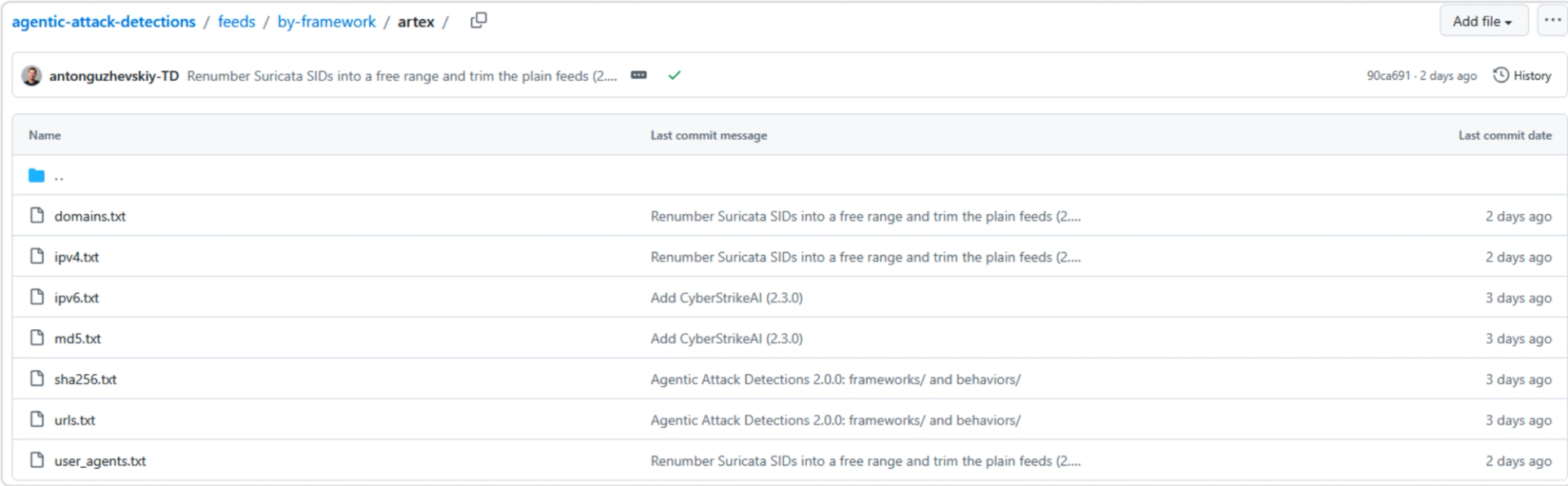
Figure 5. ThreatDefence IoC feeds for ARTEX.
There are also Sigma and YARA rules, plus queries for specific SIEMs, in ThreatDefence's frameworks/artex folder, which I have found useful to detect ARTEX.
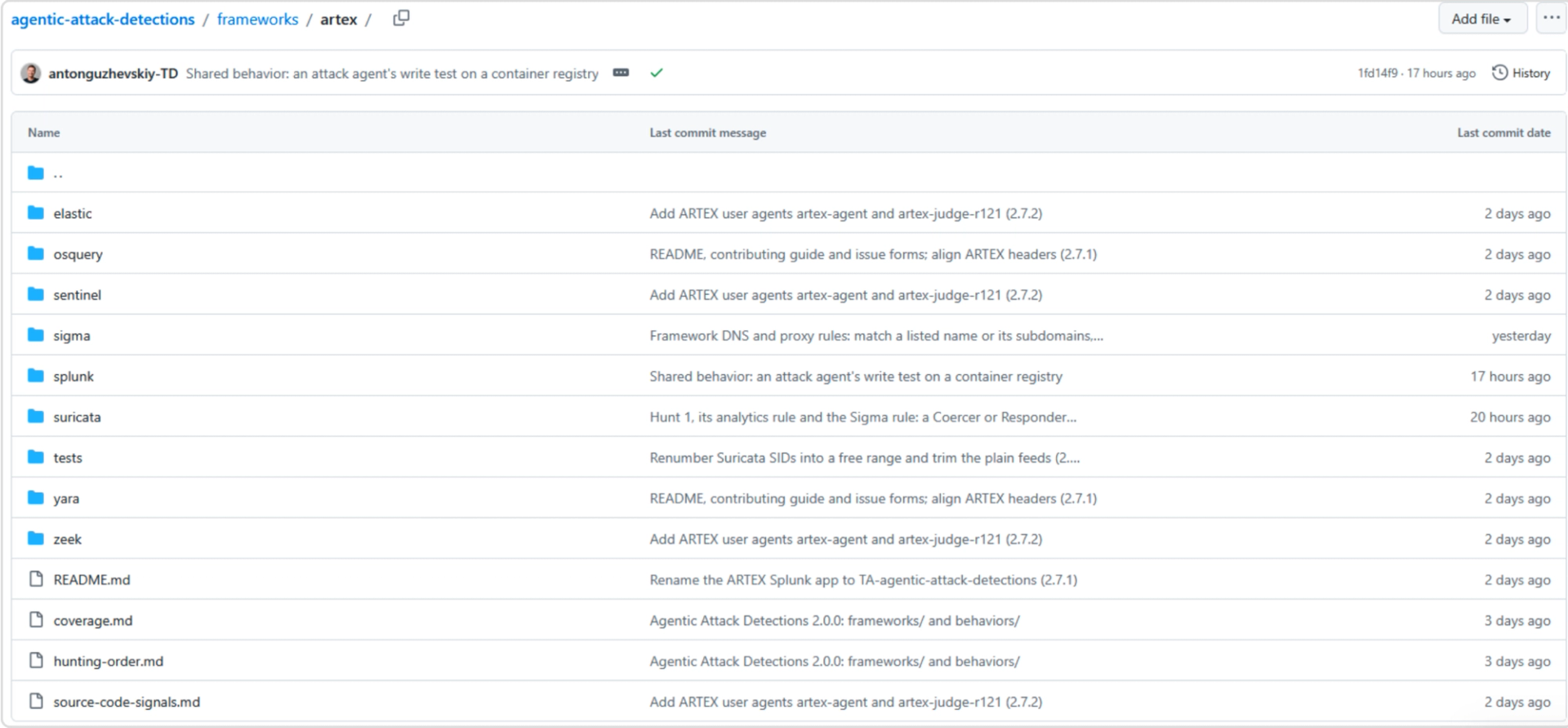
Figure 6. ThreatDefence detection rules for ARTEX.
Analyzing a compromised host running ARTEX
On a host you suspect is running ARTEX, the strongest single check is a process whose environment sets five CA variables (SSL_CERT_FILE, CURL_CA_BUNDLE, REQUESTS_CA_BUNDLE, GIT_SSL_CAINFO, NODE_EXTRA_CA_CERTS), all pointing at a mitmproxy-ca-cert.pem, alongside a proxy on port 8788. That combination is set on every worker shell and rarely occurs otherwise.
Combine it with an artex process parenting bash and scanners like nuclei, sqlmap or bbot, with ports 8787 and 8788 bound on loopback. Then check the disk for outputs or artifacts, such as data/traffic/_index/index.sqlite, data/traffic/_ca/, keys/jwt.key, keys/secret.key and task folders data/tasks/<id>/.
Another indicator is a PostgreSQL database with tables such as exploration_nodes and intercept_rules.
Host indicators, by strength:
- Child process environment containing
SSL_CERT_FILE,CURL_CA_BUNDLE,REQUESTS_CA_BUNDLE,GIT_SSL_CAINFOandNODE_EXTRA_CA_CERTSall pointing atmitmproxy-ca-cert.pem, plusNODE_USE_ENV_PROXY=1andHTTP_PROXYon port 8788 (Strong). Set on every worker shell byproxyEnv. This combination is unusual. - A process named `artex` that is the parent of
bash, and through it ofnuclei,sqlmap,ffuf,nmap,bbotorcurl(Strong). Launched bystart.sh. - Paths
data/traffic/_index/index.sqlite,data/traffic/_ca/,data/traffic/_blobs/sha256/,data/tasks/<n>/i<n>/,data/transcripts/,keys/jwt.key,keys/secret.key(Strong). In Docker these sit under/app. - PostgreSQL database with tables
exploration_nodes,exploration_edges,exploration_anchors,intercept_rules,target_pins,llm_records(Strong). Rule names begin[built-in]. - Log lines prefixed
[planner],[work ...],[traffic],[auth],[config], and the startup line "ARTEX <version> backend listening on" (Strong). On stdout, or inartex.logwhen started withnohup. - Browser extension "ARTEX Traffic Capture" with the
debuggerpermission and access to all URLs (Strong). On the operator's workstation, not the server. - Listeners on TCP 8787 and 8788, loopback by default (Medium).
- bbot output under `data/tasks/<task id>/bbot` (Medium). The path the bbot skill tells agents to use.
- Docker image `artex:local` with a
postgres:16-alpinesidecar and volumesdata,keys,skills(Medium). - Outbound HTTPS to an LLM API from a host that also runs scanners (Medium). Absent when a local Ollama profile is used.
Conclusion
ARTEX is less interesting as a piece of software than as a sign of where offensive tooling is heading. I say this without trying to fear-monger, but still trying to be cautious about what might become a standard in the future. On its own, it is a scanning and exploitation framework built from well-known tools.
Neither the tools nor the techniques are new. In fact, detections for them do exist, and some, if not all, of them are used today by both legitimate and malicious attackers. What is new is the layer above them. The LLM lets it try the tools, react to what the target does, work around defenses that would stall a scripted scan, and keep going until a goal is proven. That is why it is better understood as a threat actor with a fixed toolkit than as a tool with a signature.
On the other hand, no single request gives it away, but the combination might. This is a known practice from tracking threat actors: we may have a list of indicators, but they change tactics. And frankly, not every environment is the same, so defenders will need to keep updating the techniques and indicators they look for.
Frequently asked questions
What is ARTEX?
ARTEX is an open-source, AI-powered penetration testing console released in October 2026. An operator describes a goal in plain language, a planner agent breaks it into intents, and worker agents carry them out with real tools such as nuclei, sqlmap, ffuf and a headless browser. The original repository was made private after threat actors adopted it, but forks remain public.
Can ARTEX be detected by a signature?
Not reliably. The only strong string indicator is the artex-update-check User-Agent, which is sent only when the update check is enabled. ARTEX runs stock scanners and its LLM adapts to what the target does, so detection rests on behavior: a Go TLS fingerprint carrying many different User-Agents, metronomic request pacing, polite backoff after a 429 or 503, and a session cookie that moves from a real browser to a tool.
What does ARTEX leave on the host that runs it?
The strongest host indicator is a child process whose environment sets SSL_CERT_FILE, CURL_CA_BUNDLE, REQUESTS_CA_BUNDLE, GIT_SSL_CAINFO and NODE_EXTRA_CA_CERTS to a mitmproxy-ca-cert.pem with a proxy on port 8788. Others are an artex process parenting bash and scanners, listeners on ports 8787 and 8788, the data/traffic and keys directories, and a PostgreSQL database with tables such as exploration_nodes and intercept_rules.
Which MITRE ATT&CK techniques does ARTEX cover?
Mostly reconnaissance (T1595, T1596, T1590.002, T1594), initial access (T1190, T1078), credential access (T1110, T1552), execution (T1059) and automated collection (T1119). Its EDR bypass skill adds defense evasion techniques (T1055, T1620, T1134.004, T1106, T1562.001, T1562.006), but that skill needs a Windows lab and tools the image does not ship.
Seeing this in your environment? Call the Exaforce incident response hotline: US and Canada (toll-free) +1 (844) 660-1663, international +1 (315) 660-1697, or go to https://www.exaforce.com/incident-response. A responder answers within 15 minutes, and you do not need a retainer.